Bill payment methods and timelines
Overview
As the fastest bill payment product on the market, Bill Pay offers a variety of payment methods that ensure your vendors are paid fully and on time. You can also pay your bills with the assurance that we'll notify you if it looks like you're paying a duplicate bill.
Estimated delivery by payment method:
| Payment method | Estimated delivery time |
|---|---|
| Ramp card | Varies by vendor and card network; see Paying by card |
| Standard ACH | ~2–5 business days |
| Same-day ACH | Same business day (fully approved before 3:50 PM ET) |
| Real-time payment (RTP) | 10–15 minutes |
| Domestic wire | 0–5 business days |
| Standard check | 2–5 business days (funding from external bank) + 4–7 business days (mail delivery) |
| Overnight check | Next business day (fully approved by 1:30 PM ET) |
| SWIFT transfer (USD) | 1–4 business days (funding) + 1–2 business days (wire); up to 5 for remote regions |
| Cross-border (FX) | About 30 minutes for eligible EUR, GBP, MXN, BRL, or COP payments funded from a Ramp Checking Account; other Ramp Checking Account-funded payments usually arrive 1–2 business days after conversion, or up to 5 for remote regions; external bank funding adds 1–4 business days |
| Stablecoin | Instant when funded from a Ramp account; see Paying by stablecoin |
| Direct debit | The vendor controls the withdrawal timing; see Match direct debits to Ramp Bill Pay bills |
For details on each method, including fees and eligibility, see the sections below.
Bill Pay fees by payment method:
- Standard ACH payments: $0.59 per transaction (effective June 1, 2026, with a 3-month grace period for active Bill Pay customers with at least 1 bill paid before May 1, 2026)
- Same-day ACH payments: $10 per transaction
- Domestic wire transfers: $15 per transaction
- International wire (SWIFT USD) payments: $20 per transaction
- Standard check payments: $1.99 per transaction (effective June 1, 2026, with a 3-month grace period for active Bill Pay customers with at least 1 bill paid before May 1, 2026)
- Overnight check delivery: $20 per transaction
- Check attachments: $1 per page
- Stablecoin payments: no fee
These fees will be summarized and presented at the end of each monthly billing period in a clear, itemized statement. Learn more about Bill Pay fees here.
Waive eligible Bill Pay transaction fees by paying from Ramp Checking Account. When paying out of Ramp Checking Account, transaction fees for standard ACH, standard check, same-day ACH, domestic wires, and SWIFT transfers are waived. Fees for overnight check delivery and check attachments still apply. To pay with your Ramp Checking Account, simply select "Checking Account" under "Pay from account" within each bill. If you haven't set up a Ramp Checking Account yet, you can sign up here or read more here.
Paying by card
Ramp Bill Pay lets you pay your bills using both your existing cards and Single-use Ramp cards. If your vendor accepts Visa cards, this is a great way to earn cashback.
Ramp does not support automatically starting Bill Pay card payments from SMS or text-to-pay links. If the link opens the vendor's payment portal, you can still use Ramp's manual card-payment options. For the supported card-payment options, including auto-pay from eligible payment portals and emailing a one-time card to your vendor, see Pay Bill Pay invoices via Ramp card.
Paying by ACH
With Bill Pay, ACH payments to your vendors have never been easier or faster. Here's more information to help you make ACH payments.
Regular delivery:
Payment timeline:
Regular ACH payments typically take 2–4 business days. Payments to new vendors or from newer Bill Pay accounts may take up to 5 business days. After a successful payment history is established, processing times typically decrease to approximately 2 business days. However, Ramp has made ACH payments even faster with same-day delivery on eligible bills. Jump to Same-Day ACH to learn more.
Standard ACH fee: Standard ACH payments cost $0.59 per transaction effective June 1, 2026, with a 3-month grace period for active Bill Pay customers with at least 1 bill paid before May 1, 2026. If you pay from a Ramp Checking Account, Ramp waives the standard ACH fee.
Payment amount: USD 1 million is the maximum amount eligible for Same-Day ACH, not a maximum for all ACH bill payments. When you pay from a Ramp Checking Account, payments over USD 1 million are sent by standard ACH and are estimated to arrive the next business day. For payments funded from a linked external bank account, Same-Day ACH is available only for eligible payments of USD 1 million or less. Other provider- or account-specific limits may apply. Ramp shows the eligible payment amount when you schedule the bill in Bill Pay.
Bill Pay dates explained:
- Due date: the date that the vendor expects the payment to arrive
- Payment date: the date the payment leaves your account
- Estimated arrival: the date the payment will be delivered to the vendor
When bills are marked as paid:
Bill payments via ACH will be marked as paid in your connected accounting provider once Ramp withdraws (debits) funds from your connected account (debits). The bill payment will be marked as paid in Ramp once the bill payment funds have been credited and received by your vendor. See more information about Bill Pay Accounting: Bill Pay Accounting
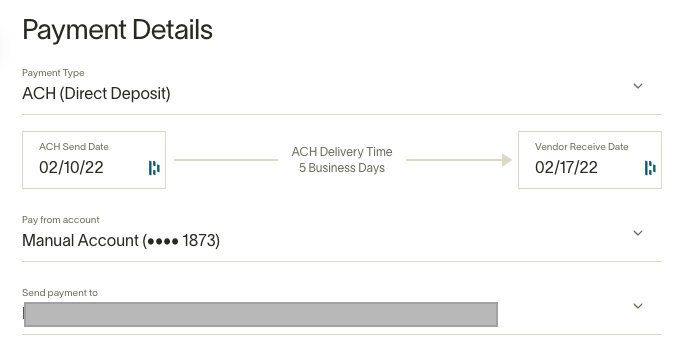
For details on how ACH bill payments appear on your bank statement, see How bill payments appear in your bank statement.
Same-day delivery
For fees, see the Bill Pay fee schedule and Ramp Checking Account waivers and exceptions. For account setup, see Ramp Checking Account setup.
On eligible bills, you will see a drop-down on the ACH Delivery time that will allow you to select Same-Day delivery. Bills with same-day delivery that are fully approved before 3:50 PM ET on the scheduled date will remit funds to vendors within the same business day.
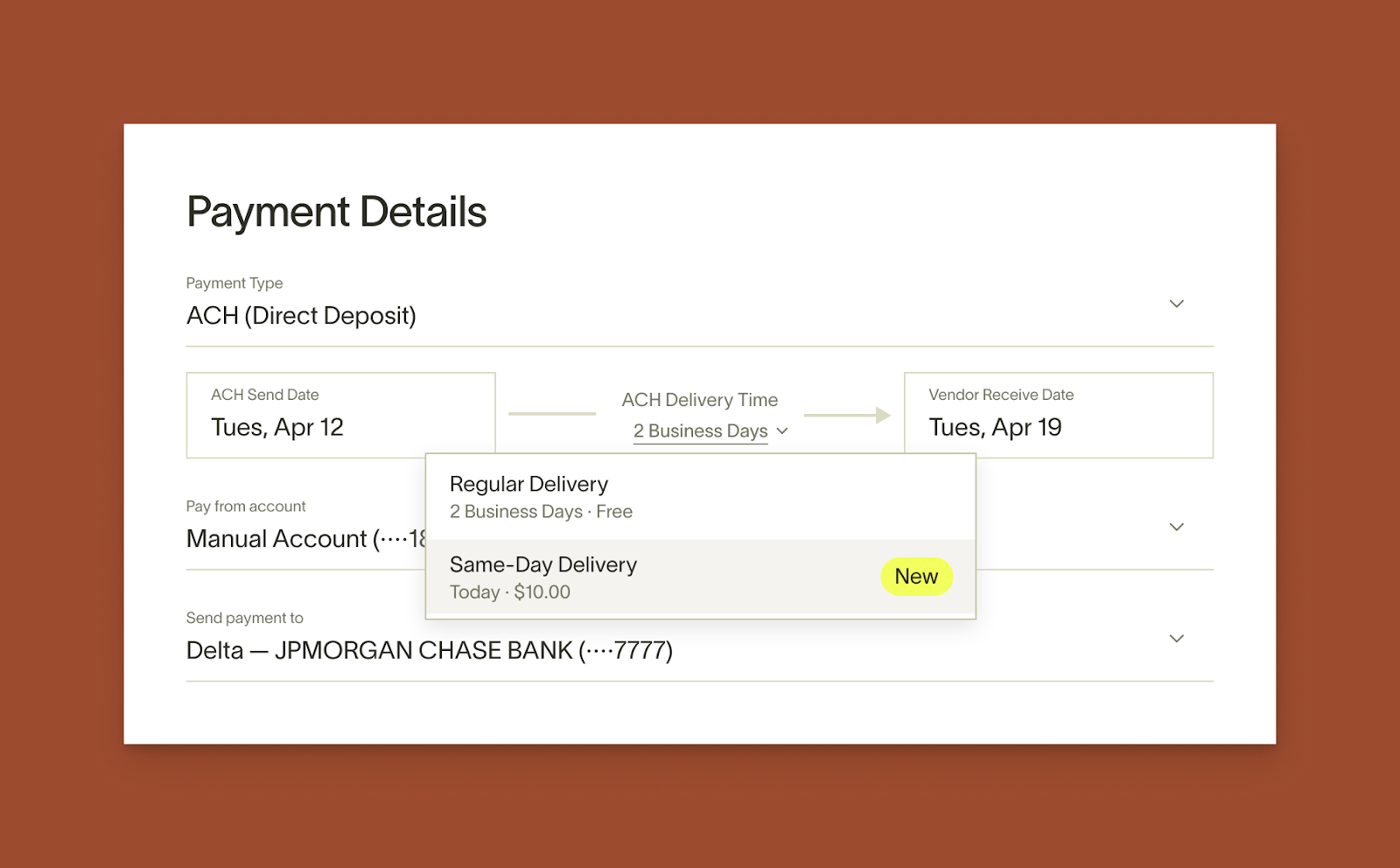
Once a same-day ACH payment is sent, you can download a remittance receipt from the History tab in Bill Pay. The receipt includes ACH trace IDs that your vendor’s bank can use to locate the payment. See Receipts and Remittance Advice for instructions.
Same-Day delivery eligibility
Please note that if a bill is recurring, same-day delivery will not be available within the drop-down. Additionally, if your business or bill falls into one of these categories, your bill may not be eligible for same-day delivery.
- New to Ramp: Same-day delivery will become available to your business after a few successful bill payments are made on Ramp.
- Outstanding Balances: If you have any outstanding balances owed to Ramp for statement payments in the last 60 days, same-day delivery will not be available for your bill payments.
- Vendor Bank: Certain receiving banks are considered higher risk. As a result, Ramp cannot offer same-day delivery to these banks to reduce risk and potential fraud. Also, even if a bank is eligible, we cannot guarantee that the bank will make the funds available on the date of payment transmission.
- High Bill Amount: To ensure secure payment delivery, Ramp does not offer same-day delivery for higher bill amounts.
Paying by real-time payments (RTP)
Ramp enables you to pay vendors using real-time payments (RTP) for free, offering an instant and secure way to transfer funds to vendors within the United States. RTP payments are limited to U.S. banks that support the RTP network. The maximum amount permitted is $1 million per transaction. RTP payments are only available when the funding account is a Ramp Checking Account(more details in Ramp Checking Account overview).
Payment timeline
Ramp will withdraw funds from your Ramp Checking Account to fund the RTP payment. Payments are delivered to vendors in real time, typically within 10-15 minutes. RTP payments are available 24/7/365, including weekends and holidays, and there is no cutoff time for submitting payments.
Real-time payments (RTP) eligibility
RTP may not be available due to the following categories:
- Per Transaction Limit: RTP payments are limited to $1 million per transaction
- Funding Account Requirement: RTP payments are only available when the funding account is a Ramp Checking Account
- Recipient Bank Eligibility: RTP payments are only available if the vendor’s bank supports the RTP network.
- Outstanding Balances: If you have any outstanding balances owed to Ramp, RTP may not be available for your bill payment.
When are bills marked as paid:
Bill payments via RTP will be marked as paid in your connected accounting provider once Ramp withdraws (debits) funds from your Ramp Checking Account. The bill payment will be marked as paid in Ramp once the bill payment funds have been credited and received by your vendor.
Paying by domestic wire
Ramp enables you to pay vendors using domestic wire transfers through FedWire, offering a secure and efficient way to quickly transfer large transaction amounts to vendors within the United States. The default maximum for domestic wire transfers is USD 12 million per transaction. For wires funded from an external bank account, same-day domestic wire is not available for payments over USD 1 million. Ramp Checking Account-funded wires may remain eligible for same-day delivery above USD 1 million, subject to other eligibility factors described below.
Payment timeline
You will have the option to pay with domestic wire for a $15.00 flat fee. For wires funded from an external bank account, Ramp withdraws funds by ACH debit on the scheduled date. Wires funded from a Ramp Checking Account are funded internally.
- Payments can take between 0–5 business days. Delivery estimates are not guaranteed and may be updated after payment initiation.
- ACH-funded bills that are fully approved before 1:00 PM ET on the scheduled date will be sent to the vendor within the same business day. The cutoff for bills funded from a Ramp Checking Account is 4:45 PM ET. The delivery estimate shown when you schedule the bill in Bill Pay reflects your funding account. In most cases, funds arrive at the vendor's bank the same day or within 1 business day. Delivery beyond that is uncommon but may occur if the receiving bank delays processing.
Same-day domestic wire eligibility
Same-day domestic wire may not be available due to the following categories:
- High Bill Amount: To ensure secure payment delivery, Ramp does not offer same-day domestic wire delivery for higher bill amounts.
- Outstanding Balances: If you have any outstanding balances owed to Ramp, same-day domestic wire may not be available for your bill payment.
- Vendor Bank: Certain receiving banks, particularly to new vendors, are considered higher risk. As a result, Ramp cannot offer same-day delivery to these banks to reduce risk and potential fraud.
When are bills marked as paid:
Bill payments via wire will be marked as paid in your connected accounting provider once Ramp withdraws (debits) funds from your connected account which may take 1 business day. The bill payment will be marked as paid in Ramp once the bill payment funds have been credited and received by your vendor.
Paying by check
Bill Pay allows you to pay vendors by check when their mailing address is in the US, Guam, Puerto Rico, or the US Virgin Islands. Here's helpful information to know when making check payments
Regular delivery:
Payment timeline:
If you pay from an external bank account, check payments involve two sequential phases: Ramp first debits your account via ACH (2-5 business days to process), then issues and delivers a paper check to your vendor (4-7 business days). If a check is not cashed within 180 days of issuance, Ramp will automatically void it. If you pay from a Ramp Checking Account, funds are debited internally, so only the mailing phase applies.
You can track a check payment's progress on the bill detail page in Bill Pay:
- Check scheduled — payment is queued for the scheduled date; the check has not yet been printed or mailed
- Check mailed — funds have been debited and the check has been printed and entered the mail stream. A downloadable check image becomes available from the bill detail page (see How to view check images).
- Paid — the vendor has deposited or cashed the check
Standard check fee: Standard check payments cost $1.99 per transaction effective June 1, 2026, with a 3-month grace period for active Bill Pay customers with at least 1 bill paid before May 1, 2026. If you pay from a Ramp Checking Account, Ramp waives the standard check fee.
What's printed on the checks:
Ramp checks will be printed with the bill amount, the name of the business paying, and a check memo pulled from the Vendor Memo field in the Ramp bill. The following will be printed under the signature: "Ramp Business Corp., as agent."
Check envelopes will include the vendor's name and address, and display your business address as the return address.
Delivering Ramp checks:
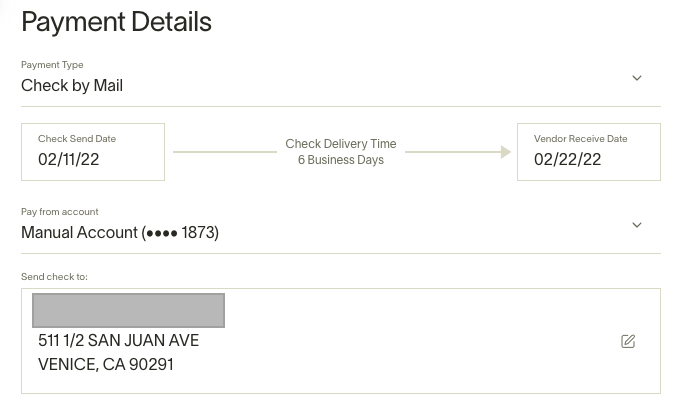
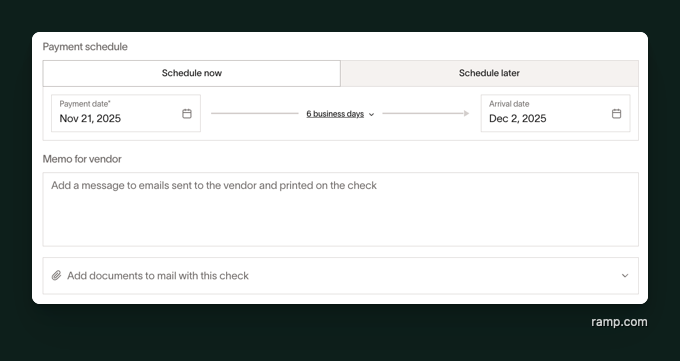
Our checks take about 4-7 business days to reach your vendor, and if you schedule a payment for a date beyond six business days, we will ensure it reaches the vendor on time. If you schedule a check payment on a non-business day (holiday or weekend), we will send it on the following business day.
Note: Ramp relies on USPS for physical check delivery. While most checks arrive as expected, delivery cannot be guaranteed 100% of the time.
If a check's payment status has stayed at 'Check mailed' well beyond the expected 4-7 business day delivery window and your vendor confirms they haven't received it, you can cancel and resend the payment by following these steps:
- Go to the Bill Pay section in Ramp.
- Locate the check payment you want to cancel.
- Click the three vertical dots or open the Bill Actions tab.
- Select Cancel Payment .
- Confirm the cancellation.
Once canceled, you can reinitiate the payment:
- Using the same method (check), or
- Choosing an alternate method (e.g., ACH, wire transfer).
Confirming a check payment was successful:
We do our best to ensure every check payment reaches its intended destination. Once the vendor deposits or cashes the check, its status changes to Paid and the payment appears in History.
Canceling a check:
You can cancel an issued check payment directly in Ramp as long as your vendor has not yet deposited the check. Go to the Bill Pay tab, locate the bill payment, click the three-dot icon to the far right, and select Cancel payment.
Once canceled, the original check is voided and cannot be cashed or reinstated. The bill returns to an unpaid state — you can reschedule payment on the same bill using check or an alternate method such as ACH or wire transfer. You cannot cancel a check after the vendor has deposited it.
Marking check bills as paid:
Ramp will mark a bill as paid within your accounting provider once the funds have been withdrawn from your bank account. Check payments will be marked as paid on Ramp when your vendor cashes the check.
Overnight checks
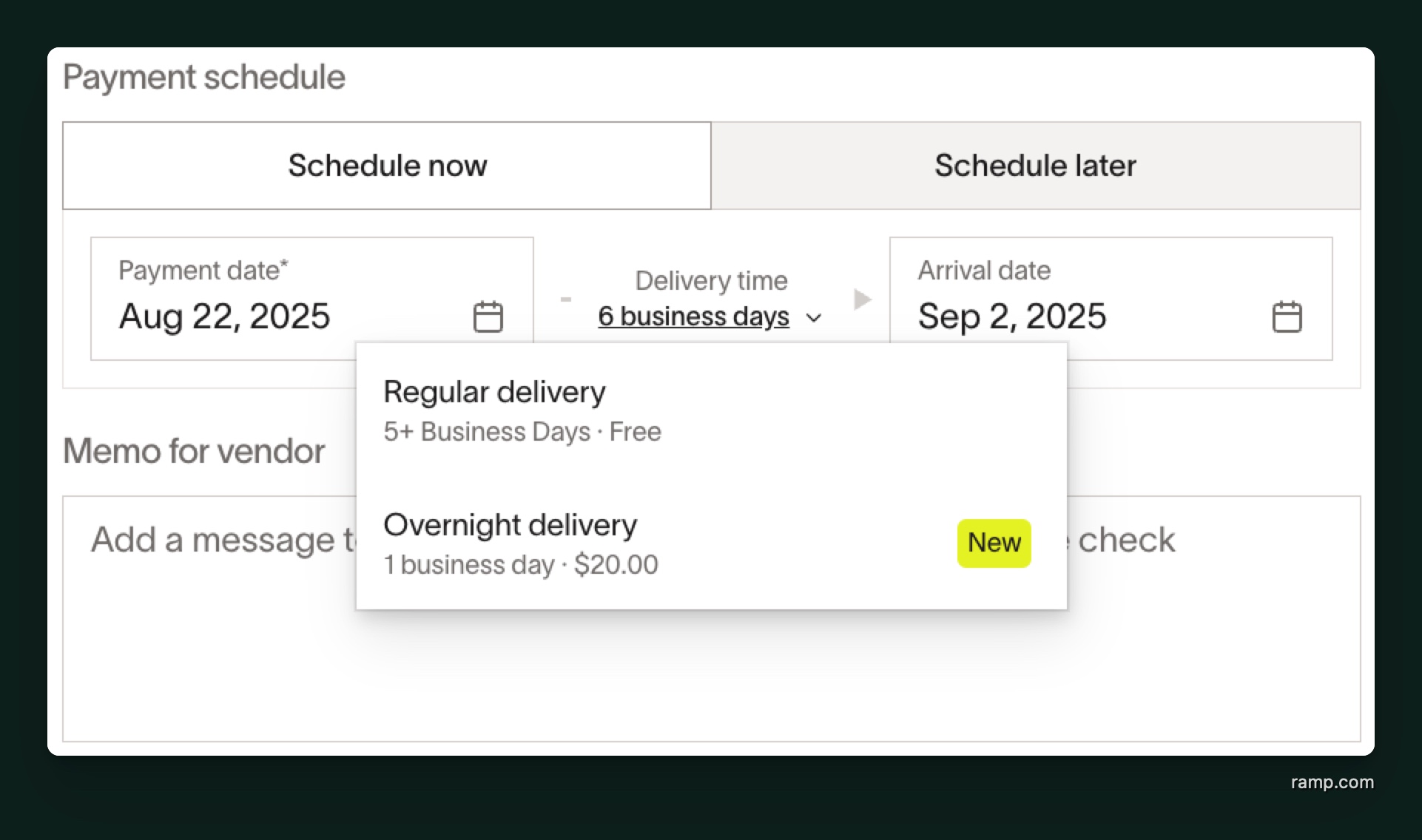
Ramp enables you to pay vendors using overnight checks through FedEx Standard Overnight, providing a reliable and secure way to ensure next-business-day delivery to eligible vendor addresses. For checks funded from an external bank account, the maximum amount allowed for overnight delivery is USD 1 million per check. Checks funded from a Ramp Checking Account may remain eligible above USD 1 million. Review the available delivery options when scheduling the bill in Bill Pay to confirm whether overnight delivery is available.
On eligible bills, you will see a drop-down on the check delivery time that will allow you to select overnight delivery for a $20.00 flat fee. Bills with overnight delivery that are fully approved by 1:30 PM ET on the scheduled date will be delivered next-business-day.
Overnight delivery eligibility
Please note that if a bill is recurring, overnight delivery will not be available within the drop-down. Additionally, if your business or bill falls into one of these categories, your bill may not be eligible for overnight delivery.
- New to Ramp: Overnight delivery will become available to your business after a few successful bill payments are made on Ramp.
- Outstanding Balances: If you have any outstanding balances owed to Ramp for statement payments in the last 60 days, overnight delivery will not be available for your bill payments.
- Vendor Address: Overnight checks cannot be sent to P.O. boxes or to addresses in Alaska or Hawaii.
- High Bill Amount: Higher bill amounts may not qualify for overnight delivery. Eligibility depends on the payment amount and funding account. Review the available delivery options when scheduling the bill in Bill Pay to confirm eligibility.
Check attachments
You can now send printed documents along with your check on Ramp. Check attachments are documents included in the envelope that provide context such as invoices, remittance details, or instructions so payments are applied accurately. They help ensure the recipient knows exactly what the check is for and reduce errors during reconciliation.
You can attach a US-letter sized PDF of up to 5 pages, and a $1 printing fee applies per page. Attachments are printed in grayscale.
At this time, checks with attachments cannot be sent via overnight delivery, and they cannot be batched.
Paying by SWIFT transfer (USD)
You can now pay your international vendors in USD on Ramp. The maximum amount permitted for international wire (SWIFT USD) transfers is $20 million per transaction.
When setting up a new vendor on Ramp, simply enter the country to which you are paying your vendor. Afterward, you'll be able to either enter your vendor's SWIFT and IBAN (or IBAN equivalent) codes or request that information from your vendor on Ramp.
Payment timelines:
If you pay from an external bank account, Ramp first debits your connected account for the required funds in USD, which may take 1-4 business days. Payments from a Ramp Checking Account are funded internally. Ramp then wires the payment to your vendor. For most SWIFT transfer payments, vendors are paid within 1–2 business days after conversion. However, in some cases, such as wires to remote regions, delivery may take up to 5 business days due to delays on international payment rails.
When are bills marked as paid:
Bill payments via wire will be marked as paid in your connected accounting provider once Ramp withdraws (debits) funds from your connected account. The bill payment will be marked as paid in Ramp once the bill payment funds have been credited and received by your vendor.
Paying cross-border (FX)
You can now pay your international vendors in foreign currency on Ramp.
Similar to international payments in USD above, when setting up a new vendor on Ramp, simply enter the country to which you are paying your vendor. Afterward, you'll be able to enter your vendor's international banking details within Ramp.
Payment timelines:
Eligible payments funded from a Ramp Checking Account and paid out in EUR, GBP, MXN, BRL, or COP typically arrive within about 30 minutes, 24/7. This faster delivery is available for eligible payments up to approximately USD 1 million, depending on the payout currency, and is not available to businesses in New York State. Review the estimated arrival shown on the bill in Bill Pay before scheduling the payment.
Other payments funded from a Ramp Checking Account skip the external-bank ACH funding period and usually arrive within 1–2 business days after conversion. Payments to remote regions or payments involving multiple intermediary banks may take up to 5 business days.
For payments funded from an external bank account, Ramp first debits the required funds in USD by ACH. This typically takes 1–4 business days, depending on your bank. Once the funds are received, Ramp converts them using competitive exchange rates and delivers the payment to your vendor in their local currency. Delivery usually takes 1–2 business days after conversion or up to 5 business days for remote regions or payments involving multiple intermediary banks.
When are bills marked as paid:
FX Bill payments will be marked as paid in your connected accounting provider once Ramp withdraws (debits) funds from your connected account. The bill payment will be marked as paid in Ramp once the bill payment funds have been credited and received by your vendor.
Paying by stablecoin
Beta. This feature is currently in Beta.
Bill Pay lets you pay vendors in stablecoin. You can pay in USDC or USDT, and payments are global — they can be sent to any country. There is no fee to send stablecoin payments.
Your vendor needs a stablecoin wallet to receive payment. They can add one through the Ramp Vendor Portal, or you can send them an email to set it up when you add them as a vendor.
Stablecoin payments are not available to customers in New York State.
Payment timelines
Delivery time depends on how you fund the payment:
- Ramp Stablecoin Account: payments are processed and delivered within 5 minutes, 24/7.
- Ramp Checking Account: most payments are processed and delivered within 5 minutes, 24/7.
- External bank account: Ramp first processes your incoming payment before the outgoing payment is initiated, which adds time before delivery.
The Bill Pay payment page shows clear information about when to expect your payment to settle.
When are bills marked as paid:
Stablecoin bill payments follow the same rule as other payment methods. The bill payment is marked as paid in your connected accounting provider once Ramp withdraws (debits) funds from your funding account, and marked as paid in Ramp once the bill payment funds have been credited and received by your vendor.
Paying outside of Ramp
If a vendor pulls funds by ACH directly from your Ramp Checking Account or Ramp Operating Account for an eligible USD, non-recurring bill, use direct debit matching instead of marking the bill as paid outside Ramp.
If a bill needs to be paid with a payment method outside of Ramp, such as Zelle, Venmo, or a direct bank transfer, you may select your payment type as "I won't pay this with Ramp."
If this payment method is selected, your bill will still be routed through the approval chain. Once payment is completed, return to Ramp and manually mark the bill as paid.
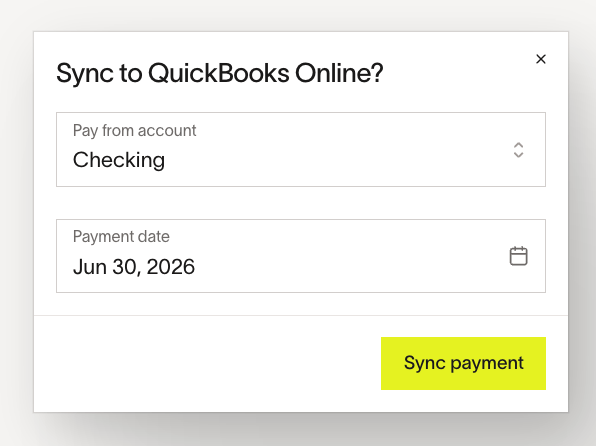
For supported accounting providers, including Acumatica, QuickBooks Online, NetSuite, Sage Intacct, and Xero, Ramp can sync the bill payment after you mark the bill as paid in Ramp. Ramp asks for the payment date and the mapped cash or bank account used for the payment before syncing. If you already recorded the payment directly in your accounting provider, use Mark as synced instead of retrying payment sync so Ramp does not attempt to create a duplicate bill payment. For unsupported accounting providers, Ramp syncs the open bill, but you must record or match the payment in your accounting provider manually.
Mark a paid-outside-Ramp bill as unpaid
If a bill was manually marked as paid after being paid outside Ramp, a user with permission to modify bills can reopen it from Bill Pay > History:
- Open the paid bill and select Mark as unpaid from its actions menu.
- Review the accounting impact shown in the confirmation, then click Mark as unpaid.
Ramp marks the bill as unpaid and removes the manual payment details while preserving the payment record in the bill's history. This action is available only when the bill has one completed payment and its payment method is Pay outside of Ramp. It does not reverse the payment that was made outside Ramp.
If the payment synced to your accounting provider and Ramp supports voiding payments for that connection, the confirmation states that Ramp will also void the payment in your accounting provider. Otherwise, reverse the payment in your accounting provider manually.
Payment notifications
Paying fast doesn't mean paying in the dark. Bill Pay notifies employees of the correct information through email and Slack. You can always see the status of your bills in any of the Bills pages.
- Bill creators and payment releasers with access to payment details receive payment failure and return notifications. Depending on your settings, a business owner may also receive these notifications.
- Relevant users receive email when synced bill payment details change.
Slack
- The bill submitter may receive a direct message when a payment fails.
For vendor-facing payment notifications, see Automatic vendor payment notifications below.
Automatic vendor payment notifications
When you pay a bill through Ramp using ACH, wire, check, or cross-border transfer, the vendor automatically receives email notifications from [email protected] — no manual action is required. For successful payments, Ramp sends notifications at two points:
- Payment initiated — sent when Ramp starts processing the payment and it is on its way to the vendor
- Payment delivered — sent when the payment is completed and funds have arrived
Card-paid bills use different notification flows — see Pay Bill Pay invoices via Ramp card for details on card payment notifications.
These emails include your business name, the vendor name, invoice number, payment amount, payment date, and estimated or actual arrival date. If you added a vendor memo to the bill, it is included in the email. For individual payments, the delivery notification also includes a link for the vendor to download a remittance receipt.
To change which email address receives these notifications, update the default contact email on the vendor's profile. If the vendor has signed up for the Ramp Vendor Portal, notifications are sent to their portal account email instead, and the vendor can manage their notification preferences from their portal account, including opting out of specific notification types.
If your business is on Ramp Plus, batch payments send the vendor a single notification covering all bills in the batch. See Batch payments on Ramp Bill Pay for details on batch payment remittance.
Receipts and remittance advice
Ramp makes it easy to track vendor payments by tracking receipts alongside your bills. Receipts are an easy way to help locate payments and provide vendors with confirmation that a payment has been completed.
Downloading receipts
You can download the receipt as a PDF to save for your own records or to send to vendors directly.
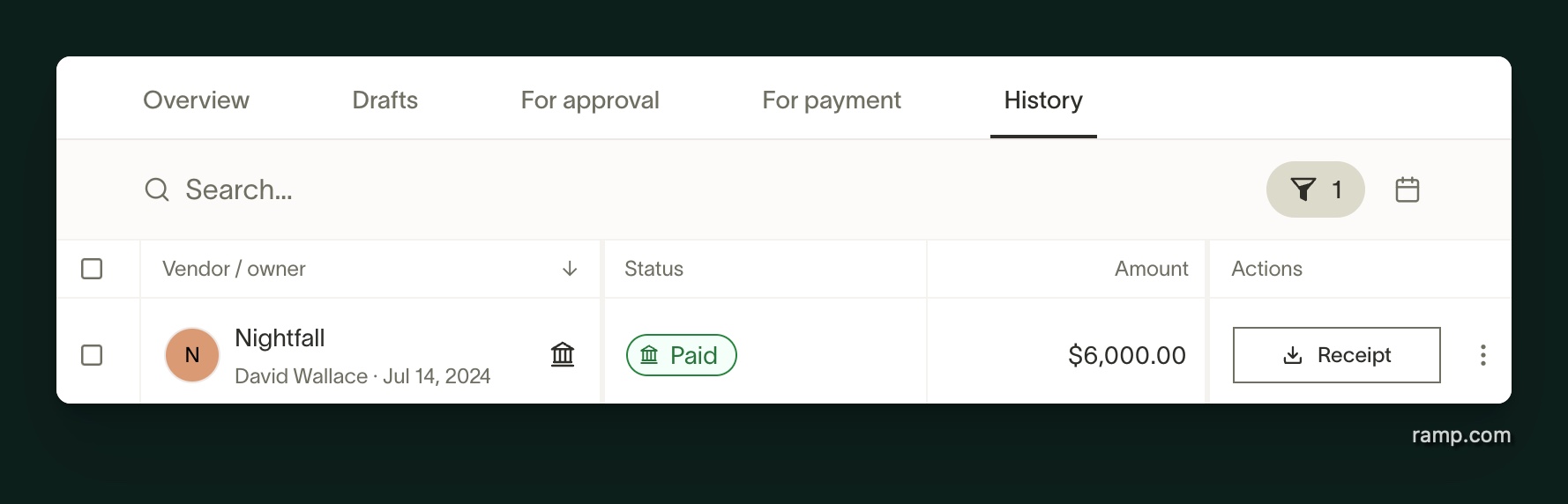
- To get started, navigate to the Bill Pay tab on Ramp
- Click on History to locate the desired bill
- In History, select Receipt in the bill row
Receipt details
The receipt PDF contains the following:
- Business Name and Vendor Name
- Invoice Date
- Invoice Number
- Payment Method and Currency
- Invoice Description
- Payment Amount and Date
Based on the payment type, we also provide details that help banks locate payments:
- Check: Check Number or Check Image (if available)
- ACH: Trace IDs (if available) and Vendor Account Details
- International Wire : Payment ID, Banking Partner ID or Reference number, and Vendor Account Details (if available). For payments processed through Wise, the receipt may also include an MT103 reference and banking partner reference — these are especially useful for tracing delayed payments
For ACH and wire payments, if a payment shows as completed in Ramp but your vendor has not received it, send your vendor the payment date and the locating details shown in the remittance receipt. Your vendor can provide those details to their bank to trace the payment.
How to view check images (pre- and post-deposit)
If you need proof that a check has been mailed or deposited—for record-keeping, vendor follow-up, or dispute resolution—you can access check images directly from the bill details view.
Here’s how to find them:
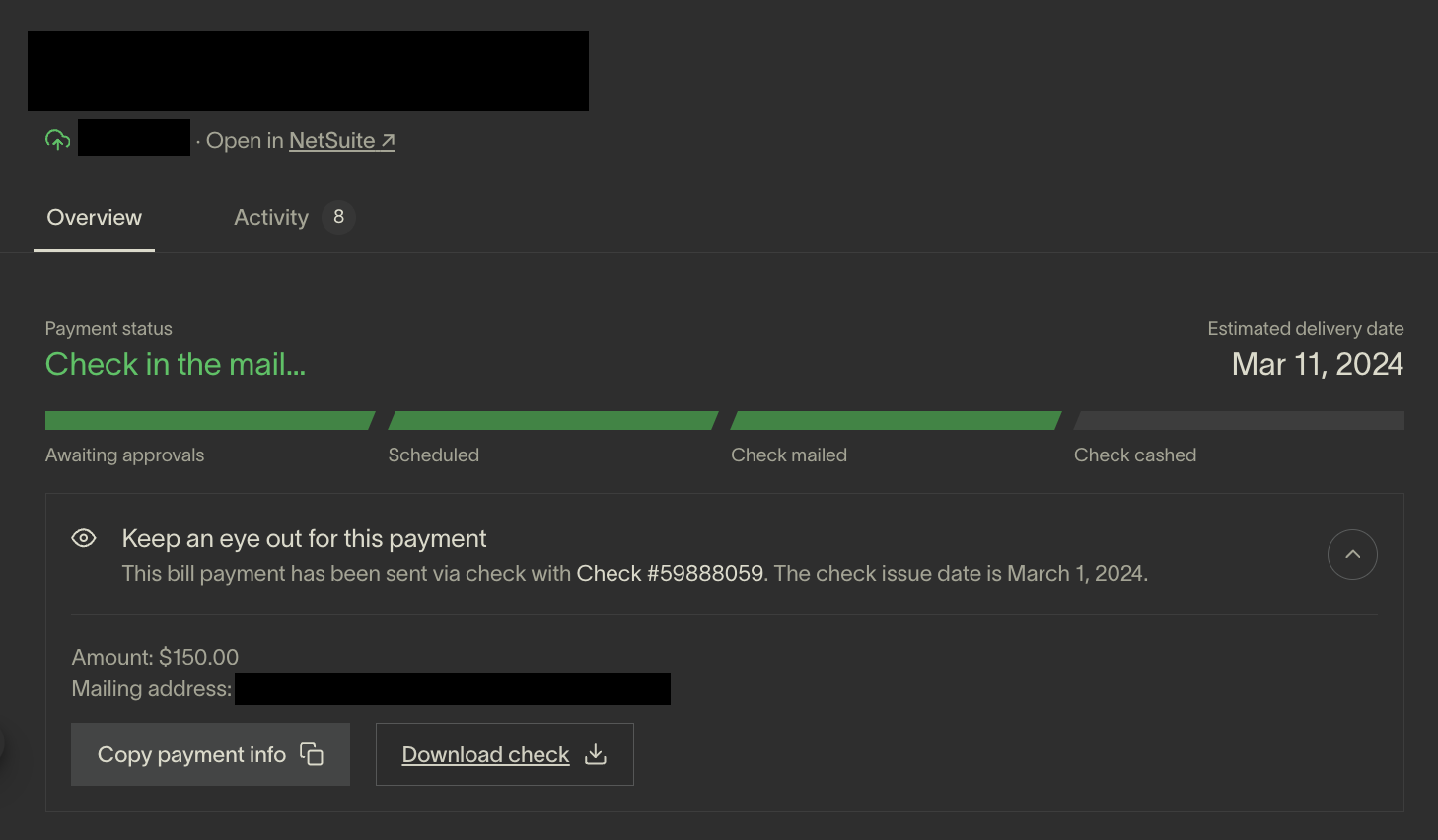
- Go to the Bills tab and click on the relevant bill
- Scroll to the "Keep an eye out for this payment" section
- Click the down arrow to expand the details
- When check images are available, you’ll see one or both of the following images. For eligible mailed checks, you can also select Download check.
Pre-deposit image (check in the mail)
- This is the check that was mailed out to the vendor
- Available after the bill status is Check mailed, when Ramp receives the mailed-check image
- Useful for confirming payment was issued
Post-deposit image (check deposited)
- This is the image from the bank of first deposit , confirming the vendor deposited the check
- Available after the bill status is Paid, when Ramp receives the deposited-check image
- Useful for verifying the check cleared successfully
If you have trouble locating a check image or need assistance with a specific payment, please contact Ramp Support.
Vendor payment accelerations
For eligible payments, Ramp offers vendors the option to accelerate their payments via same-day or real-time payments (RTP) rails, for a small fee.
This fee is paid by the vendor, is facilitated by Ramp, and in no way affects your side of the payment.
In the event you would like to disable this option for your vendors:
- Go to the Bills tab
- Click Settings
- Under Permissions , unselect "Enable Vendor Payment Acceleration".
How bill payments appear in your bank statement
When Ramp processes a bill payment, the debit from your bank account includes a description that helps you identify it. The exact format depends on the payment method and whether the bill is a single or batch payment.
ACH payments
For a single ACH bill payment, your bank statement shows the vendor name alongside identifying details:
- If the bill has an invoice number: Your bank statement shows the vendor name and the invoice number. Your vendor's bank statement shows your business name and the invoice number.
- If the bill has no invoice number: Your bank statement shows the vendor name and
BILL PAY. Your vendor's bank statement shows your business name andBILL PAY.
For example, if your company is Cafe Kramer and you are paying invoice 018 to Jerry Donuts, you will see JERRY DONUTS 018 on your bank statement. Jerry Donuts will see CAFE KRAMER 018 on theirs.
If you are paying Jerry Donuts and the bill has no invoice number, you will see JERRY DONUTS BILL PAY on your bank statement. Jerry Donuts will see CAFE KRAMER BILL PAY on theirs.
Note: Banks may display these fields differently. Some banks show an additional detail line that includes the invoice number, your business name, and "via Ramp."
Batch ACH payments
For batch payments, a single debit covers multiple bills to the same vendor. Your bank statement shows the vendor name and the Ramp Payment ID. The detail line includes the Payment ID, vendor name, and the number of bills in the batch.
For example, if you are paying 3 bills to Jerry Donuts in one batch, your bank statement shows JERRY DONUTS [Payment ID] with a detail line like [Payment ID] JERRY DONUTS for 3 bills. Invoice numbers are not included in batch ACH descriptions due to character limits.
You can find the Payment ID in Bill Pay by clicking into a batched bill and opening the batch payment drawer.
Payments from a Ramp Checking Account
When you pay a bill from your Ramp Checking Account, Ramp debits the funds internally rather than initiating an ACH debit from an external bank account. This means no entry appears on your external bank statement. Instead, the payment appears in your Ramp Checking Account transaction history as Bill #[invoice number] - [Vendor Name] (or Bill - [Vendor Name] if no invoice number is present).
To view these transactions, go to Business Banking in Ramp. If you have a bank feed connected to your accounting provider, the payment appears as an unmatched transaction for reconciliation.
Frequently asked questions
Are there any fees for using Ramp Bill Pay?
Fees vary by payment method. See the Bill Pay fee schedule and Ramp Checking Account waivers and exceptions.
These fees are summarized at the end of each monthly billing period in an itemized statement.
Can I use Zelle to pay a bill, vendor, or individual through Ramp?
No. Ramp does not support Zelle as a payment method. You cannot send Zelle payments through Ramp or collect Zelle details as vendor payment information. To pay a bill in Ramp, use ACH, domestic wire, check, SWIFT transfer, or a Ramp card if your vendor accepts Visa. If you pay from a Ramp Checking Account and your vendor's bank supports the RTP network, you may also be able to use RTP.
If you already paid a vendor via Zelle outside of Ramp, you can still track the bill in Ramp by selecting "I won't pay this with Ramp" as the payment method and manually marking the bill as paid once payment is complete. See Paying outside of Ramp for details.
Can I print Bill Pay checks myself instead of having Ramp mail them?
No. Bill Pay only supports mailed check payments. When you choose Check by mail, Ramp mails a physical check to your vendor's mailing address.
Why was my payment debited later than the scheduled date?
Payments are initiated on the scheduled date, but ACH debits typically clear by the next business day due to NACHA settlement processes. For example, a payment initiated on Feb 2nd may clear by the next business day. Bill Pay syncs to the customer's ERP after the debit clears, ensuring accurate accounting.
How can a Vendor check the status of a payment?
Vendors have the option to create an account in the Ramp Vendor Portal. Once registered, they can sign in at any time to view payment statuses, download remittance information, and manage their account details. Vendors can accept Faster Payments for the fee shown in their offer, typically 1%. Faster Payment offers are not guaranteed. Eligible fee-free offers paid to a Ramp account may be accepted automatically.
If a Vendor reaches out asking for proof or status of payment, we recommend directing them to the Vendor Portal. You can share the following article with them to get started: Ramp Vendor Portal: How to create and use your account
Why is my payment stuck in "Scheduled" status?
If a payment remains in Scheduled status and is not processing, check the payment date. A payment will not be released until the scheduled payment date arrives. If the date was entered incorrectly (for example, a far-future year due to a data entry error), the payment will remain in Scheduled status until that date. To fix this, select the bill in Bill Pay and use Edit payment date to correct it. If editing is not available, use Unschedule to remove the date, then reschedule with the correct date.
I see the error "Cannot retry payment without replacing invalid source bank account details!" — what do I do?
This error means the bank account Ramp uses to fund the payment is no longer valid — typically because the connected bank account was removed or needs to be re-verified. To resolve:
- Return to the failed ACH payment and select Retry payment.
- Choose a different valid funding account with compatible details.
- Submit the retry.
Which timezones are used to define business days and cutoff times for payment processing?
The U.S. payment-method cutoff times below use Eastern Time (ET), including Daylight Saving Time adjustments.
- Same-day ACH: bills must be fully approved before 3:50 PM ET for same-day remittance
- Domestic wires funded from an external bank account: bills must be fully approved before 1:00 PM ET for same-day sending
- Domestic wires funded from a Ramp Checking Account: bills must be fully approved before 4:45 PM ET for same-day sending
If you schedule or approve one of these U.S. payments after its cutoff, it will be treated as submitted on the next business day in Eastern Time.