Partial payments on Ramp Bill Pay
Overview
Partial payments let you split a single bill into multiple payments so you can pay an invoice over time instead of all at once. You can create up to 20 payments on one bill, track the remaining balance, and manage each payment separately in Ramp Bill Pay.
Partial payments are available to all businesses whose ERP supports partial payments. See ERP support for the list of supported accounting providers.
Partial payments are available for standard Bill Pay bills. Draft bills and recurring bills are not currently supported.
To split a bill across multiple card payments, see Pay one bill with multiple card payments.
How partial payments work
- Split one bill into up to 20 payments.
- Schedule the first payment and leave the remaining amount unscheduled, or schedule multiple payments in advance.
- Track the remaining balance on the bill separately from the total bill amount.
- View each partial payment as its own payment in the Payments table.
- Once all partial payments are completed, the bill status updates to Paid .
How partial payments appear in Ramp
- In the Bills table, Ramp shows the amount remaining while a bill is only partially paid.
- In the bill details view, Ramp shows a payment summary for the bill and lets you open the linked payments.
- In Bill Pay > Payments , each partial payment appears as its own payment record so you can track payment-level status and actions.
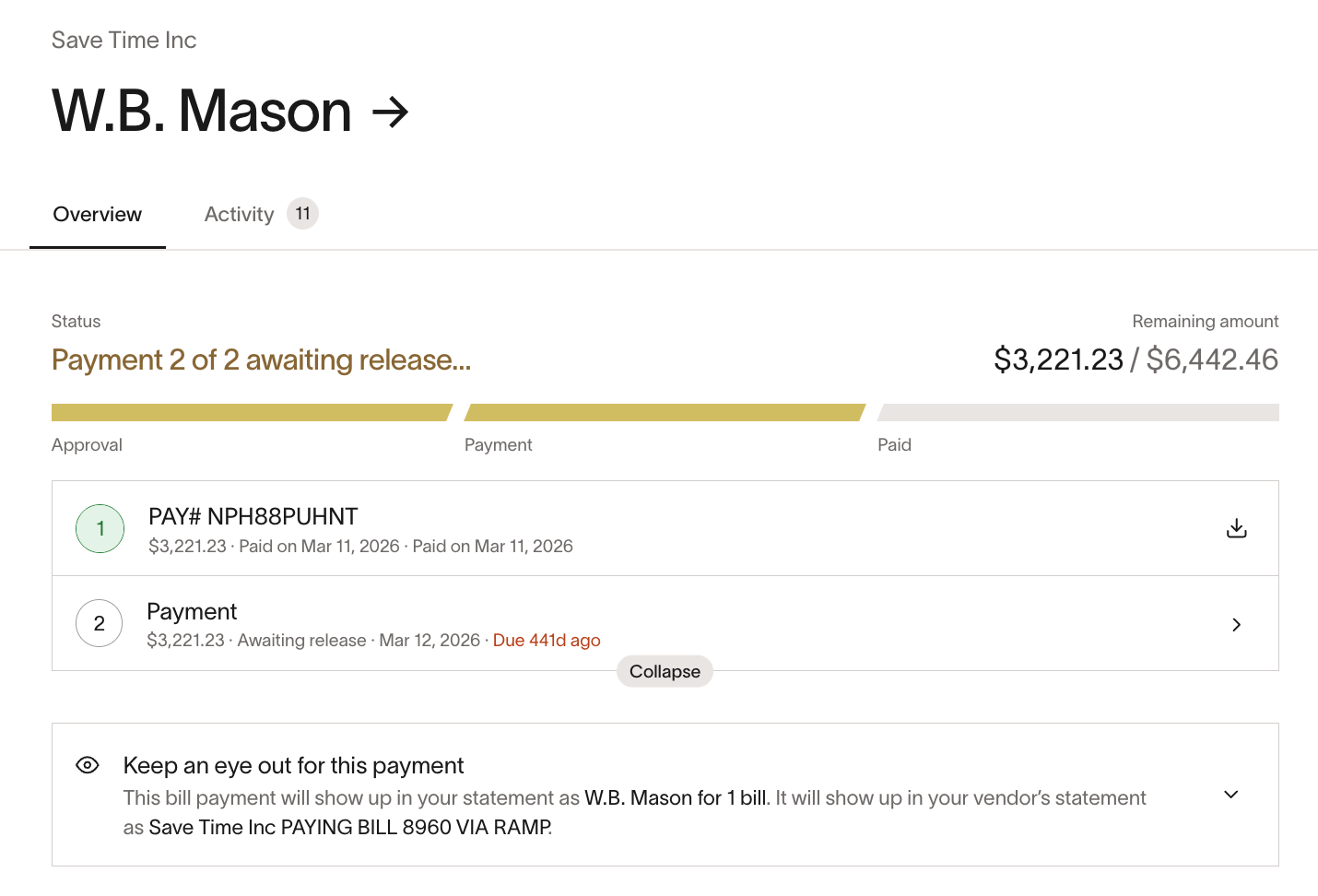
Bill details view with one partial payment paid and the next partial payment awaiting release
Create and manage partial payments
- Open the bill you want to pay in Bill Pay.
- If you're viewing an existing non-draft bill, click Edit to open the bill form.
- In the payment section, click Split payment or Add split .
- Enter the amount for each payment. Ramp tracks the remaining balance as you go.
- Set payment dates for any payments you want to schedule now. You can leave later payments unscheduled and return to them later.
- Review the payment details for each payment and save your changes.
- Manage each partial payment from the bill or the Payments tab until it is initiated.
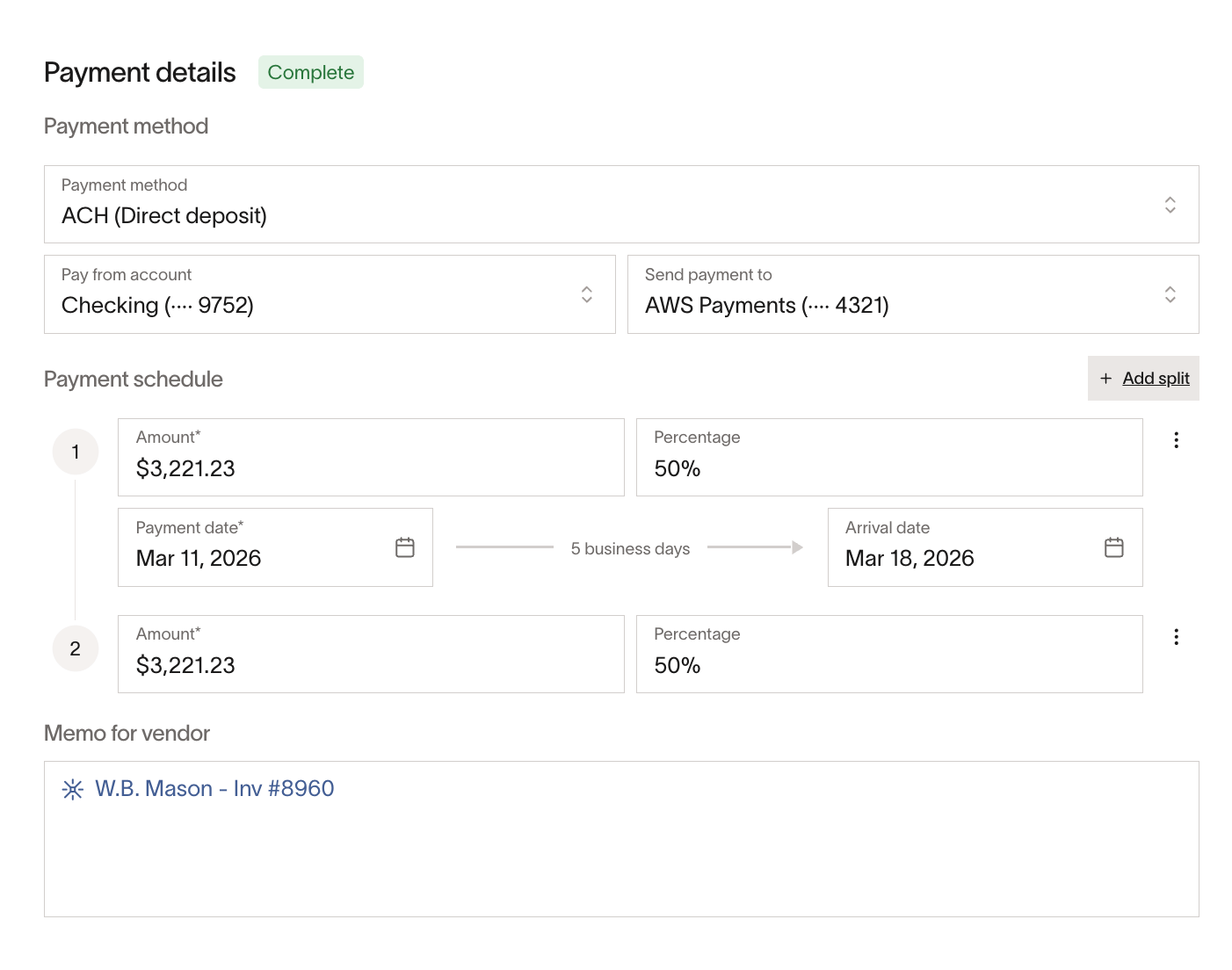
Creating two partial payments from the bill payment details view
For supported payment rails and timing expectations, see Bill payment methods and timelines.
Editing and release
- You can edit an individual partial payment until it is initiated.
- Once the first payment is initiated or completed, you can no longer change the vendor, the total bill amount, or the payment details on the initiated payment.
- If the first payment fails, those fields can be edited again.
- If your business uses payment release, each partial payment has its own release approval chain. Only a payment whose branch includes an approval step needs manual release. See Bill Pay payment release.
- If partial payments require release approval, review and release each one individually. Some bill-level bulk actions are not available for bills with partial payments.
Emails
For partial payments, Ramp sends the vendor's payment notification from [email protected] to the vendor's default contact email. If the vendor is enrolled in Ramp Vendor Portal, the notification goes to their portal account email instead. To change which email address receives these notifications, update the default contact email on the vendor's profile (or the portal email for Vendor Portal vendors). For more information about vendor notifications, see Bill payment methods and timelines.
The email shows the full invoice total and lists each split payment separately so the vendor can see what has already been paid and what is still scheduled. Completed payments are labeled Completed and can include details such as the payment amount, payment type, payment date, estimated arrival date, and Payment ID. Upcoming payments stay listed below the completed payment with their payment amounts and payment types.
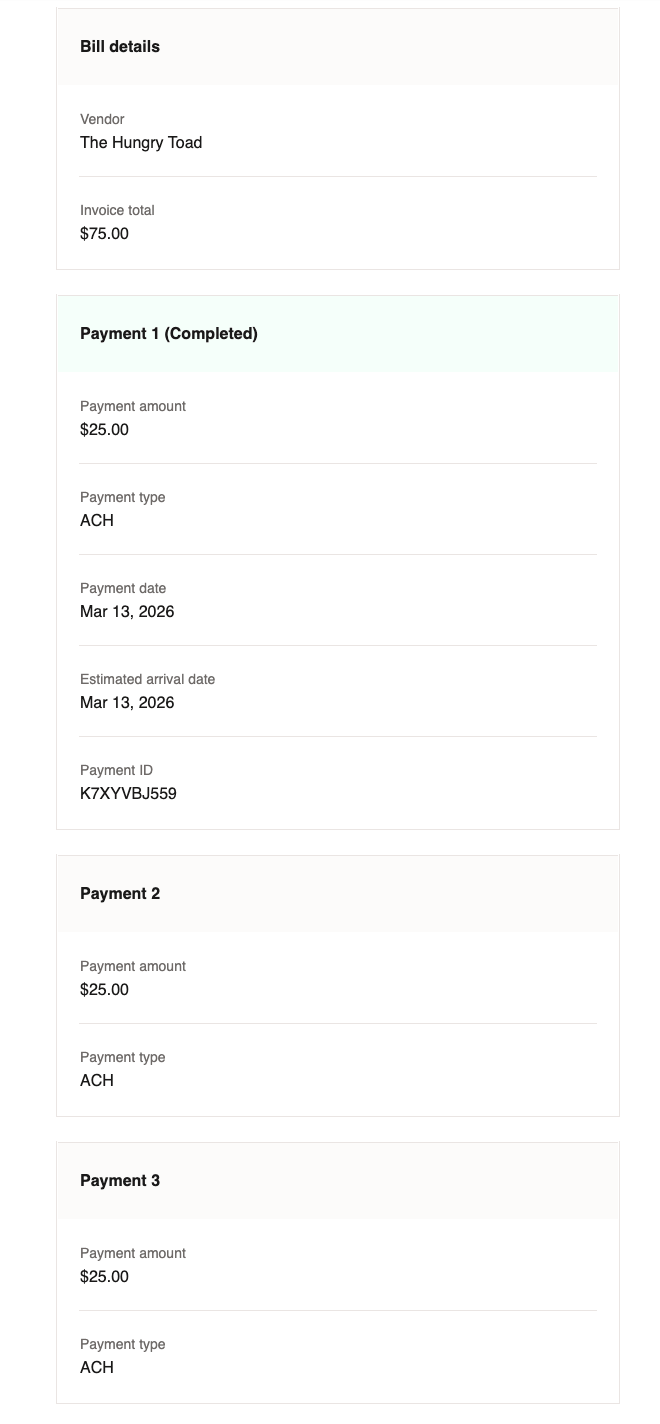
Vendor payment email for a bill with three partial payments
Supported and unsupported features
Supported capabilities
- Up to 20 payments on a single bill
- Card payments
- ACH, check, and domestic wire payments
- Direct debit, with each payment matched to one same-amount debit
- Leaving later payments unscheduled
- Multiple partial payments on the same bill scheduled for the same date
- Different supported payment methods on the same bill
- Separate payment records for each partial payment in the Payments table
- Remaining balance tracking in the Bills table
ERP support
- Supported: Acumatica, QuickBooks, NetSuite, Sage Intacct, Xero, Zoho Books, Microsoft Dynamics Business Central, and Microsoft Dynamics Finance & Operations
Not supported yet
- Vendor credits on bills with partial payments when the legacy Apply vendor credits flow appears
- Draft bills
- Recurring bills
- FX payments
- Manual payments
- Automatic card payments
- Batch payments for partial payments
Frequently asked questions
Can I schedule only one payment and add the rest later?
Yes. You can schedule the first payment and leave the remaining amount unscheduled until you are ready to add more payments.
Can multiple partial payments on the same bill use the same payment date?
Yes. Multiple partial payments on the same bill can be scheduled for the same date.
Can I edit a partial payment after I create it?
Yes. You can edit a partial payment until it is initiated.
How do I view the payments after I split the bill?
You can open the bill to view its payment summary, or go to Bill Pay > Payments to view each partial payment as a separate payment record.
Can I change the bill after the first payment is initiated?
Once the first payment is initiated or completed, you can no longer change the vendor, the total bill amount, or the payment details on the initiated payment. If the first payment fails, you can edit those fields again.
Can I bulk release bills with partial payments?
No. Bills with partial payments must be reviewed individually for release.
Which accounting providers support partial payments today?
Partial payments are supported for Acumatica, QuickBooks, NetSuite, Sage Intacct, Xero, Zoho Books, Microsoft Dynamics Business Central, and Microsoft Dynamics Finance & Operations.
How do I get access to partial payments?
Partial payments are available to all businesses whose ERP supports partial payments. See ERP support for the list of supported accounting providers.
Can I use different payment methods on the same bill?
Yes. You can select a different supported payment method for each payment.
Can I pay one bill with multiple card payments?
Yes. Each card payment independently uses its own card option, amount, and date, and you can mix a single-use card and an existing card on one bill. See Pay one bill with multiple card payments.
Can I use vendor credits with partial payments?
Vendor credits can be used with partial payments when Apply available vendor credits appears, but not when an already-split bill uses the legacy Apply vendor credits flow; see Vendor credits / Credit memos on Ramp Bill Pay for steps.
Can I use partial payments on recurring bills?
No. Partial payments are not available for recurring bills.
What is the difference between partial payments and batch payments?
Partial payments split one bill into multiple payments over time. Batch payments combine multiple bills for the same vendor into one payment. To learn more, see Batch payments on Ramp Bill Pay.
What is the difference between partial payments and recurring bills?
Partial payments split one existing bill into multiple payments. Recurring bills automatically create future bills on a schedule. To learn more, see Creating and managing recurring bill payments on Ramp's Bill Pay.