Create and manage blanket purchase orders
Overview
Alpha. This feature is in early development and may change based on feedback.
Use blanket purchase orders to plan repeat purchases and track them against an approved spending limit.
What a blanket PO is
A blanket purchase order (PO) holds the approved spending limit for one supplier. Each individual order against that limit is a release purchase order (release PO).
For example, you expect to buy laptops from one supplier as new employees join. Approve the models, unit prices, and overall quantities on the blanket PO. When you need a shipment, create a release PO for the laptops you want to order.
The blanket PO brings those orders together in its Release POs section and shows how much of the limit is still Available.
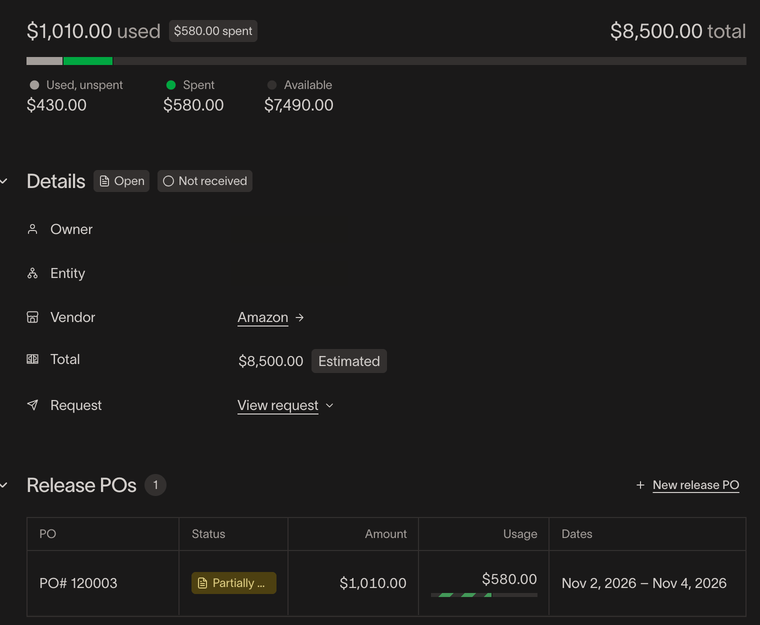
Blanket POs vs. regular POs
- Blanket PO: Each purchase has its own release PO number. Match invoices, receipts, and card transactions to the release PO for that purchase. The blanket PO tracks the overall limit and the orders using it.
- Regular PO: Match invoices, receipts, and card transactions directly to one PO. You can use a regular PO for multiple invoices without creating release POs.
See Purchase orders in Ramp for the regular PO lifecycle.
When to use a blanket PO
Use a blanket PO for repeat purchases from one supplier when you can agree on the items, prices, and overall quantities up front. For example:
- Office supplies: Approve quantities of paper and toner, then create an order whenever the team needs to restock.
- Printed materials: Approve quantities and prices for brochures or branded materials, then order batches for each event.
- Maintenance parts: Approve a supply of replacement parts, then order the parts as repairs come up.
Each release PO uses the blanket PO's line items and prices and must fit its remaining amount and quantities.
When to use a regular PO instead
A regular PO is usually a simpler choice when:
- You're making a one-off purchase and don't need separate orders under a shared limit.
- You only need to match several invoices to the same PO, such as monthly invoices for a service.
- Each order needs a different supplier or different prices. Release POs keep the blanket PO's supplier and line prices.
Use the regular PO request process for these purchases.
Blanket PO prerequisites
These instructions cover Ramp on the web for businesses enabled for the Alpha. Blanket POs are allowed by default once your business has Alpha access, unless your team has turned them off.
Use a purchase-order Program that collects line items. If your team needs to create or update one, follow Set up Ramp Procurement.
If your team requires review of individual orders, configure release PO approvals before creating them.
To create a release PO, you need access to the blanket PO and either permission to edit it or permission to create release POs on blanket POs. Settings, Program editing, and approval configuration also depend on your permissions. Ask your Ramp Admin to check missing access using Procurement role configuration.
Request a blanket PO
- Start a procurement request and choose your line-item PO Program.
- Select a supplier and enter the line items, quantities, and prices for the overall limit. A supplier is required before you submit.
- Expand Advanced and select Request a blanket PO.
- Complete the remaining fields. If Start and end dates appears, you can set dates for the blanket PO. Submit the request for approval.

Once approved, the blanket PO is ready for release POs.
Missing Request a blanket PO? Ask your Ramp Admin to check:
- Alpha access: Confirm your business is enabled for the Alpha.
- Program: Confirm the purchase-order Program collects line items.
- Business setting: If your team turned blanket POs off, use purchase order settings to turn on Allow blanket POs under Blanket PO in General.
If those checks pass and the option is still missing, contact Ramp Support to check the request form.
Create a release PO
Open the approved blanket PO and select New release PO. The blanket PO must be open, within its end date if one is set, and linked to an active supplier and a Program with a release PO approval workflow.
- Select the line items you want to order and enter quantities within the blanket PO's remaining quantities and Available amount. Use items in their base unit; converted units of measure aren't supported for release POs.
- Enter a Request name, Reason, and start and end dates under Duration. The start must be on or before the end, and both dates must fit within the blanket PO's dates, if set.
- Review the total. The supplier, entity, currency, and line prices carry over from the blanket PO and stay fixed on the release PO.
- Select Create to submit the release PO for approval. It follows the Program's release PO approval workflow.
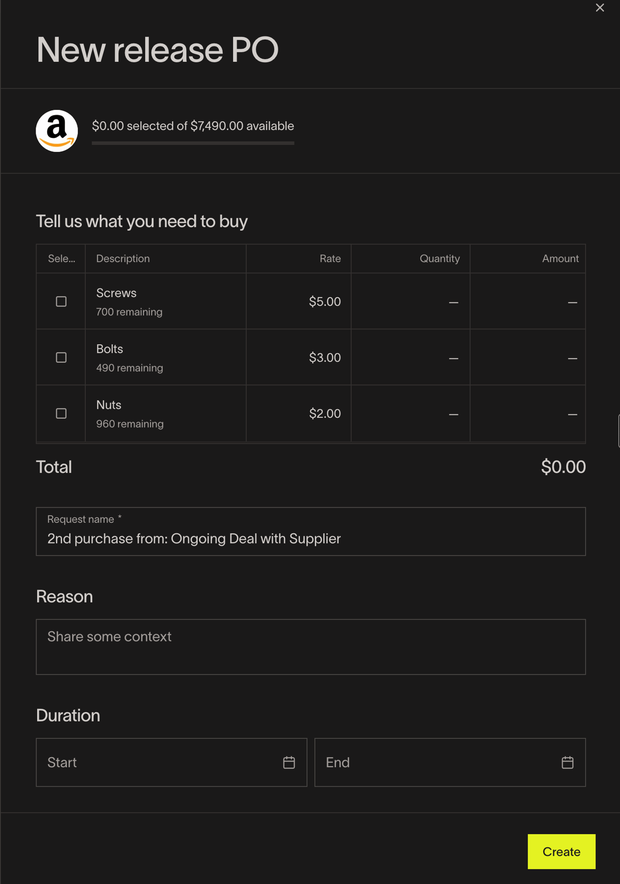
Find the resulting orders in the blanket PO's Release POs section. If creation is disabled, resolve the reason shown on the blanket PO, such as a closed blanket PO, expired end date, or missing workflow.
Configure release PO approvals
Release POs are automatically approved by default. If your team needs someone to review each order, configure the Program's release PO approval workflow. Release PO approvals are configured separately from the blanket PO request's approvals.
- Open the Program editor for your purchase-order Program.
- Find Who approves release purchase orders? and select Edit.
- Add the review steps your team needs and select Save. This saves a draft of the workflow.
- Return to the Program editor, finish editing, and publish your changes to apply them.
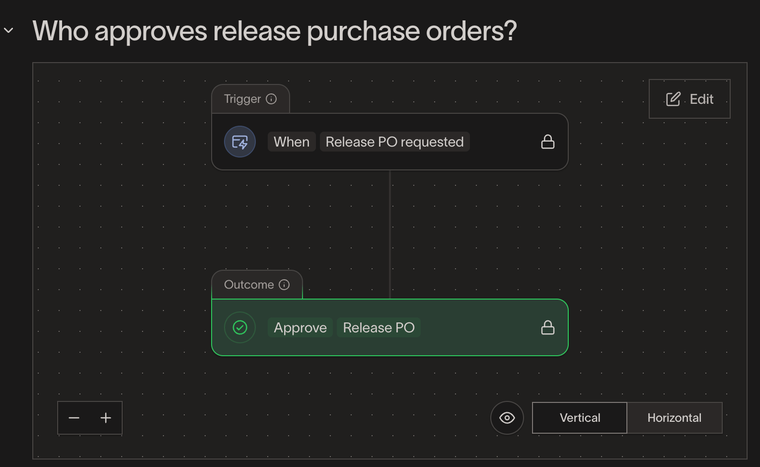
For help adding review steps, see Configure Procurement workflows.
Track the remaining blanket PO limit
Check Available on the blanket PO to see how much is left for new orders. Approving a release PO sets aside part of that limit for the order, even before it is billed.
For example, suppose the blanket PO for your laptop purchases has a USD 50,000 limit and one open, approved release PO for USD 10,000. With USD 3,000 billed and no card spend, USD 40,000 is still available for other orders.
Other changes affect the available amount:
- Closing a release PO: Only its billed amount plus paid and pending card spend continues to count against the limit. The rest becomes available for other orders. In the laptop example, closing the release PO with USD 3,000 billed and no card spend leaves USD 47,000 available.
- Spending above a release PO's total: For an open release PO, Ramp uses the higher of its order total or its billed amount plus paid and pending card spend.
Remaining quantities: On a closed release PO, used quantities are the greater of the received or billed quantity for each line.
Pending release PO approvals: Draft and pending release POs don't reserve the available amount. If another release PO is approved first, it can use that amount. Ramp checks availability again at approval and rejects a release PO if there isn't enough left.
Overbilling a release PO can make the blanket PO's remaining amount negative. To restrict bills above a PO's approved amount, review Overbilling protection separately.
Bill and receive against release POs
Match invoices, receiving records, and card spend to the release PO, not the blanket PO. A blanket PO cannot receive bills or item receipts, issue a card, or have card transactions matched to it. Release POs use the normal PO matching and receiving processes.
Give the supplier the release PO number for each purchase. If an invoice references only the blanket PO number, Ramp does not suggest the blanket PO for matching; your accounts payable team must select the appropriate release PO manually. For receiving requirements on release POs, see 3-way match with Ramp Procurement.
Change a blanket PO or release PO
Use the normal PO editing rules or submit a change order when a material change needs approval. Blanket POs add these restrictions:
- Blanket PO limit and lines: You cannot reduce the limit below existing commitments, remove a line with quantities still used by release POs, or reduce a line below its used quantity. After a release PO has been issued, you cannot change the blanket PO's supplier, entity, or currency.
- Release PO quantities: Increases must fit the blanket PO's remaining amount and quantities, and the blanket PO must still accept release POs. Reductions cannot go below quantities already received or billed. Inherited supplier, entity, currency, and prices remain locked.
- Release POs synced as NetSuite releases: You cannot add or remove lines or change their quantities or prices after sync. Create another release PO to order more; see Accounting sync for blanket POs for edits that remain available.
Blanket PO price and coding changes can update pending release POs. If a submitted release PO's total increases, its approvals regenerate; removing a blanket PO line can reject pending release POs using that line. Review pending release POs when changing the blanket PO.
Close or reopen blanket POs
- Close a PO: Open it, select Options, then Close, and provide a reason. Select Close purchase order to confirm.
- Reopen a PO: On a closed PO, select Reopen if that action is available to you.
Before closing a blanket PO, review what happens to its release POs:
- New and pending orders: Closing the blanket PO prevents new release POs and rejects pending release POs and pending release PO change orders that increase quantities or committed amounts.
- Already-issued release POs: These stay open. Review and close those separately when purchasing is complete.
- Rejected requests: Reopening the blanket PO does not restore rejected requests.
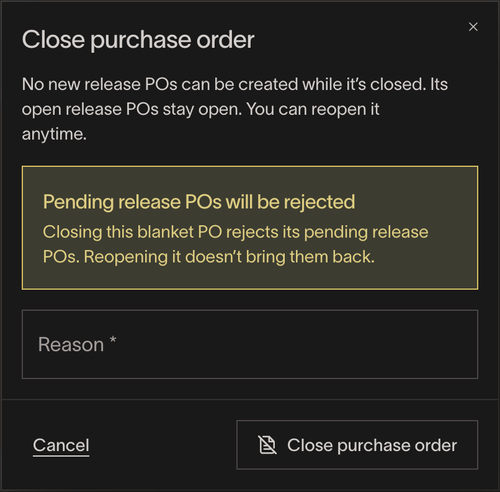
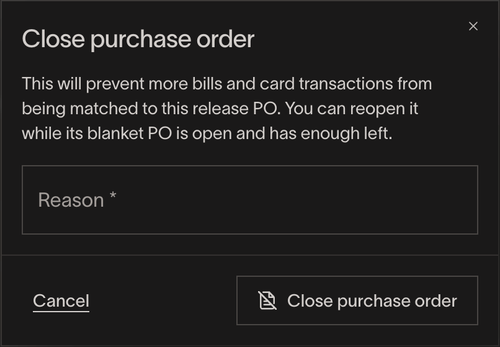
Closing a release PO: Prevents new bills and card transactions from being matched to it. It also returns its unused monetary commitment as described in Track the remaining blanket PO limit.
Reopening a release PO: Requires a blanket PO that can still accept release POs and enough remaining amount and quantities to restore the release PO's commitment. If reopening is blocked, check the blanket PO's status, end date, workflow, supplier, and remaining capacity first.
Sync blanket POs to your accounting system
NetSuite supports native blanket POs and linked release POs. Before syncing:
- Enable NetSuite's Blanket Purchase Orders feature and update the Ramp SuiteApp if Ramp reports that a newer version is required.
- Use a currency that is active in the NetSuite connection. Native blanket PO sync is blocked if the currency is missing or the connection has no active currencies.
- Do not include saved taxes on the blanket PO you need to sync; native blanket PO sync does not support them.
- Use each NetSuite item or expense account only once on the blanket PO. Combine duplicate lines before syncing.
- Sync the blanket PO and its lines before syncing linked release POs. A release PO already synced as a regular PO before the blanket PO remains a regular PO; it is not converted to a linked NetSuite release later.
Once a release PO syncs as a NetSuite release, you cannot add or remove lines or change their quantities or prices. Accounting coding and custom fields remain editable. Billing, receiving, and closing still use the release PO. Closing the blanket PO in Ramp does not close it in NetSuite; manage its NetSuite status separately.
Other accounting integrations, including Sage Intacct, do not support native blanket PO sync. Release POs follow their ordinary PO sync path, where that integration supports PO sync and its normal prerequisites are met. See Syncing Ramp purchase orders into accounting for general setup.
Frequently asked questions
Can I turn an approved regular PO into a blanket PO?
No. The blanket PO selection locks after approval; submit a new blanket PO request instead.
Does a blanket PO limit reset each month?
No. A blanket PO has one total spending limit. It does not reset each month.
Does marking a PO total as estimated allow release POs?
No. Let approvers know the total is estimated marks a regular PO's total as estimated. To create a blanket PO, select Request a blanket PO when you request the blanket PO.