Sage Intacct integration: Multi-entity changes
Overview
Available on Ramp Plus. See Ramp Plus overview for plan details.
Ramp supports multi-entity businesses for Sage Intacct customers. Ramp allows customers to add all business entities with a single instance and set a different payment setting for each entity.
This enables customers to:
- Generate individual statement payments for each entity / subsidiary
- Eliminates the need to perform inter-company transactions every time you close your books
- Track card transactions, pay out reimbursements and bill payments for each entity from different bank accounts
- Sync to multiple entities within one batch sync for both transactions and reimbursements
Creating business entities
**Note:**Before creating additional Business Entities on Ramp we recommend connecting Ramp to your accounting system. If you still need to connect Ramp to your Accounting system, see this article.
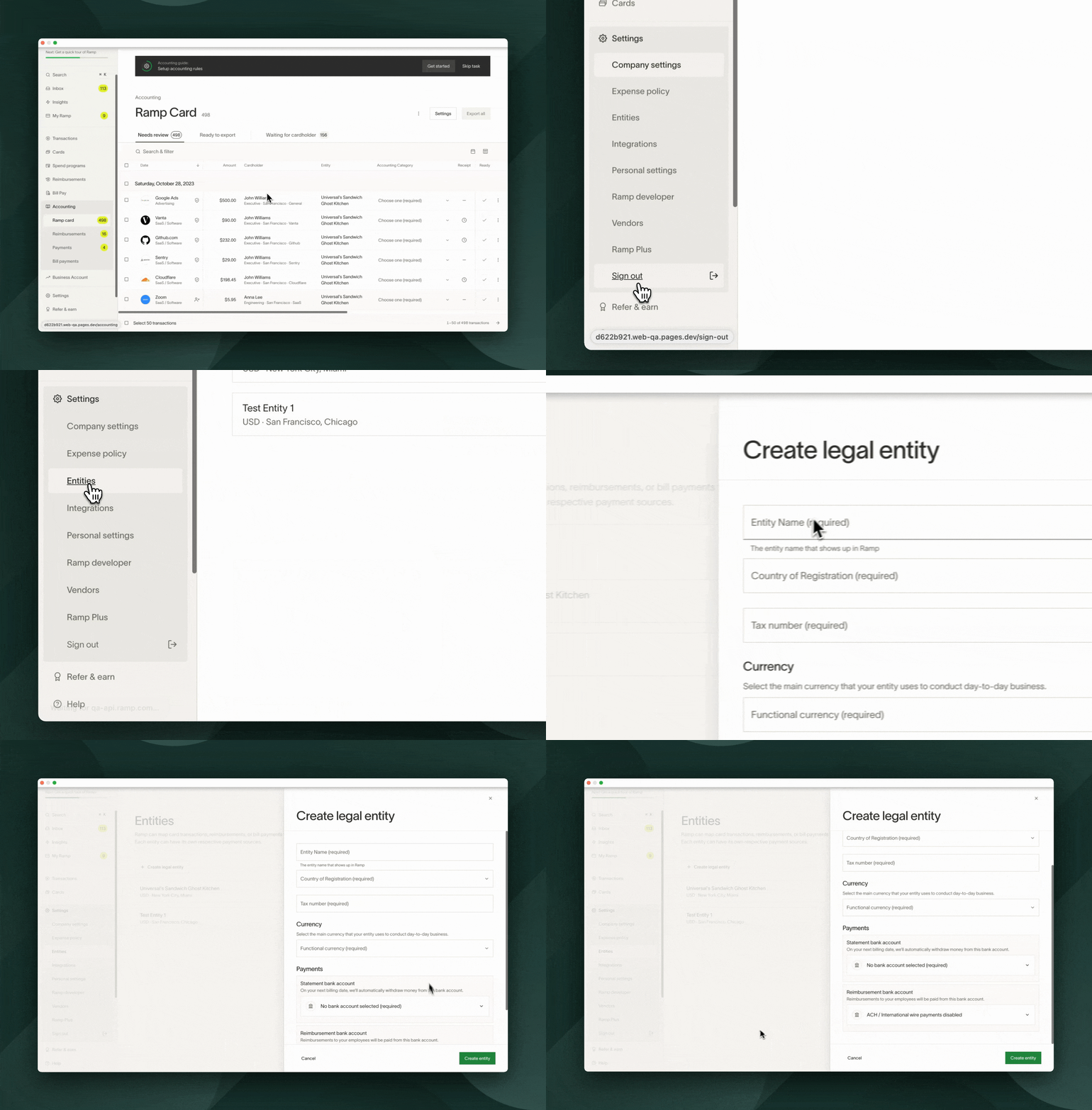
To create business entities on Ramp:
- Go to Entities under Company.
- Click Create legal entity .
- Note: During set up, the default entity will apply to all existing transactions and reimbursements.
- Fill out all required fields.
- Note: When selecting the checking account you'd like to use to pay down the balance for this entity, the bank account must be verified on Ramp to be included as an option in the drop-down.
- Click Create entity .
How business entities work on Ramp
With users
When inviting a user onto Ramp, you have to select a Department and Location that the user belongs to. Additionally, when setting up multi-entity on Ramp, you have to map Locations to Entities.
So, when inviting a user,make sure you select the correct locationfor said user since all of the cards will default to the entity corresponding to that location.
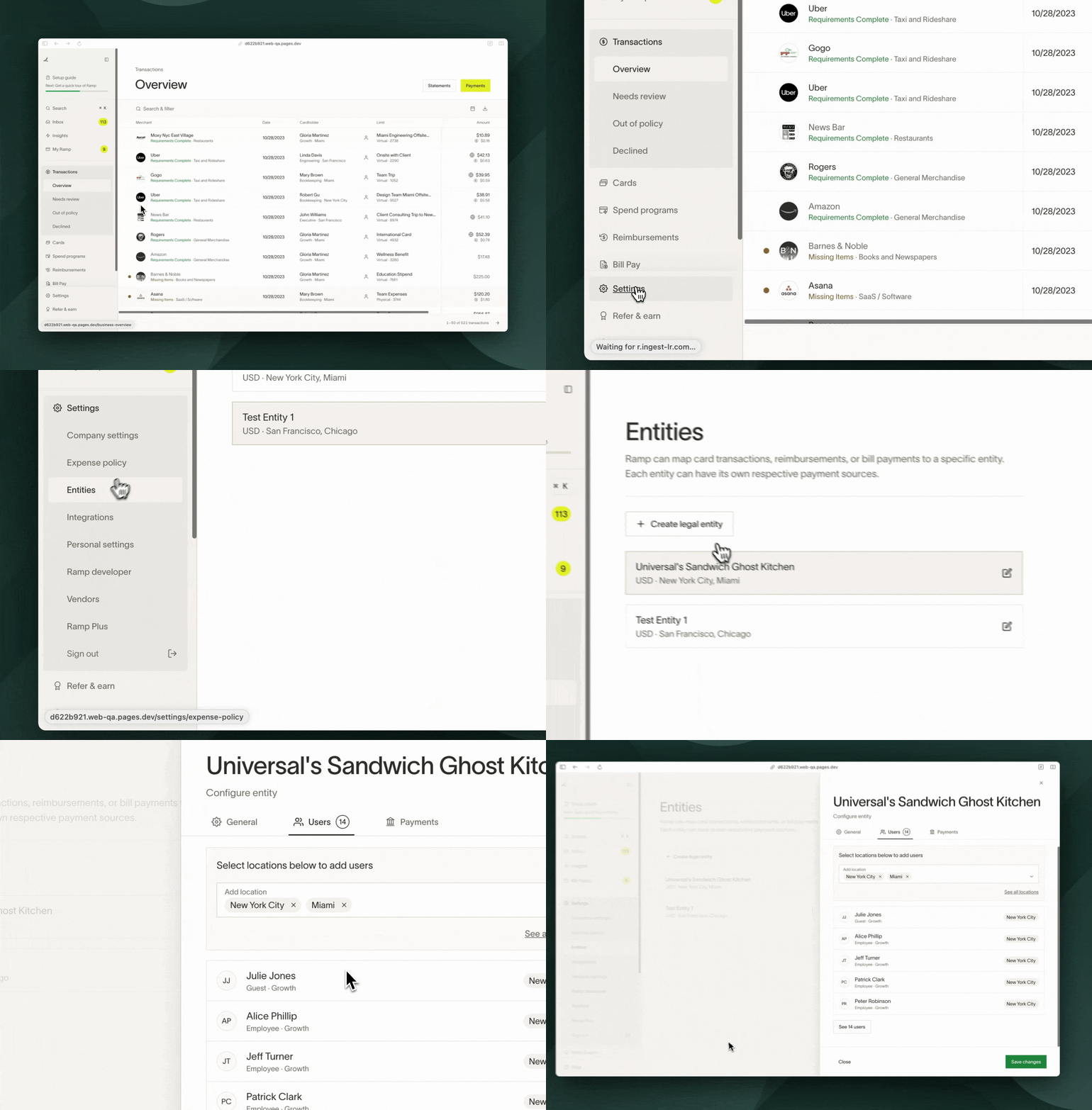
To see which users map to each entity:
- Go to Entities under Company.
- Click the entity.
- Click Users tab.
With card transactions
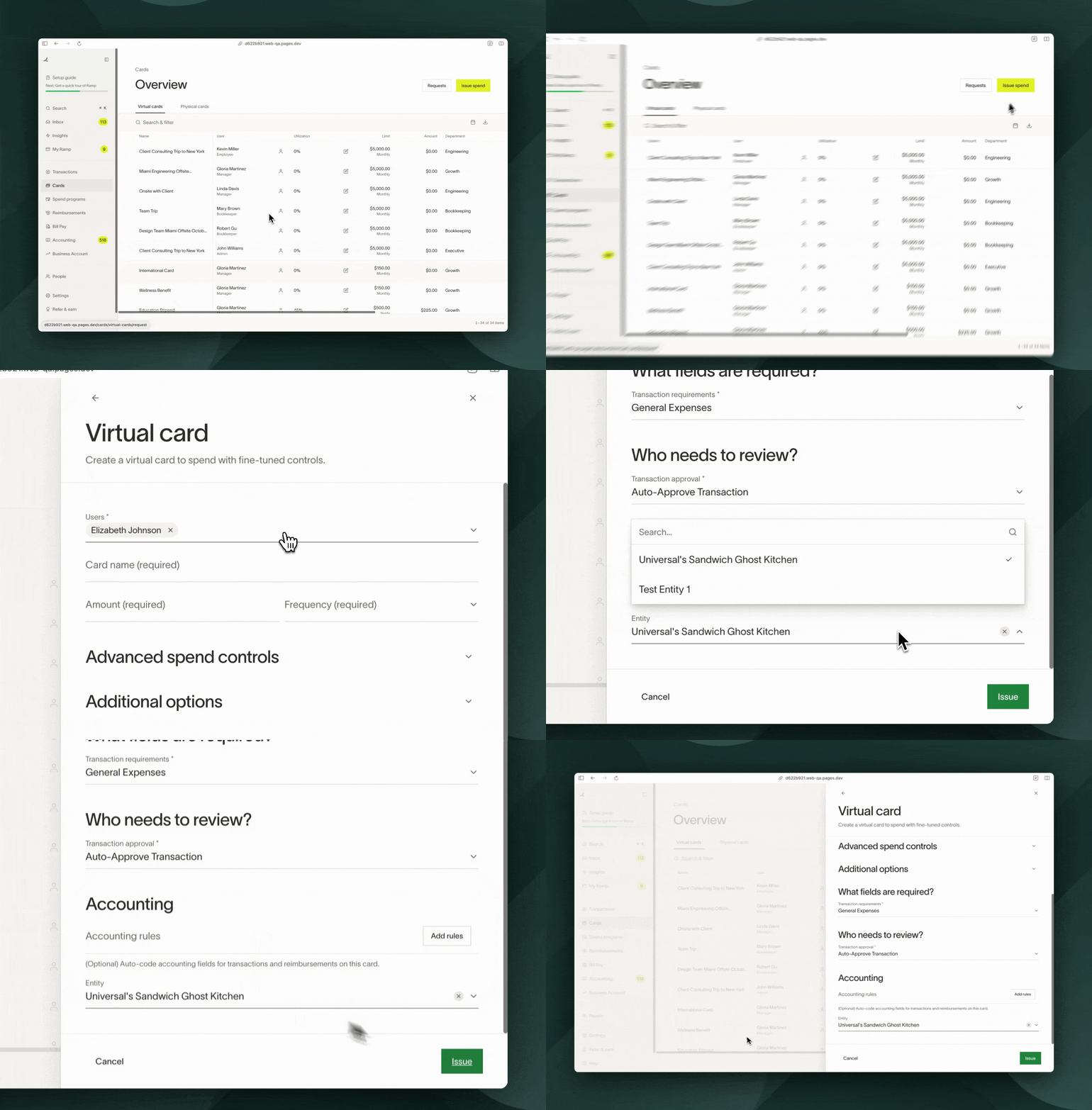
Each issued card is linked to a specific entity, with all transactions on the card attributed to this entity. The card's associated entity is determined at the time of issuance, defaulting to the entity tied to the cardholder's designated location. However, this default entity can be modified during the card creation or editing process.
- Navigate to Funds & cards.
- Click on Issue spend.
- Select the card type.
- In the Advanced section, click Transaction coding rules.
- Click the Entity drop-down.
- Select the entity you'd like that card to map to.
- Entity change will ONLY affect future transactions. In other words, the entity of a transaction is locked once a transaction is made.
With reimbursements
The entity of a reimbursement is dependent on what entity the user who submitted the reimbursement is in. There is no way to currently change this.
With statement payments
Statement payments will now be calculated at the entity level and paid out from the bank account specified in the entity settings. If an entity does not have enough funds to cover their expenses, we will default to the parent / default entity's bank account.
Edit business entities
- Go to Entities under Company.
- Select the entity you would like to edit.
- Click Details to change basic information or delete an entity
- For instructions on how to delete an entity, see How to delete an entity on Ramp
- Click "Users" to view who is a part of this entity
- To add or remove users, update their assigned location in Ramp
- Click "Payments" to change statement payment information
- For instructions on how to verify a new bank account, see Verifying bank accounts
- Click Details to change basic information or delete an entity
Frequently asked questions
Can I have limits per entity and/or get underwritten per entity?
Currently, we cannot delegate limits by entity within one Ramp instance. Underwriting is also as a whole, not by entity.
How can I change the entity of a transaction?
Click into the transaction and then scroll to the entity field in the transaction drawer. Click the drop down and change the entity of the transaction. Please note that this functionality is only available before the statement is generated. Once a statement is generated the entity of the transaction is locked.
Why can't employees change the entity of transactions?
Please contact your account manager or support team to request this feature be enabled on your account.
What should I do if an employee or user spends across multiple entities?
Each virtual card is tied to an entity, and a user may have virtual cards that tie to different entities. Thus, if a user spends across multiple entities, the suggested set up is to have multiple virtual cards, one for each entity. This will make the statement payment and reconciliation process more seamless since if you had the option to move around the subsidiary, there is the possibility it doesn't match up with how it was paid out.
What happens if I change the mapping of a location (i.e., Location A now maps to Entity A instead of Entity B)?
Future cards will now default to the updated entities, however existing cards will remain untouched. To edit the entity of a card, open the card from Manage Spend, click Actions, select Edit, then scroll to the bottom and change the entity of said card. *Note: this will only affect future transactions
Can I get multiple physical cards, one for each entity?
You can only have 1 physical card by employee and the business name on their card will be the entity they are assigned to. That said, see our section above on "What should I do if an employee or user spends across multiple entities?".
Can I split transactions across entities?
You can split across locations (which may correspond to entities). However the locations available are the locations available where the credit card is created (i.e., if credit card is created at Location 100, then the only locations you can split that transaction across are other locations available within Location 100).
How to delete an entity?
Please see How to delete an entity on Ramp?
How to remove a user from an entity?
Change the location of the user.
Why isn't this bank account showing?
The bank account will need to be verified in Ramp in order to be show in the list of drop down options for an entity.