1099 Filing on Ramp
Overview
1099 Filing on Ramp allows businesses to manage their 1099-eligible vendor list, generate and electronically file 1099-NEC and 1099-MISC forms with the IRS (and optionally with participating states), and deliver 1099s to vendors electronically or by mail, all within Ramp.
Ramp streamlines the annual 1099 process by offering recommended box-mapping rules, automatically identifying 1099-eligible expenses, and reducing time spent on manual corrections.
Note: 1099 filing through Ramp will be available starting January 6, 2026, when the IRS e-filing service is live.
Video walkthrough: Prepare and file 1099s on Ramp, including which vendors qualify and how to review filings before you submit. Best at year-end when 1099 season starts. Watch the video.
Getting started
Admins, Accounts Payable roles, and Accounting roles with Accounts Payable privileges can begin preparing for 1099 season by reviewing vendors, validating tax details, and applying appropriate mapping rules.
- Go to Vendors → click the menu (⋯) → Review 1099 vendors
- If you have multiple entities, use the entity switcher to review eligibility, spend, and mappings per entity
- If vendor payments seem to be missing, ensure you're reviewing vendors for the correct entity
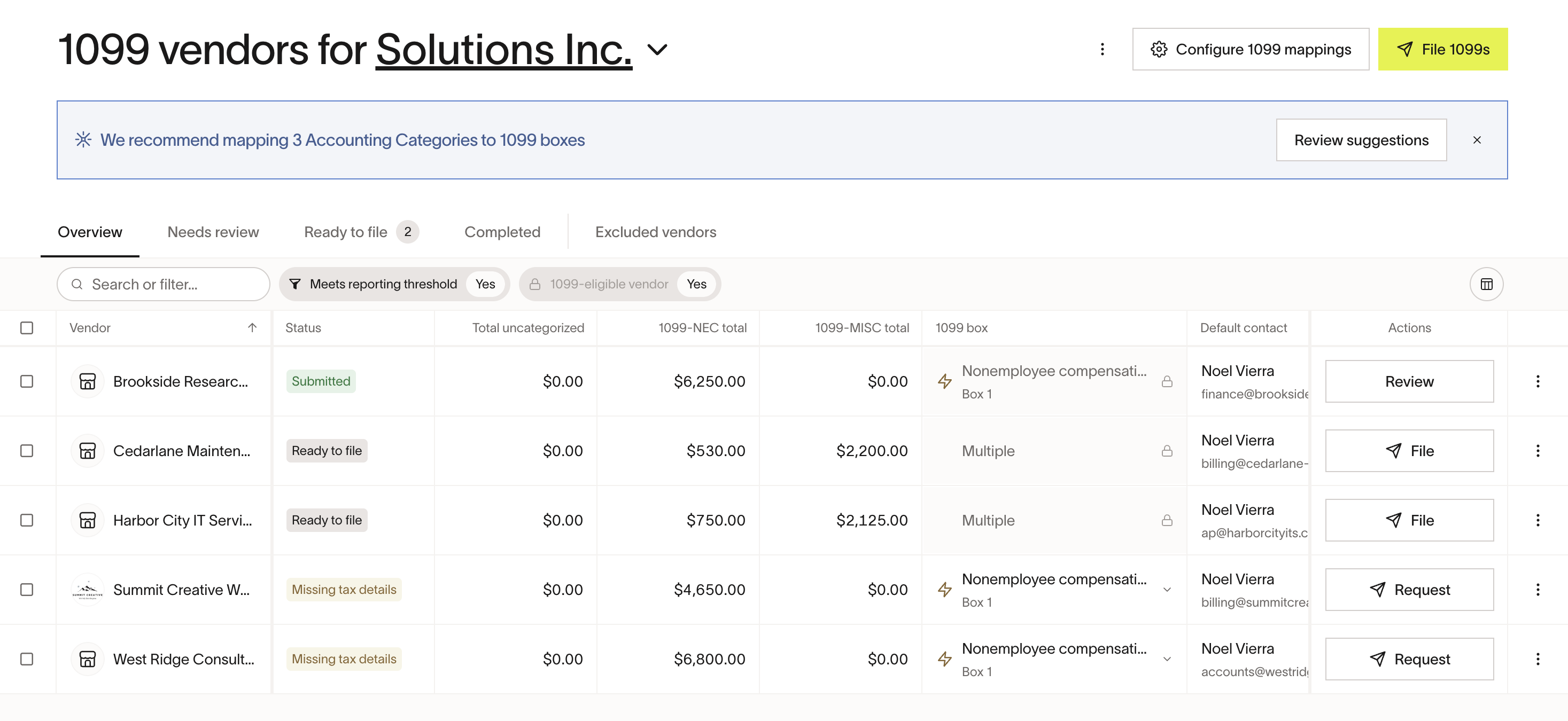
Table overview
- Overview: All vendors whose 1099 status = Yes for the selected year (read more about 1099 tax status and eligibility in Manage vendor tax details.) As spend is categorized, totals appear in '1099-NEC total' and '1099-MISC total'. Any uncategorized spend appears under Total uncategorized.
- Needs review: Vendors that require fixes before filing
- Ready to file: Vendors that have the required information and are ready to start filing
- Completed: Vendors with a 1099 that Ramp successfully filed with the IRS
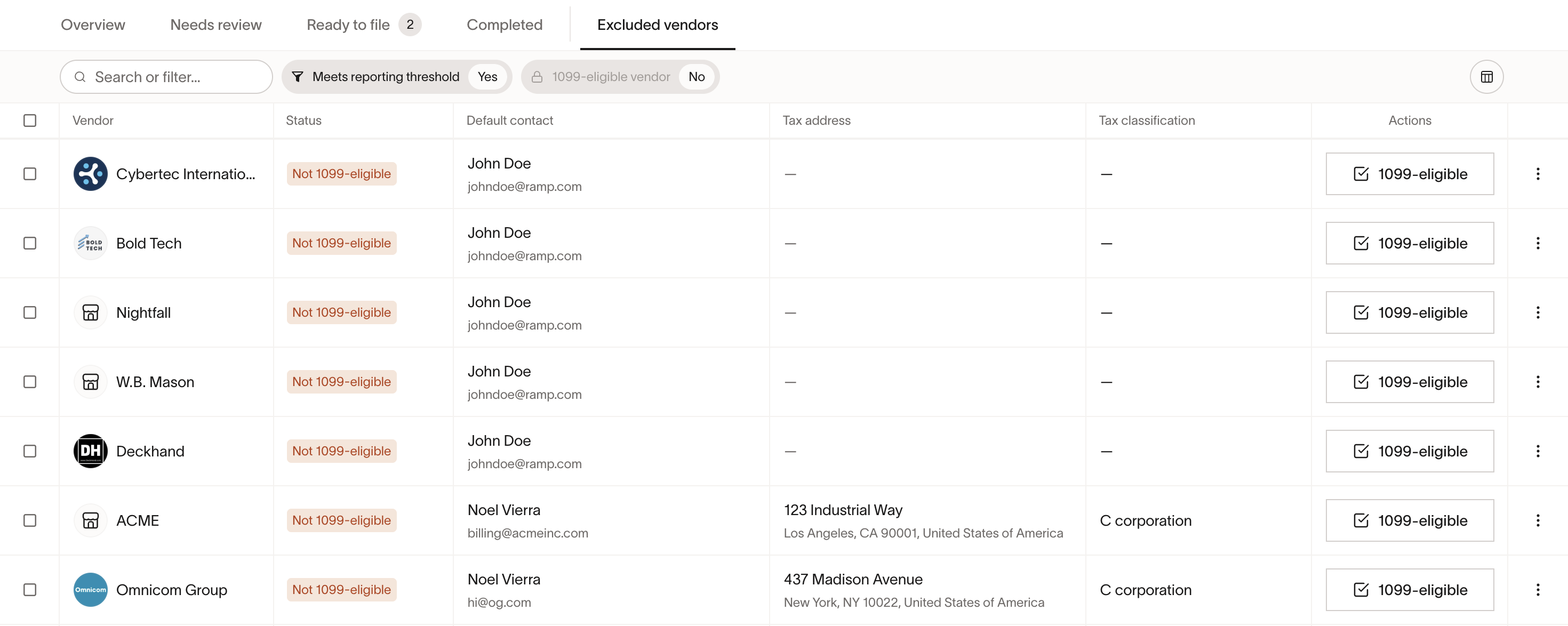
- Excluded vendors: Vendors not marked 1099-eligible. You can change their eligibility status at any time
Here are all the possible statuses you might see in your 1099 table:
- Not 1099-eligible
- Missing tax details
- Requested tax details
- Missing TIN type
- IRS TIN Check Failed
- Needs categorizing
- Ready to file
- Filed
- Submitted
- Filing error
Pre-Filing setup
Confirm vendor eligibility
- In 'Overview' , ensure you're seeing all vendors that should receive a 1099
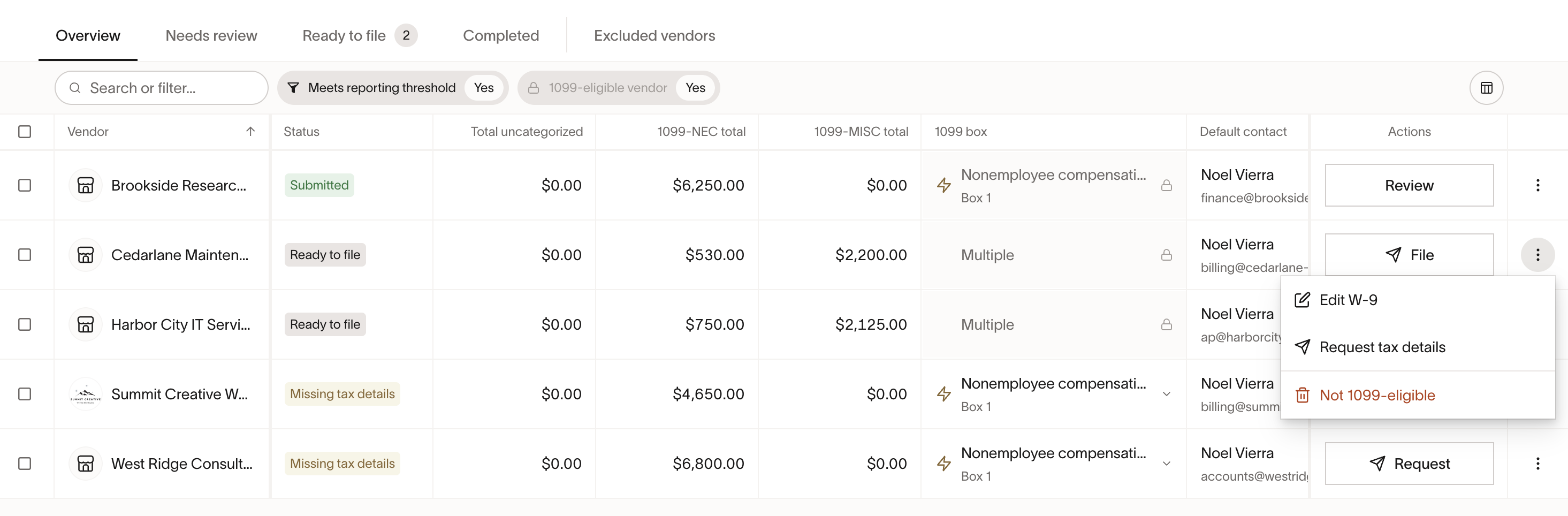
- To exclude a vendor, set them as Not 1099-eligible by clicking on the menu button (3 dots), or from Vendor Profile → Payment & tax → Tax details → Tax status
- To include a vendor, review your list of excluded vendors and click 1099-eligible on a vendor or bulk select to update multiple
Collect and manage tax details (W-9 and TIN)
Throughout the year, you can use the 1099 table to manage your vendors’ tax information, request tax details, and collect W-9 forms.
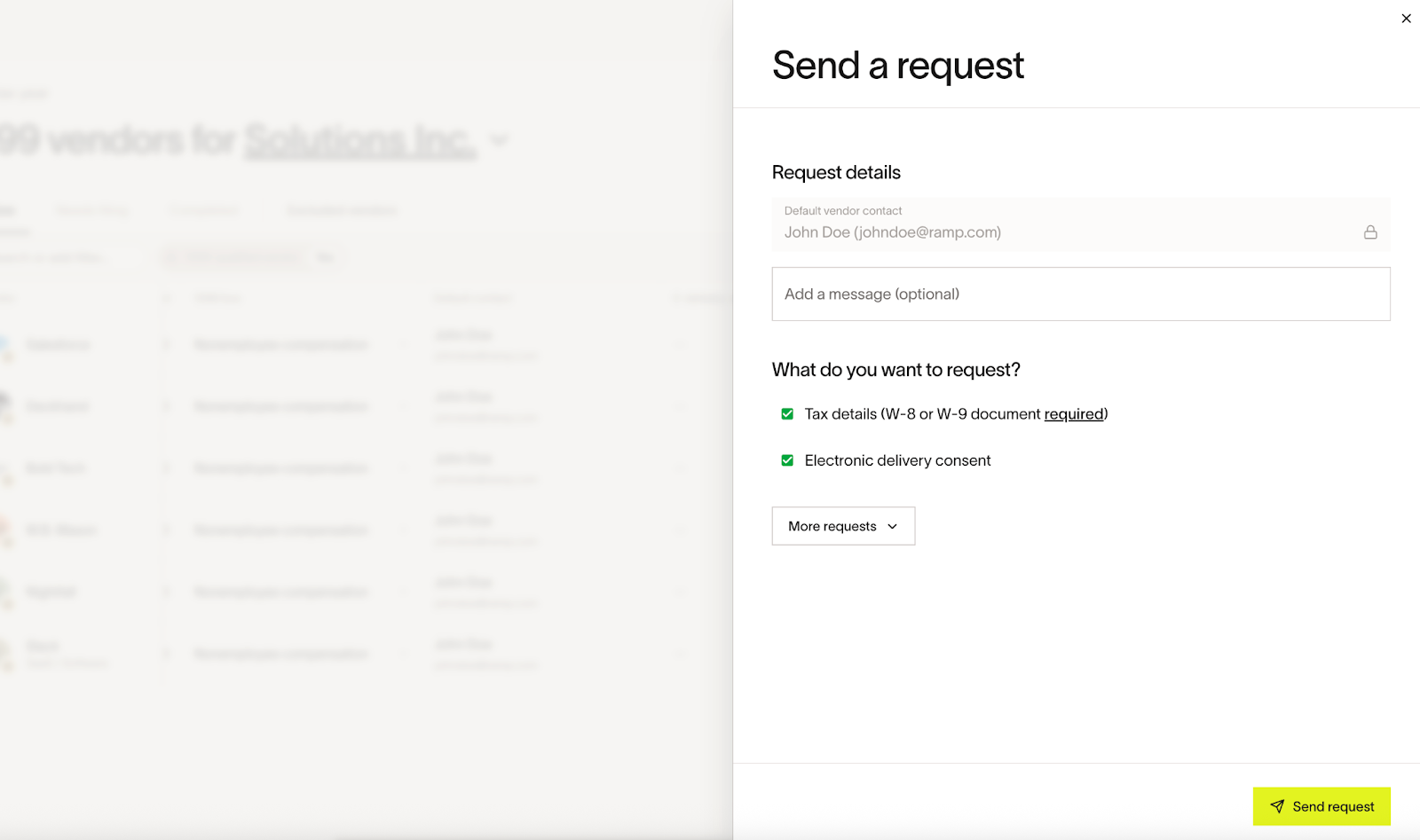
- Click menu button (⋯) → Request tax details. This will send an email to the vendor's default contact. You have the option to add a message in your request
- Use bulk requests by selecting multiple vendors before sending
- To upload existing W-9 forms, click the menu (⋯) on the Vendors table → Upload documents
- You can also edit tax details directly from a vendor's profile under Tax details
TIN CHECK
Ramp verifies a vendor's legal name and TIN against IRS records. A failed TIN check means the TIN and legal name do not match IRS records. If the vendor's TIN type is provided, you can continue filing after acknowledging the warning. Ramp is not responsible for any penalties or other tax non-compliance caused by a mismatch. Read more in Vendor TIN verification.
To provide a missing TIN type:
- Open the vendor from the 1099 dashboard
- Click Edit W-9 > re-enter the Tax Identification Number (TIN) > select whether this number is a SSN or EIN > Save
For a failed TIN check, acknowledge the possible implications during filing before completion.
Request/confirm e-consent for digital delivery
To avoid sending paper 1099s, you can request and manage e-consent from your vendors for digital delivery. E-consent is legally required to digitally delivery 1099s to your vendor. Without it, we'll require you to send 1099s by mail. To request e-consent:
- Click the menu (⋯) → Request tax details → Check 'Request consent to deliver 1099s electronically'
- Vendors grant consent through the email request
- Depending on the vendor's response, you will see 'Yes', 'No', or 'Sent' in the 'Digital delivery' column
- For vendors that have declined, you must mail their 1099 copy during filing
*Note:*1099s delivered by mail will also be delivered to vendors electronically. If you need to update a vendor's e-consent status, you'll need to send another request or ask them to update it in the Vendor Portal.
In the event you've received consent from your vendor off Ramp for digital delivery, you can update this preference in a vendor's settings.
- Click on a vendor → Consent for e-delivery → Manually confirm consent → Confirm
- Please confirm that you've received proper consent from your vendors for digitally delivery before manually adjusting, in accordance with IRS guidance
- Note: You cannot manually confirm consent if a vendor has already responded 'No' to an e-consent request. You must re-request e-consent from the vendor to update it, or they can update it from the Vendor Portal.
Vendor Experience: You can see the vendor's side of granting e-consent in Ramp Vendor Portal.
Automatically map categories
You can easily categorize vendor spend by creating rules that automatically map specific general ledger (GL) accounts to 1099 boxes for your eligible vendors, reducing the need for manual categorization.
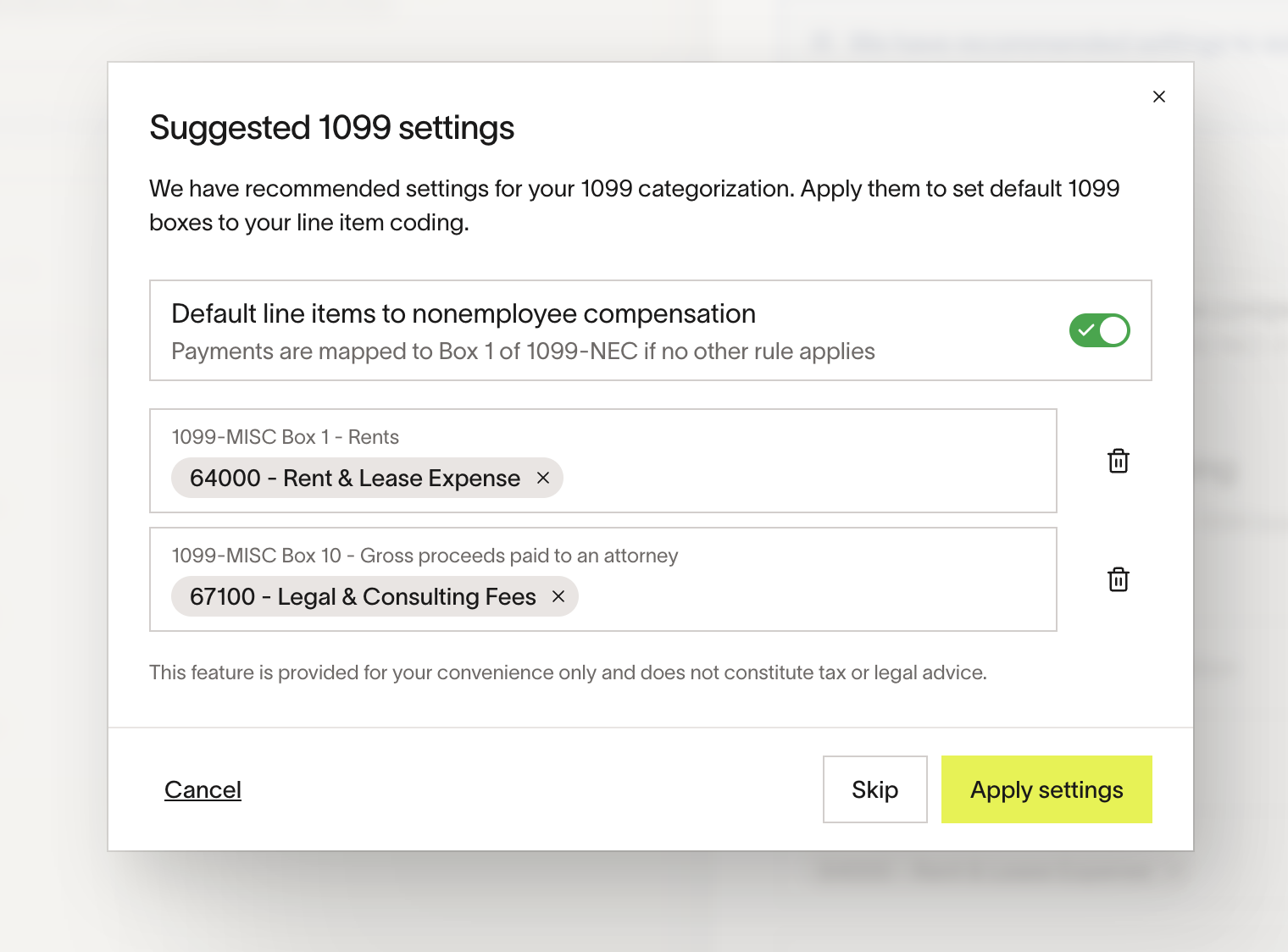
- Suggested rules : Ramp may propose 1099-MISC mappings based on your expense patterns to help you get started. You can accept, edit, reject, or add your own, then 'Confirm'. 'Skip' allows you to re-visit the suggestions later
- Click Settings to view and manage rules
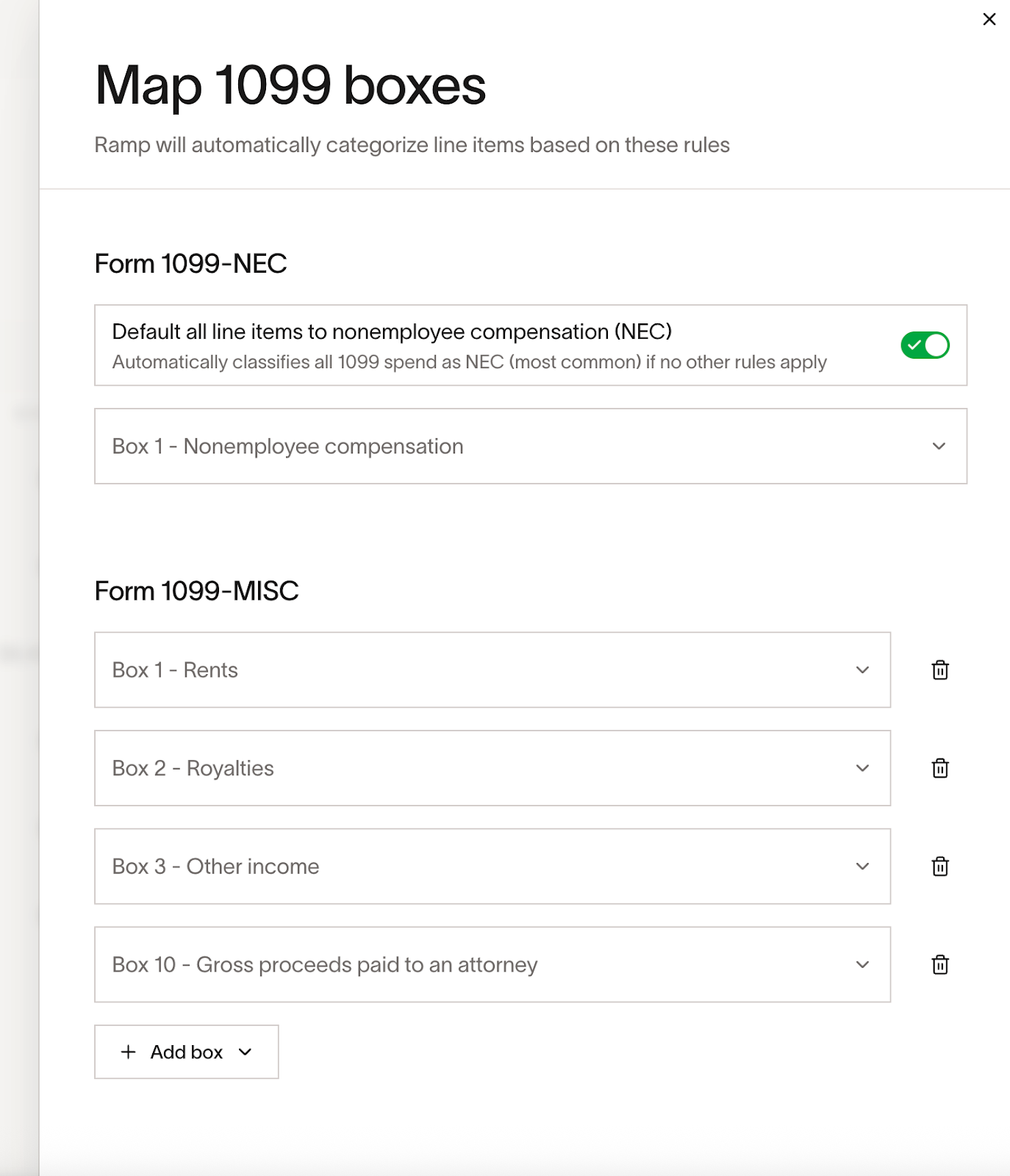
- Create rules : Click Add Box → choose GL accounts → map them to a 1099 box (single or multiple accounts per box) → Save, to apply the rule
- Default to NEC: Turn this on to classify uncategorized spend as NEC unless another rule overrides it. This will be turned off by default
Categorize vendor spend
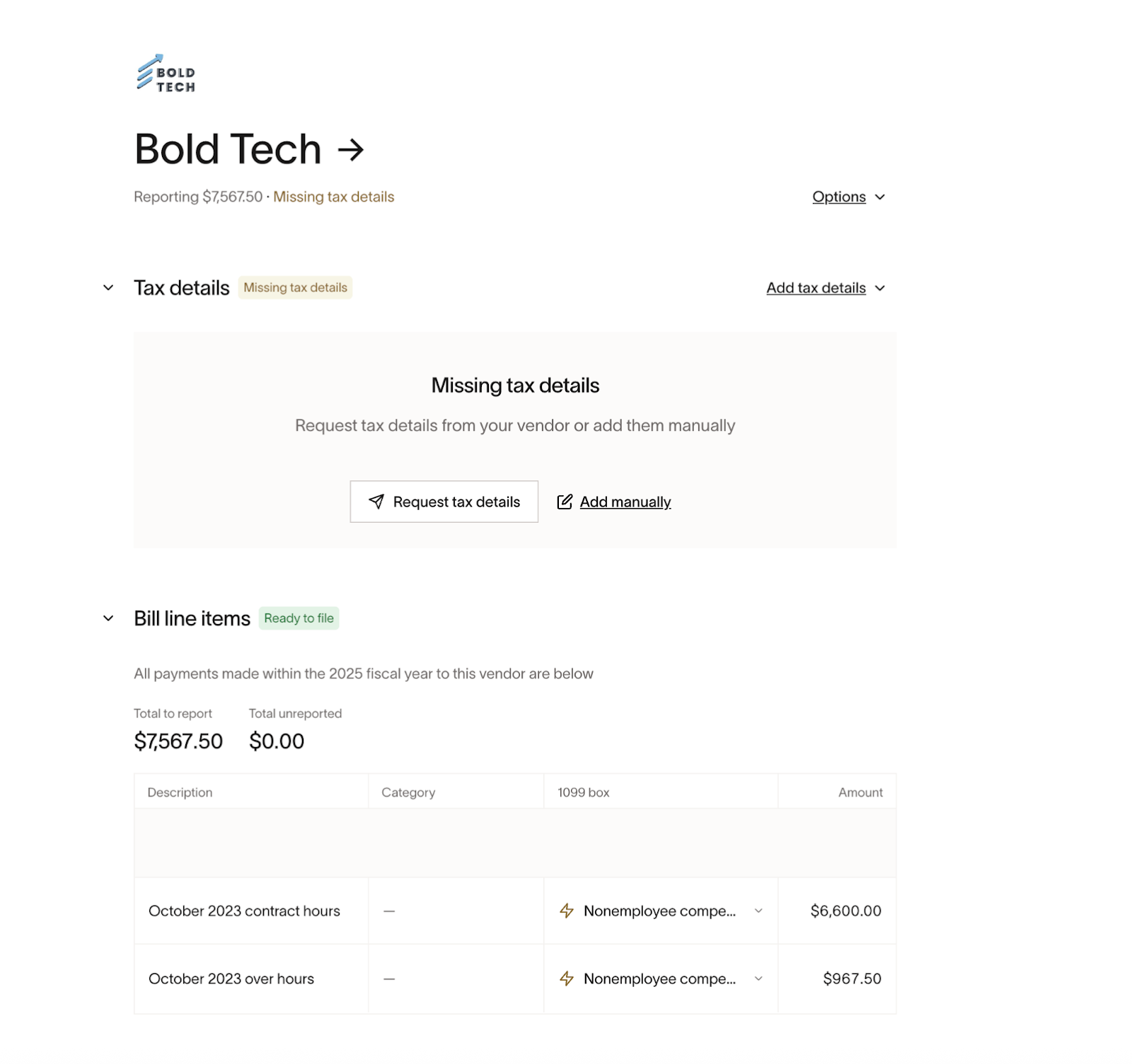
Each vendor has a detailed view where you can manage both Tax details and Bill line items for spend paid to your vendor. 'Bill line items' shows all the associated expense line items and invoices paid to a vendor during the calendar year.
- Click a vendor to open the detailed view
- In Bill line items, assign each line to the correct form (NEC/MISC) and box (e.g., Other income, Rents) in the '1099 box' column
- Mark non-reportable spend with 'Not reportable'
- A lightning bolt icon shows where accounting rules auto-applied a category
Additional spend
If you have spend outside of Ramp that you would like to include in filing, you can make adjustments to your total filing amount for a vendor by going clicking on the Vendor → scroll to 'Additional Spend' at the bottom → Add additional spend. To update or remove the amount, click in to the amount box → update amount or zero out → hit enter to save.
Filing 1099s
Select vendors to file
- Go to Ready to file (or Overview) to begin
- File one vendor : click File on the row
- File many vendors: bulk select → File
- File all visible vendors: click 'File 1099s' button at the top right
Review your business information and filing batch
-
Confirm Business name, TIN, Address, and Phone
- All fields are required and appear on each 1099 form submitted to the IRS
-
Review the list of vendors you're about to file - verify NEC/MISC totals and delivery method per vendor.
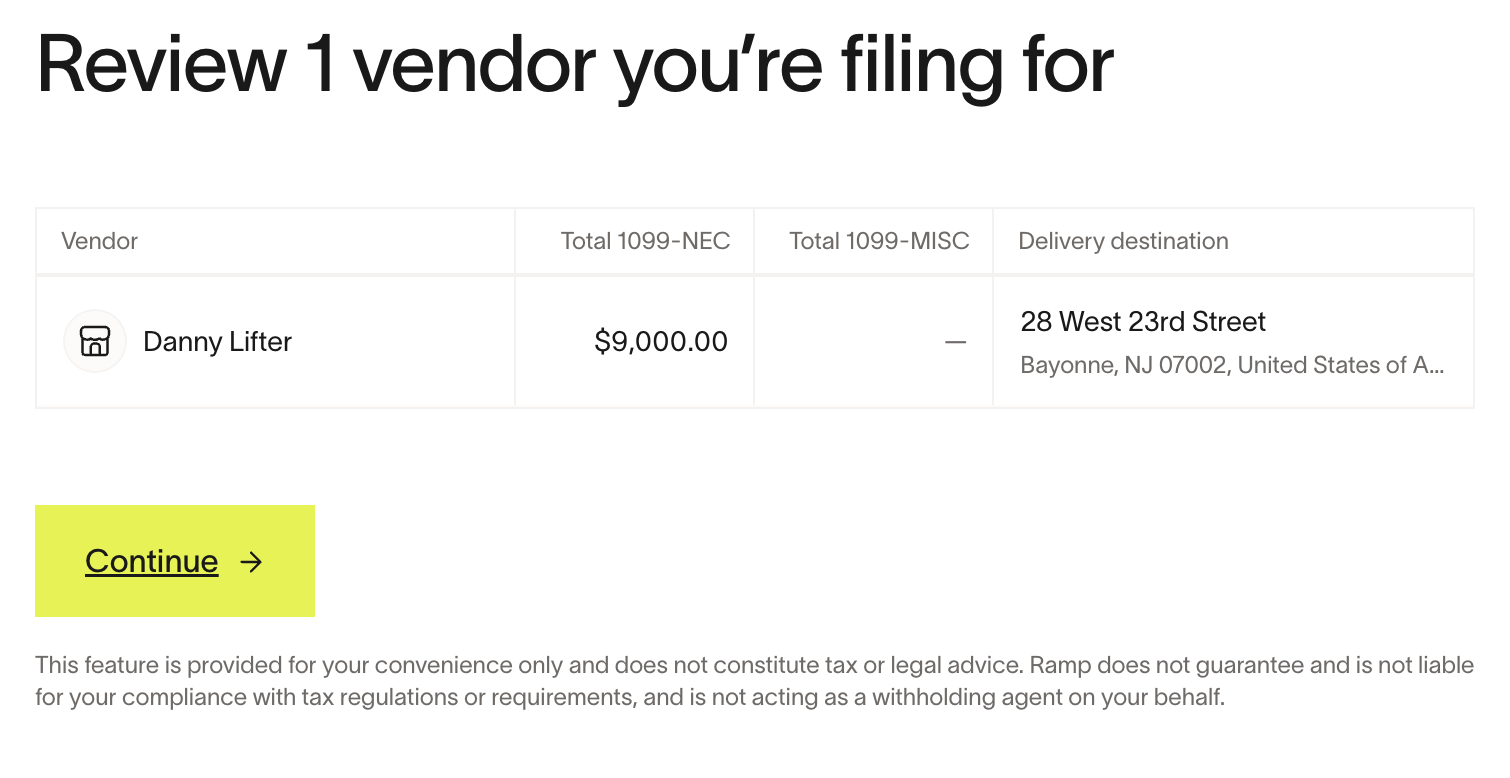
Choose filing options
- Federal filing is always included
- For states in Combined Federal/State Filing (CF/SF) program, you may choose to include state filing with your federal submission. Visit 1099 State Filing to check state filing requirements
- Note: Some states have extra requirements and may require you to file directly with their agency. Check each state's rules to ensure full compliance
Select delivery method and review costs
- Electronic delivery for vendors with e-consent
- Vendors receive an email when their 1099 is ready - they can sign up or log to the Ramp Vendor Portal to access it to view and download the form. Read more in Ramp Vendor Portal.
- Mail delivery for vendors without e-consent
- Vendors receive a paper 1099 by physical mail - allow 5-7 business days after filing for delivery
- Review cost summary (federal filing + mail delivery, if applicable)
Pricing and billing
Filing charges will appear on your next billing statement.
| Item | Cost |
|---|---|
| Federal filing per form | $0.65 |
| State filing per form | $0.90 |
| Mail delivery per form | $1.85 |
| Rush mail delivery per form (in 5 business days before 2/2) | $1.00 |
*Note:*The 2026 IRS filing deadline is 2/2. 1099s submitted by 11:59pm on 2/2 will be postmarked with 2/2 as the filing date, even if they aren't sent out that day. There is a rush filing fee for mail delivery in the 5 business days before the deadline. After the deadline the rush filing fee stops and you can continue filing, but late filings assume a penalty.
Purchase and file
- Click 'Purchase and file' to generate and submit your 1099s to the IRS (and any selected states)
View and download forms
View and download filed 1099s
- In Completed →click 'Review on a vendor → Download filed 1099s
- Forms will be ready for download when the status is "Submitted to the IRS". If you're having issues downloading the 1099 PDR, try opening it in a different PDF viewer as the issue is likely with the PDF software and not the file itself.
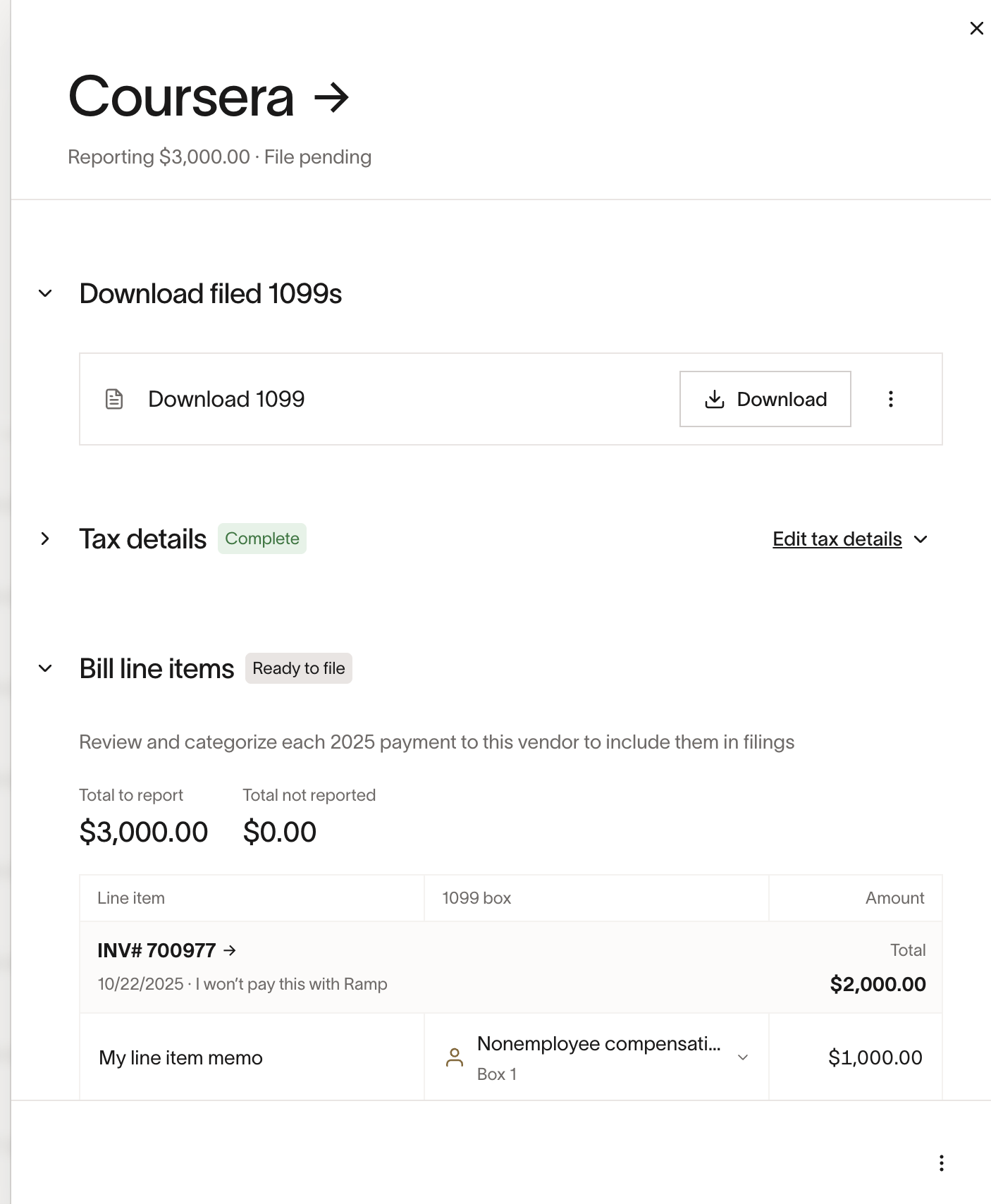
- To download all your filed 1099s, follow instructions to bulk download documents
Read about making corrections to filed 1099s in 1099 Corrections.
Best practices and tips
- Eligibility hygiene: Keep Excluded vendors accurate so year-end reviews are lighter
- Early data capture: Request W-9s and e-delivery consent well before January
- Rules first: Turn on Default to NEC and add GL overrides to reduce manual work
- Watch uncategorized: Clear the Total uncategorized column regularly
- Entity & year checks: Always confirm the tax year and entity before filing
- State rules: Use CFSF where possible, but confirm any state-specific requirements
Frequently asked questions
Why are there two forms for one vendor?
If spend maps to both NEC and MISC, Ramp generates separate forms.
Can I change mappings after I start filing?
Yes, but review totals before submitting.
Does Ramp provide 1099-K or 1096 forms?
No, Ramp only generates and files 1099-NEC and 1099-MISC documents. A 1096 is an IRS transmittal form that accompanies paper 1099 filings. Because Ramp files 1099s electronically, no separate 1096 form is needed or generated. 1099-K forms do not apply to the issuer of a payment card (such as Ramp) and only apply to the payment network or processor (like Visa).
Can I use this feature if I signed up for Ramp mid-year or file 1099s for spend made outside of Ramp?
Yes, but you cannot import spend made outside of Ramp. You can make manual adjustments to your 1099 amounts per vendor if you want to add amounts paid to vendors outside of Ramp. *Note:*Bill payments made on Ramp with payment method "Paid outside Ramp" are includedin 1099 payments.
To file 1099s for a vendor with no payments made on Ramp, create the vendor → go to 'Excluded vendors' in the 1099 filing dashboard → Remove 'Has 2025 payments' filter → Mark vendor as eligible → Add additional spend and complete filing.
You can also export 1099 vendors from Ramp and file using an external service if needed. Read more on exporting 1099 vendors in Manage vendor tax details.
Does Ramp validate tax identification numbers?
Yes, read more in Vendor TIN verification.
Will bills paid manually in Ramp be included in filing?
Yes. As long as a bill is managed through Ramp, those with the payment method paid outside Ramp will be included.
Does Ramp support communicating with vendors and reconciliation if a vendor says something is wrong?
You cannot communicate with vendors directly about 1099s on Ramp, but you can file corrections.
Can Ramp help vendors/contractors file their taxes?
At this time, Ramp only supports customers using our Bill Pay product.
Does Ramp support backup withholding?
No, not at this time.
How does Ramp select 1099 eligible vendors?
Ramp applies a Bill Pay spend threshold by tax year when automatically determining 1099 eligibility: at least $600 USD for tax years through 2025 or at least $2,000 USD for tax year 2026. You can review vendor 1099 statuses for the applicable tax year.
For check payments, the payment initiateddate is used to determine what date the vendor was paid.
Does Ramp factor in vendor credits for 1099 filing?
Currently, vendor credits are not reduced from amounts when filing 1099s. This is something that will be addressed for 2026 filing. In the meantime, you can mark a line item as "Not reportable", and enter the correct amount minus vendor credits you want to file for in "Additional spend".
Does Ramp provide W-2 or W-4 forms?
No. Ramp handles vendor tax forms (1099-NEC, 1099-MISC, and W-9 collection), not employee payroll forms. For paystubs, W-2s, or W-4 forms, contact your payroll provider.
Where can I find 1099 tax documents I received from Ramp?
If your business earned interest from a Ramp Business Account or has a Ramp Investment Account, Ramp may issue you a 1099-MISC. These tax documents are available in-app at Banking > Documents. Business Account tax forms are typically available starting in January; Investment Account 1099 forms are typically available by the end of February. This is separate from the 1099s you issue to your vendors, which are covered in this article.
This feature is provided for your convenience only and does not constitute tax or legal advice. Ramp does not guarantee and is not liable for your compliance with tax regulations or requirements, and is not acting as a withholding agent on your behalf.