Payments Runs on Ramp Bill Pay
Overview
Available on Ramp Plus. See Ramp Plus overview for plan details.
Payment runs allow AP teams to group payments together for batch review and release. An AP team member can prepare a payment run, and an eligible releaser can act on payments in the run that are awaiting their approval. An intermediate approval does not release the payment; its final required approval does.
Payment runs are ideal for teams where the person entering bills and managing payments is different from the person authorizing payment release.
Payment runs are an opt-in feature that builds on top of payment step approvals. Once enabled, you can create runs from the Payments tab, but payments can still be released individually. Payment runs are optional even when the feature is turned on.
Enabling payment runs
To enable payment runs:
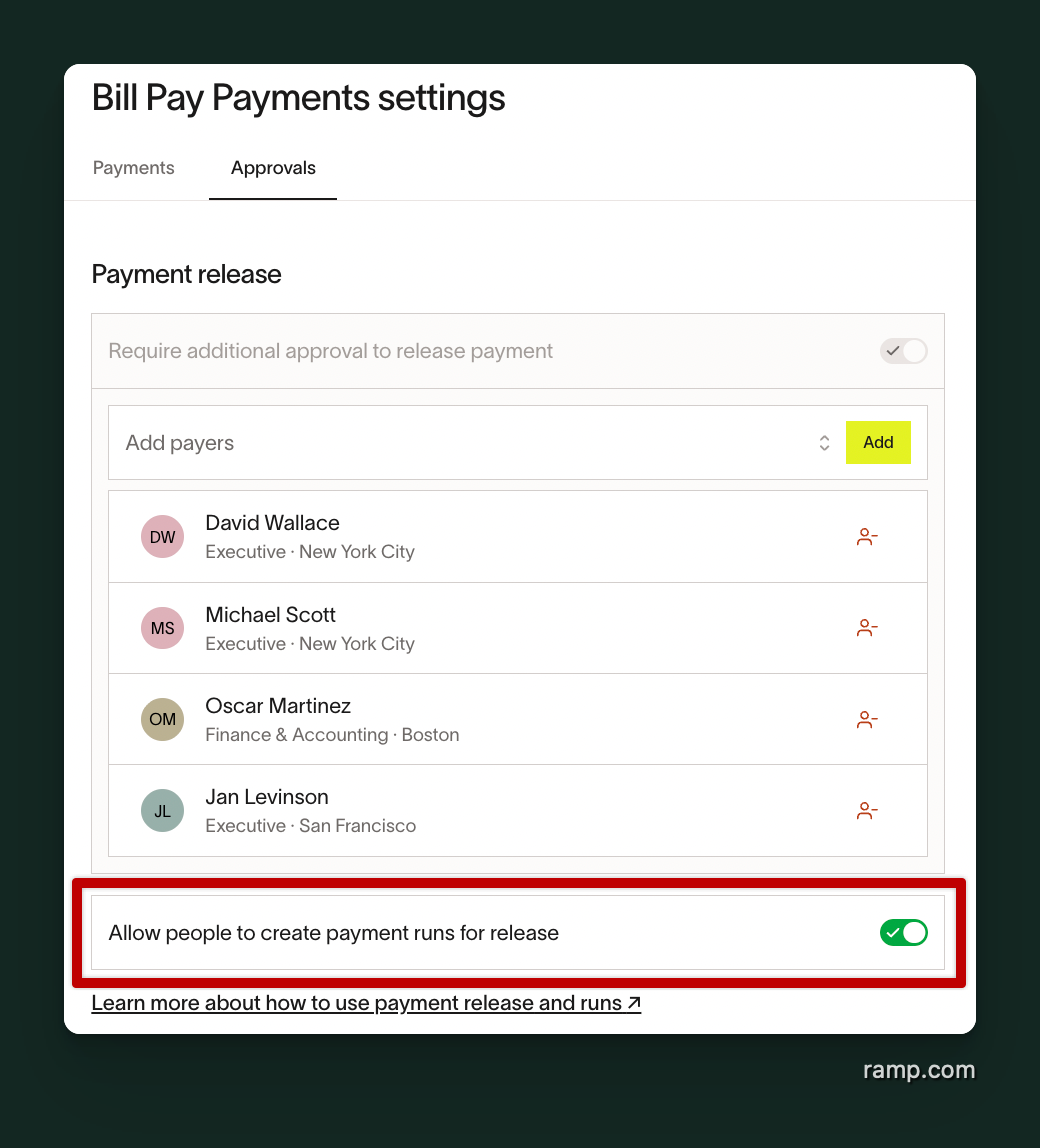
- Open Bill Pay approval settings and find Payment release.
- Turn on Allow creation of payment runs for release.
Note: Payment step approvals must be enabled before the payment runs toggle will appear. If you don't see this option, ensure that payment release approvals are turned on first.
Creating a payment run
To create a payment run:
- Go to the Payments tab within Bill Pay.
- Use filters and sorts to find the payments you'd like to include (for example, filter by bill due date to find everything due in the next week).
- Select the payments you want to include using the checkboxes.
- Click Review payment run .
- Review the summary, which shows the selected payments, total amount, and any associated fees.
- Click Create payment run to confirm.
What makes a payment eligible for a run:
A payment can be added to a run only if all of the following are true:
- The bill is fully approved, but payment is pending release
- The bill is not missing information such as pending vendor edits or missing payment details (excluding payment date)
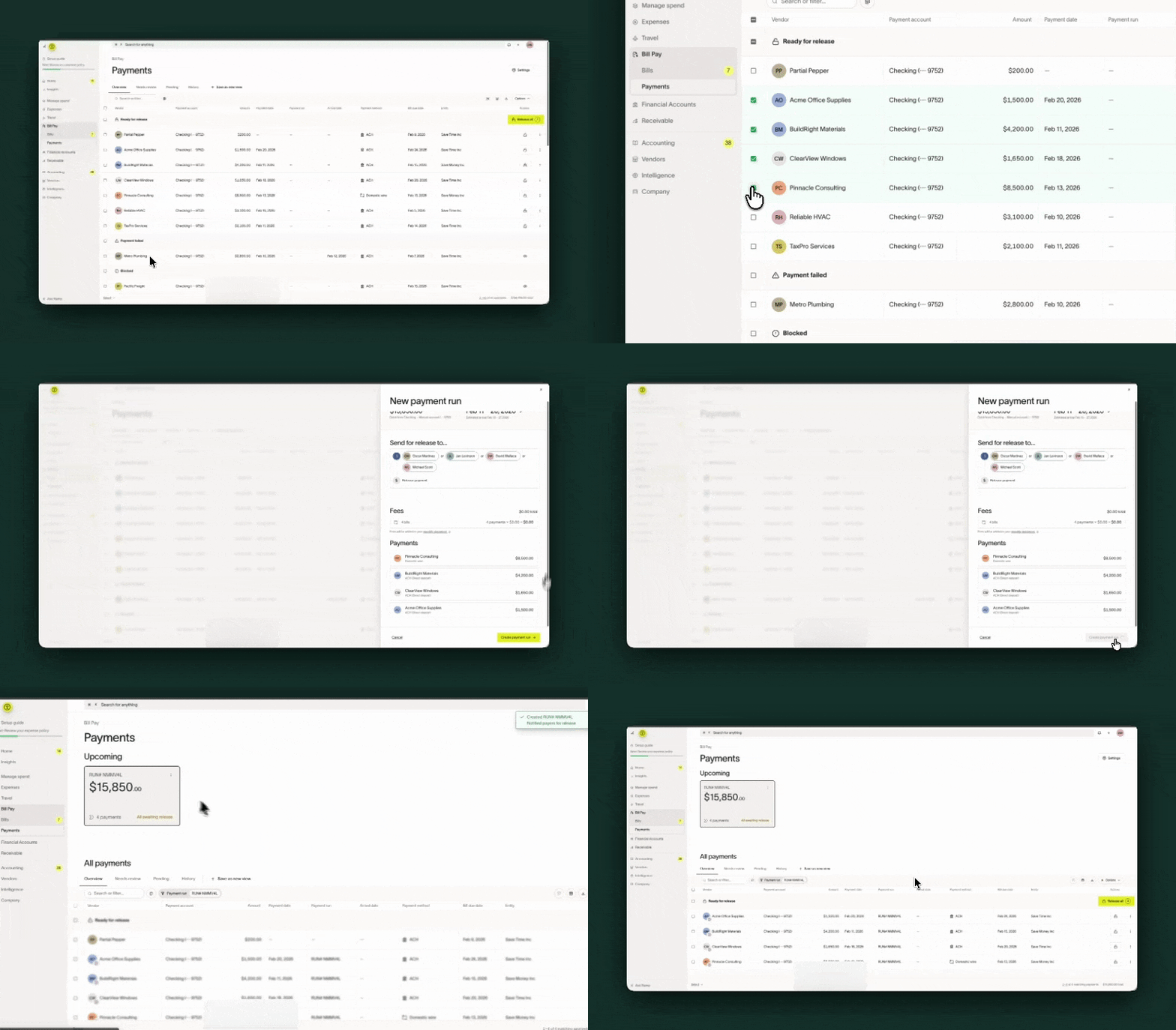
Video of user adding payments to a run and then releasing payments from the run
Reviewing and releasing payment runs
Once payment runs are created, they appear as tiles at the top of the Payments table. Click a tile to filter the table down to the payments in that run.
Runs are automatically categorized based on their status:
- Upcoming - None of the payments in the run have been initiated yet
- Active - At least one payment has been initiated, but not all have been completed
- Historical - All payments in the run have been paid
Adding and removing payments:
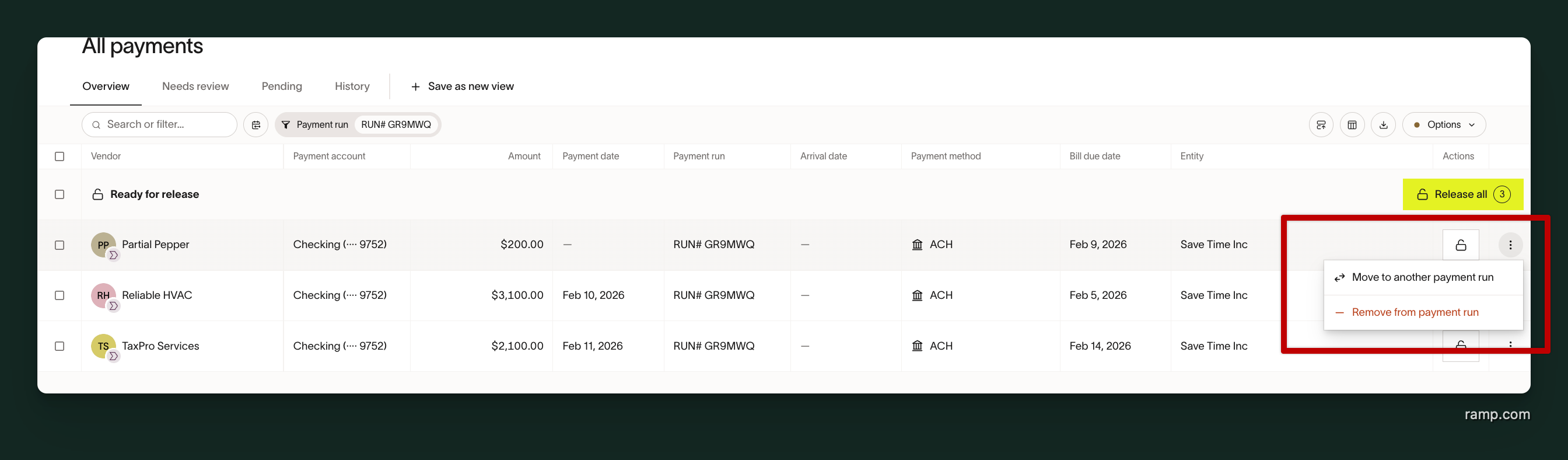
- You can add eligible payments to a run or remove payments from a run until the run is fully released.
- You can also move a payment from one run to another — for example, shifting a payment from this week's run to next week's run.
- A payment can only belong to one run at a time .
Releasing a run
If you're the current release approver, you can act on eligible payments in a run in several ways:
- Release — act on eligible payments awaiting your approval in the run. Payments with another approver's current step are not released by your action.
- Selectively release — act on individual eligible payments from within the run. An intermediate approval advances only that payment's chain.
Auto-batching within runs
If multiple payments in the same run are going to the same vendor using the same payment method, they will be automatically batched after release. However, auto-batching only applies within a single run:
- Payments in different runs will not be auto-batched together.
- A payment inside a run and a payment outside of a run will not be auto-batched together.
- Payments that are both outside of any run will still be auto-batched as usual.
Turning off payment runs
If you disable the payment runs feature in Settings, current and historical payment runs data are permanently cleared. Payment states will not otherwise be affected.
- All existing run groupings are permanently deleted . This action cannot be undone.
- If you re-enable payment runs later, previous groupings are not restored . You will start fresh.
- The vendor payment release state and any pending or active money movement is not affected by disabling payment runs.
Frequently asked questions
Can a payment be in multiple runs?
No. A payment can only belong to one payment run at a time. You can move a payment from one run to another, but it cannot be in two runs simultaneously.
Who can create and manage payment runs?
Admin and Accounts Payable roles can create and manage payment runs by default. This is controlled by a distinct permission. Anyone with the ability to view payment details has view access to payment runs.
Can I release payments without adding them to a run?
Yes. Payment runs are optional even when the feature is enabled. You can continue to release individual payments directly from the Payments tab or from the Payment Details Drawer without adding them to a run.
Can I add payments to a run after payment release?
No. Payments can only by added to a run during the payment release step.
How do I know which payments have been added to a run?
Payments that have been added to a run will show a signal on both the Bills and Payments tables. You can also filter by payment run on either table.
What happens when I turn off payment runs after creating runs?
Existing run groupings are removed and permanently cleared. Groupings will not be restored if the payment runs setting is re-enabled. The vendor payment release state and any pending or active money movement is not affected.