Manage construction retainage in Ramp Bill Pay
Overview
Available on Ramp Plus. See Ramp Plus overview for plan details.
Ramp Bill Pay can record retainage on invoice and purchase order line items, withhold the retained amount from payment, track the remaining balance, and create a bill to release it. Retainage is currently eligible for businesses using Sage Intacct, Acumatica, QuickBooks Online, or Universal CSV.
The retainage actions available to you depend on your Bill Pay and purchase order permissions. If you can view a bill or PO but cannot edit its retainage fields or create a release bill, ask someone with permission to create or edit bills or purchase order requests to complete the action.
Requirements by accounting provider
A bill with retainage cannot include more than one purchase order.
- Sage Intacct / Acumatica: Each bill that withholds or releases retainage must have exactly one matched purchase order.
- QuickBooks Online / Universal CSV: A matched purchase order is not required. You can withhold retainage on a bill without a purchase order, and you can create a retainage release bill without one.
Add retainage to a bill, purchase order, or Spend Program
Open or create a bill in Bill Pay. On QuickBooks Online and Universal CSV, select Show retainage from the three-dot menu on a bill line item, then enter the Retainage %. On Sage Intacct and Acumatica, retainage comes from a matched purchase order or an uploaded invoice showing it. Ramp calculates the Retainage amount and withholds it from the payment.
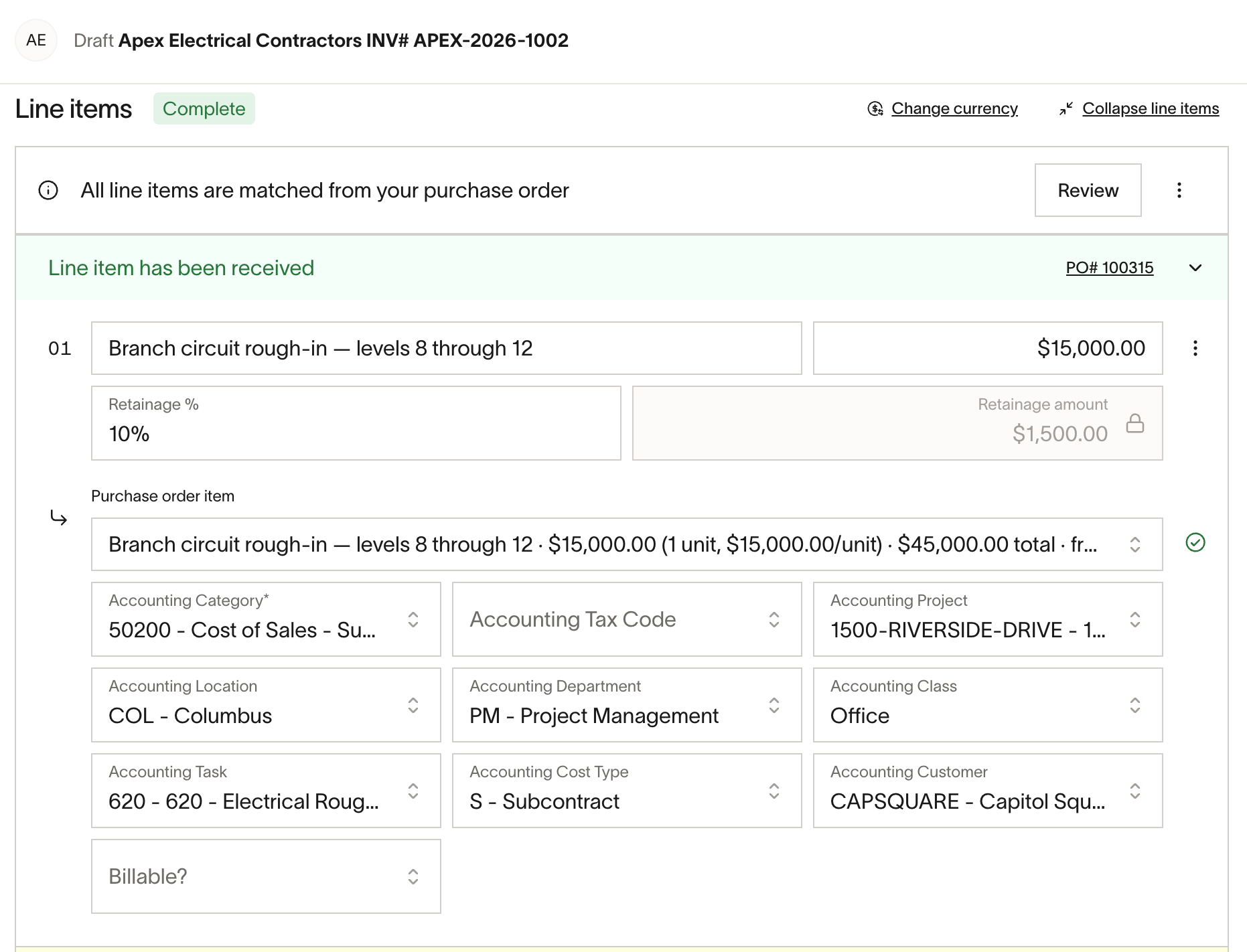
To add retainage to an approved purchase order, open it from Purchase orders, select Options, then Edit purchase order. On the edit page, select Add retainage from the three-dot menu above the line items and enter the percentage. To copy that percentage to the other line items, select Apply retainage to all above the line's Retainage % field. The button appears only with more than one line item. Lines already matched to a bill keep their retainage — the Retainage % field is disabled and shows This line item is matched to bill line item(s).
A Spend Program can show the retainage field on every purchase order line item and require a value before submission. In the Spend Program's configuration step, under What's on the request form? enable Line items, then select Edit field selection. In Edit line item fields, select Add field, choose Retainage, and select Required for intake if every line must carry a percentage. When a Spend Program already includes retainage, the field is on each line item and Add retainage does not appear.
A Spend Program cannot set a default percentage — the requester enters it on each line item. Requests keep the configuration in effect when they were created, so changing a Spend Program does not alter open requests.
Find bills by retainage status
Use the Retainage status filter on the bills table in Bill Pay to find bills that are Withholding, Unreleased, or Releasing. Withholding means the bill holds back part of the payment, Releasing means the bill releases retained funds, and Unreleased means the linked purchase order still has retainage remaining.
For retainage linked to a purchase order, these statuses can overlap. For example, a withholding bill remains Unreleased until its retained balance is fully released, and a partial release remains Unreleased while a balance is still outstanding.
Release retained amounts
Open Bill Pay, select New bill, and choose Create retainage release bill. If you are releasing against a purchase order, match the PO whose balance you want to release; Ramp fills each matched line with the remaining amount withheld on that PO. You can release less than the remaining balance, but a PO-linked release cannot exceed it. When a draft bill is matched to a PO with retainage, select Mark bill as retainage release to release an existing balance instead of withholding more.
On QuickBooks Online and Universal CSV, you do not need a purchase order to release retainage. Create the release bill with the same Create retainage release bill option, leave it unmatched, and enter the amount you are releasing from the vendor's invoice.
Release retainage for Sage Intacct or Acumatica
Match the release bill to the same purchase order as the bills whose retainage you are releasing. Ramp releases retainage from withholding bills that are paid in Ramp and synced to your accounting provider. Unpaid withholding bills are excluded from the release; they do not require you to wait until every bill on the purchase order is paid. After the release bill is paid in Ramp, Ramp syncs the release before its payment.
If the retainage release fails to sync:
- Confirm that the matched purchase order lines have enough retainage remaining for the release. If Acumatica reports insufficient unreleased retainage, check the remaining balance on the source bills in Acumatica.
- Confirm that the paid withholding bills matched to the same purchase order have synced to your accounting provider.
- In Bill Pay, open the affected bill and select Retry sync in the sync failure notice after correcting the issue. See Managing bills and payments for Bill Pay actions.
Sync retainage to QuickBooks
Retainage is supported on QuickBooks Online. We currently do not support retainage for QuickBooks Desktop.
Set the retainage payable account
Before Ramp can sync a bill with retainage, someone who manages your accounting settings must select a Retainage payable account on the Bill Pay tab of your accounting sync settings. The purpose of this account is to store retainage withheld from bills until it is released. The account is mapped per business entity, so select one for each entity that withholds retainage.
Until the account is set, bills with retainage will fail to sync. Open Retainage in the Ramp for Construction setup guide and select the account under Where should Ramp track withheld retainage?
How retainage appears on QuickBooks bills
On a bill that withholds retainage, Ramp posts each expense and item line at its full pre-retainage amount, then adds one negative line for every line that has retainage. Each negative line posts to your retainage payable account, and its description begins with Retainage - . The negative lines bring the bill down to the amount currently due, so the expense lines themselves are not reduced.
A retainage release is a separate bill in QuickBooks. Its lines post to your retainage payable account; the original expense lines are not posted again. When a release draws from specific purchase order lines, Ramp adds a line for each source withholding line with an amount allocated to this release. Descriptions begin with Retainage release and include the source invoice number, or the QuickBooks bill ID if no invoice number is available, followed by the source line's memo when present. When a release is not matched to a purchase order, Ramp uses each nonzero expense or item line on the release bill, with its memo when present and no source withholding bill label.
Understand Universal CSV retainage exports
Universal CSV does not sync bills directly to an accounting provider. Follow Exporting bills via CSV to download the bill accounting export.
Retainage columns are not part of the default export template, so someone who manages your accounting settings has to add them. From Accounting settings, select CSV customization, then the Bill expense tab. Select Add another row and choose Retainage Type from Other fields under Content type. Repeat these steps to add a separate row for Retainage Amount, then select Save. The Column name field sets the header that appears in your CSV, so you can rename either column.
Two columns carry retainage detail, named Retainage Type and Retainage Amount by default:
- Retainage Type identifies whether a bill withholds or releases retainage. The cell reads
WithholdingorRelease, and stays blank on bills without retainage. - Retainage Amount shows the retained amount on a withholding bill, and stays blank on a release bill.
Troubleshoot missing retainage fields
If you do not see retainage fields, check these causes:
- Retainage is not turned on yet. Retainage turns on automatically when your business enables Ramp for Construction and your accounting provider supports it. Open Retainage in the Ramp for Construction setup guide to check the status and finish any remaining setup steps. If you cannot access the setup guide, ask someone who manages your Ramp construction settings.
- Your accounting provider does not support retainage. Retainage is available on Sage Intacct, Acumatica, QuickBooks Online, and Universal CSV. The setup guide says retainage is not supported with your ERP if your provider cannot post it.
- Bill Pay is not set up. Retainage is withheld on bills, so Bill Pay has to be set up first.
- On QuickBooks Online, no retainage payable account is set. Bills with retainage will not sync until it is. See Set the retainage payable account.
- On a bill, retainage has not started yet. On Sage Intacct and Acumatica, retainage has to come from a matched purchase order or an invoice that already shows it. On QuickBooks Online and Universal CSV, select Show retainage from the three-dot menu on a bill line item.
- On a purchase order, the field has not been added. Select Add retainage from the three-dot menu above the line items, unless the Spend Program the request came from already includes retainage.