NetSuite integration: International accounting support
Overview
Available on Ramp Plus. See Ramp Plus overview for plan details.
Ramp's international accounting support for NetSuite automates and streamlines global transactions. It accurately matches Ramp credit card transactions with the correct tax code, calculates foreign exchange (FX) fees, and generates inter-company journals when needed.
Support for taxes
Ramp now supports NetSuite's SuiteTax and Legacy Tax products. SuiteTax is a tax engine within NetSuite that provides accounting teams:
- Automated tax calculations: SuiteTax automates complex tax calculations for transactions and bills, adapting to different tax rules across jurisdictions. For example, a company selling products in multiple states can automatically calculate the correct sales tax for each location, ensuring accuracy and efficiency.
- Compliance management: It helps businesses stay compliant with various tax regulations, significantly reducing the risk of penalties. For instance, a business operating internationally can rely on SuiteTax to adjust to different VAT or GST requirements in each country, ensuring compliance with local tax laws.
- Streamlined reporting: SuiteTax simplifies the tax reporting process by consolidating tax data and generating necessary reports. A business can easily generate detailed tax reports for audits or internal reviews, saving time and reducing the potential for errors in manual reporting.
Ramp pulls in the tax codes set up in NetSuite and presents them as options for transactions, bills and reimbursements.
To set this up:
- Head to the Accounting tab
- Click into Accounting settings via the 3 dot menu
- Click Accounting fields
- Enable the Tax Code accounting field
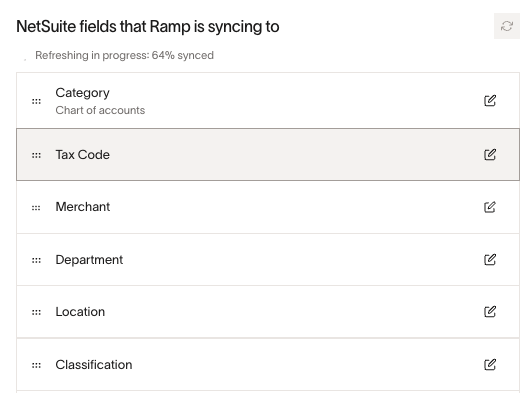
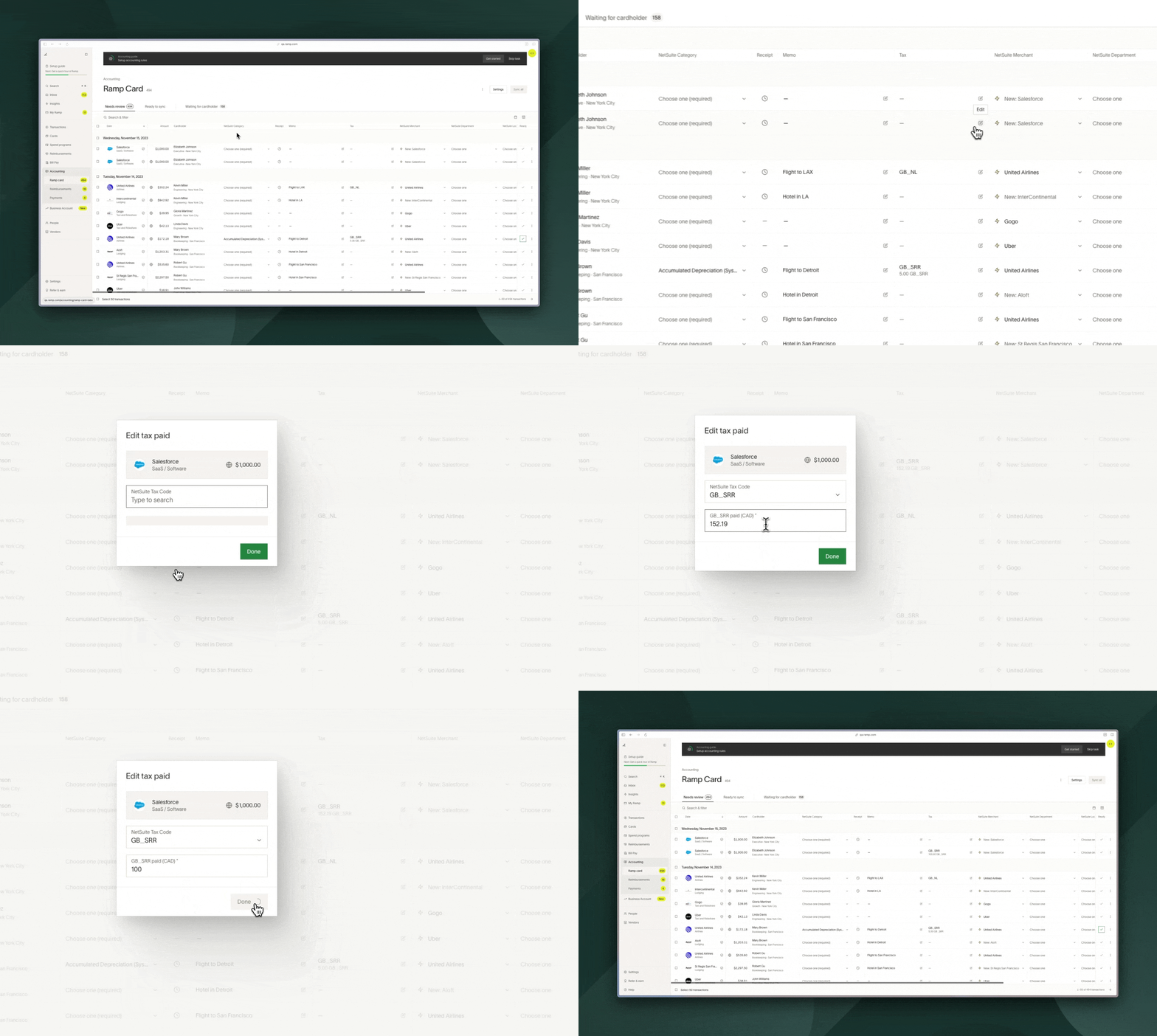
Once Tax Code is enabled, these fields will populate as accounting options on transactions, bills and reimbursements.
If they're selected, we will get the tax rate (tax %) tied to that code and calculate the tax amount. Customers can edit the underlying tax amounts if it's incorrect. This only applies to international taxes.Additionally, we automatically filter the tax codes based on the subsidiaries/countries they're available in.
Note that for Bill Pay:
- If Tax Code is enabled as an accounting field, and an international bill is OCR'd, we will automatically drop any OCR'd tax line items pulled from the invoice, so that tax can be accounted for manually using Tax Codes on a line item by line item basis.
- We will always flag to you if the invoice total sum doesn't match the total amount pulled via OCR, so you can make sure that Tax Codes are applied correctly.
- You can optionally set tax codes as default accounting coding on the vendor, and every time a new bill comes in for that vendor, we will automatically set the tax code to the default for each line item and calculate the tax amount.
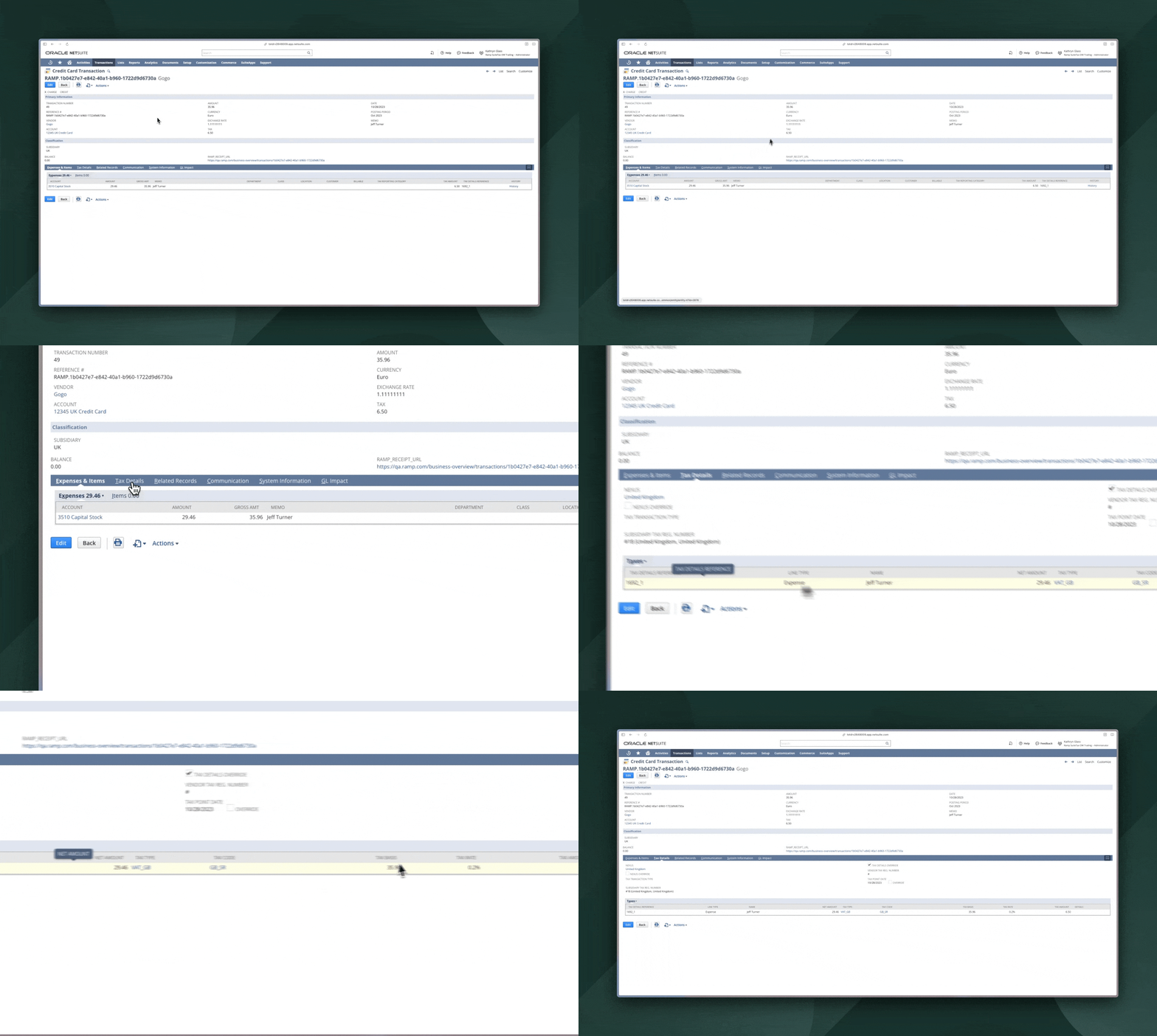
When the transaction, bill or reimbursement is synced to NetSuite, then Ramp will post the information at the line level in the 'Tax Details' tab. If the vendor does not accept the transaction's currency, we will add this currency to the vendor's supported currencies and sync the transaction in this new currency.
However, if NetSuite does not accept the currency, we will instead use the primary currency of the NetSuite subsidiary we are syncing with. In such cases, we convert the transaction's or reimbursement's original currency to the subsidiary's primary currency for syncing.
Note: If you'd like employees to input this information, you can require tax codes in the expense policy (more details here in section 4: Define Submission Requirements) and provide aliases for them in Ramp so they are easy for employees to understand.
Support for FX gains or losses
International companies assume FX risk if the entity's currency is different from what the transactions settle in. This will more accurately represent the amount paid to Ramp andhow much of that is to reduce the Ramp card liability account vs. attributable to FX Gain / Loss.
Example: A European entity uses euros (functional currency) while the Ramp card is in USD (issuing currency). Transactions in different currencies are converted to euros in the accounting system (at varying exchange rates based on the rate on the day of the transaction, which is set by Ramp). When the statement payment rate differs from initial transaction rates, an FX gain or loss is recorded.
Customer Set Up
- The customer has a European Entity.
- The currency of the European Entity is euros, which is denoted as the functional currency (currency of the entity in their accounting system).
- The currency of the Ramp card is USD, which is denoted as the issuing currency.
Overview of the process end-to-end
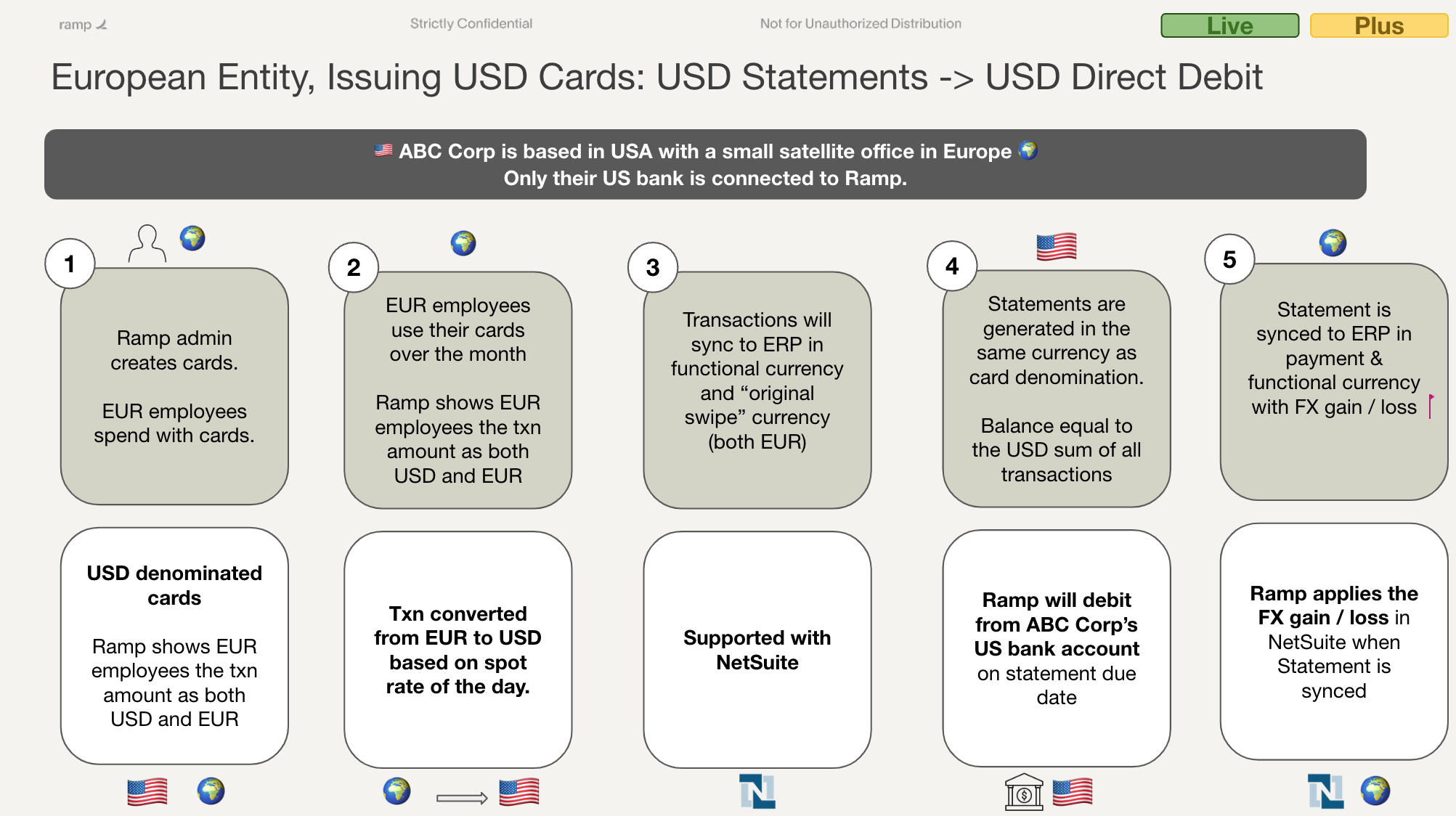
Example of customer processing transactions and the transactions being converted to the functional currency in their accounting provider. Notice that the exchange rates are different on different dates.
| Transaction Date | Transaction Currency | Transaction Amount | Statement Amount (USD) | Exchange Rate (Statement Currency to GL Currency) | Transaction Amount (in GL Currency, EUR since EUR entity) |
|---|---|---|---|---|---|
| 9/1 | USD | $85.12 | $85.12 | .8 | €68.10 |
| 9/10 | CAD | 105.84 | $77.49 | .8 | €61.99 |
| 9/15 | EUR | 657.92 | $691.74 | .95 | €657.92 |
| 9/25 | USD | $235.46 | $235.46 | .7 | €164.82 |
| Total | $1107.81 | €952.83 |
Example of a customer statement with a different exchange rate than when the initial transactions were accounted for in their accounting provider.
The accounting provider's statement payment amounts to $1107.81 and €997.03. However, the amount in NetSuite that is owed to Ramp is €952.83.
Difference between payment amount in entity currency taken from their bank account (€997.03) and the total amount owed to Ramp in NetSuite in entity currency (€952.83) = FX Gain Loss (€44.2).
| Statement Date | Statement Currency | Statement Amount | Exchange Rate (Statement Currency to Payment Currency) | Payment Currency | Payment Amount (EUR) |
|---|---|---|---|---|---|
| 9/30 | USD | $1107.81 | .9 | EUR | €997.03 |
This is how this functionality will populate in the customer's NetSuite instance:
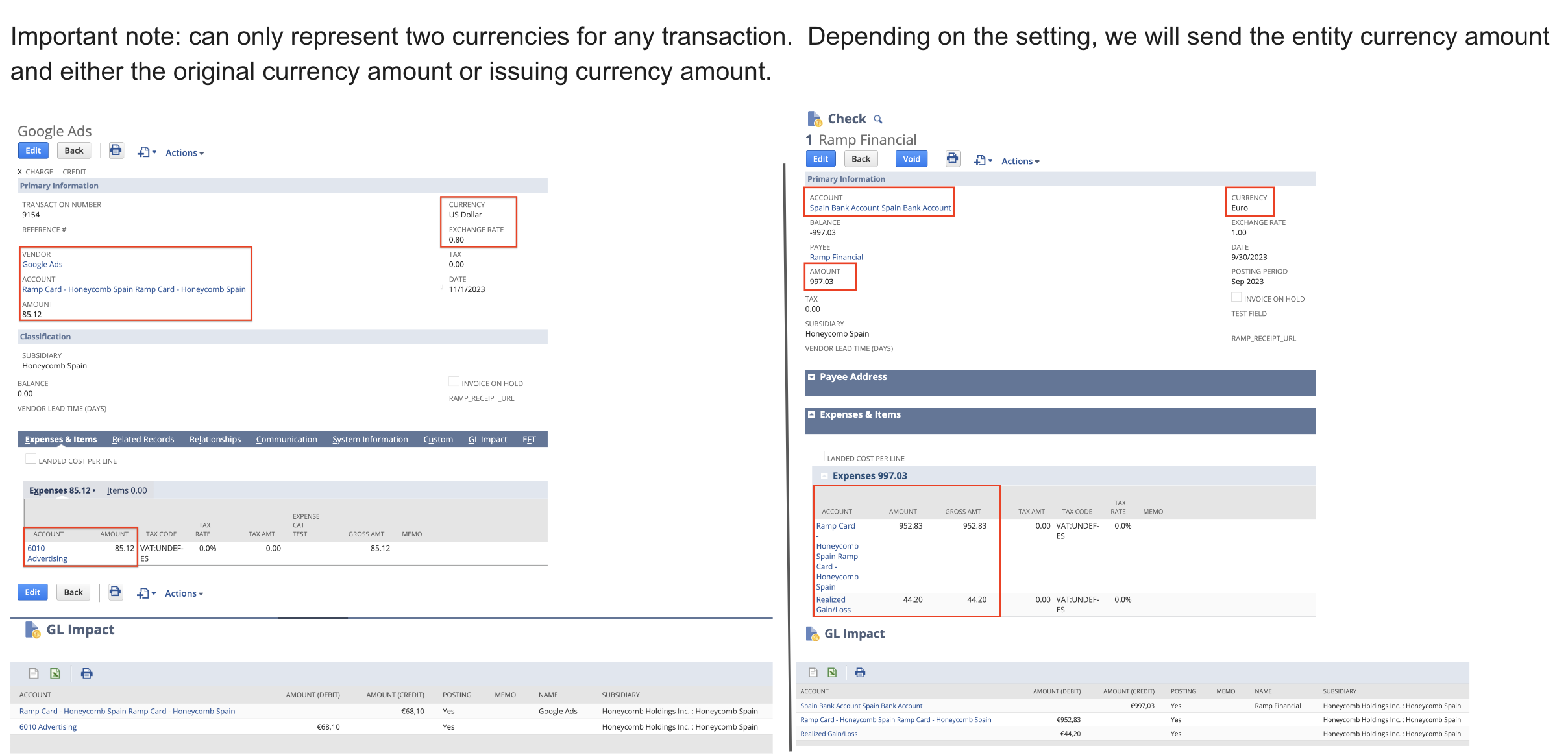
Support for inter-company journal entries
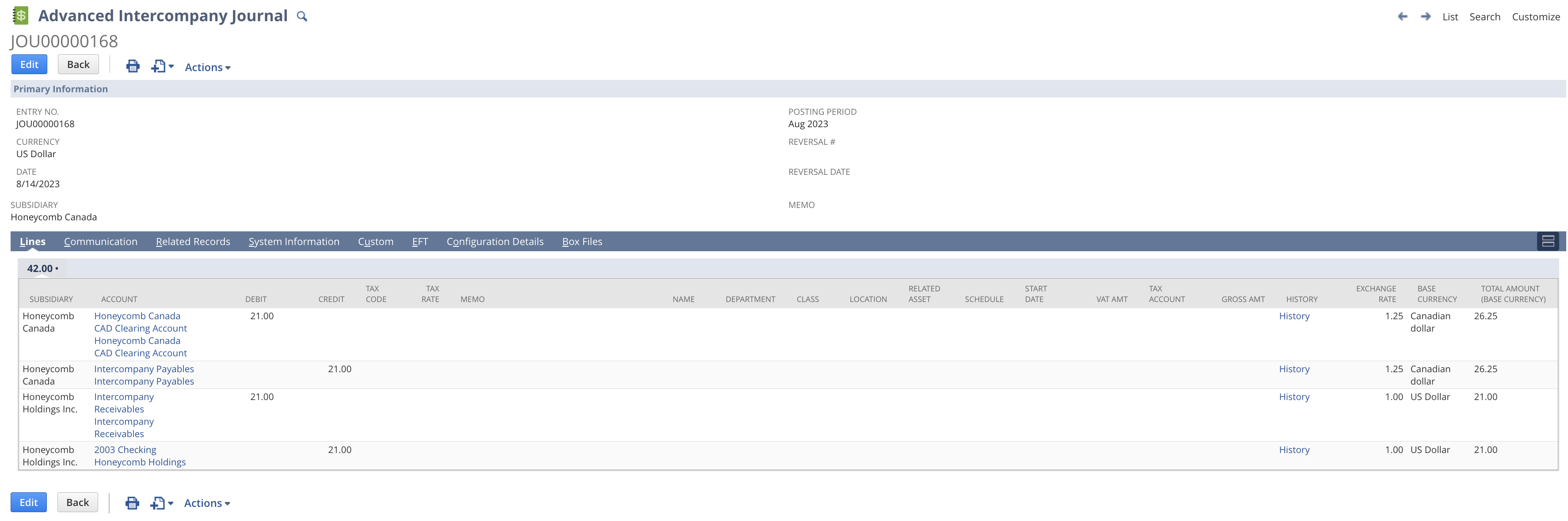
Inter-company journal entries are needed due to our system's constraint of only accepting USD for statement payments. Customers typically use a USD parent company to pay for subsidiary expenses in other currencies. Ramp's new functionality will automatically create these journal entries in NetSuite, streamlining the process.
- Sync statement payment.
- Affects Clearing account, Ramp Card Liability account, and potentially FX gain / loss account
- Post an inter-company journal to move that USD amount across entities.
- Debits clearing account (zeroes it out) > initial entity
- Credits inter-company payables > initial entity
- Debits inter-company receivables > parent entity
- Credits bank account > parent entity
All customers will need to do is set their inter-company accounts within Ramp in their Accounting sync settings.
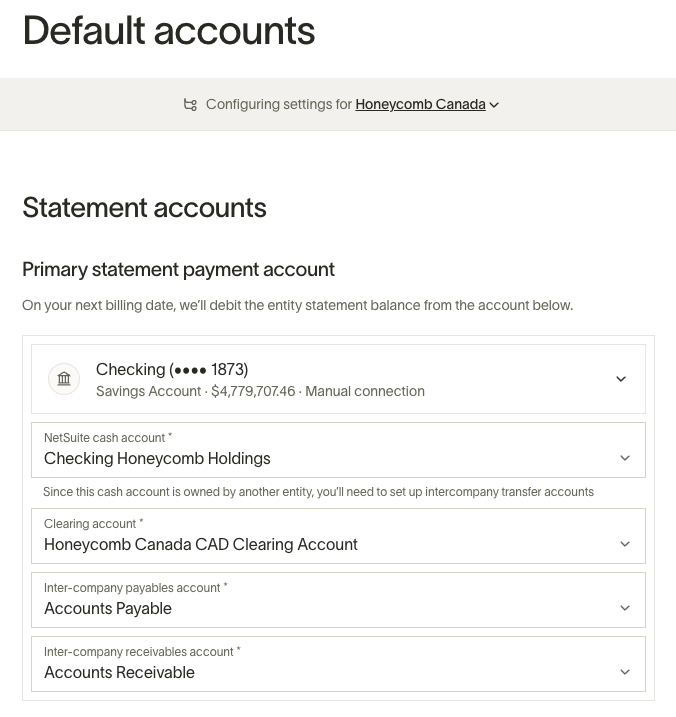
What does an inter-company journal look like in the NetSuite?
Detailed breakdown of NetSuite
Vendors
Currency: NetSuite vendors have a primary currency (which is the default for that vendor) but can also accept other currencies. For example, Amazon's primary currency is USD, but it may also accept GBP, CAD, etc.
Primary currency
A NetSuite OneWorld instance has a primary reporting currency. This currency is usually the currency of a corporation’s holding company and is the currency in which all consolidated reporting is performed. By default, any new subsidiaries created within a NetSuite OneWorld instance will use this reporting currency if an alternative currency isn’t specified.
Subsidiaries
Subsidiaries have a functional currency in which local accounts are managed. It may be the same as the overall reporting currency or it may be different. When a subsidiary has a non-USD functional currency, Ramp will sync transactions in the original currency, as long as the vendor accepts the currency, and that transaction amount will be converted to the functional currency of the subsidiary.
Tax codes
Tax codes in NetSuite are tied to a specific country in NetSuite. Additionally, you can see what tax code is the default by:
- Look up "page: tax codes" in the NetSuite search bar up top and select it
- You will be navigated to a page that looks similar to the one below
- The right-handmost column says "default code" with a yes or no. Here is where you can see the default code per country (only one default code is allowed per country)
- Note: if this column is not visible, select the "edit view" button right below "tax codes" and add "default code" to the view (picture below).
- This means that when someone syncs over a transaction or creates one within NetSuite, that tax rate will take effect on the transaction
For example: if the default tax rate is 10%. We attempt to sync a $100 transaction and it will add a 10% tax rate to that transaction to have a total of $110 (which is incorrect).

Frequently asked questions
Why don't I see the XYZ tax code in Ramp as an option?
The likely reason is that you have not configured your tax groups fully in your NetSuite instance. Therefore, we fall back on using Tax Items to populate any taxes that have a tax item. This generally impacts Canada-based entities.
Another reason, this occurs is when there is no tax rate associated with the tax code. When a tax code is applied without a tax rate, there isn't a percentage that Ramp can apply to the expense. Therefore, please ensure Tax Rates are appropriately populated in your NetSuite instance.
The final reason you could be missing a specific tax code is that Ramp does not support syncing NetSuite tax codes with the "Reverse Charge" tax type. These tax codes are managed differently in NetSuite and are not included in the tables our sync relies on, so they will not appear in Ramp.
Does this work for Bill Pay?
Yes, this is also supported for Bill Pay
How do I reconcile the information I have synced from Ramp to my accounting provider?
To clear expenses on NetSuite, you go to the "match bank" screen (NS documentation link). The transactions shown are shown in the currency of the account, in the case of a credit card account, it will be in the functional currency of the entity.
How does Ramp handle FX gain/loss for statement payment syncing?
When the issuing currency is different from the functional currency, an FX gain/loss will be incurred. Ramp handles this by syncing the statement payment in the payment currency with a spot rate translated to the functional currency.
- Sync statement payment.
- Affects clearing account, Ramp card liability account, and potentially FX gain/loss account
- Post an inter-company journal to move that USD amount across entities.
- Debits Clearing Account (zeroes it out) > initial entity Credits inter-company payables > initial entity Debits inter-company receivables > parent entity Credits bank account > parent entity
Are FX gain/loss and inter-company journals supported for reimbursements?
No, at this time, it only supports credit card transactions.