NetSuite integration: Bill Pay amortization
Overview
Available on Ramp Plus. See Ramp Plus overview for plan details.
Ramp supports Bill Pay amortization for NetSuite by using the amortization templates already configured in your NetSuite account. NetSuite customers do not use Prepaids for amortization because NetSuite manages the schedule from the selected template. For provider-wide amortization coverage, see Ramp amortization with accounting integrations.
Prerequisites for NetSuite Bill Pay amortization
You see NetSuite Bill Pay amortization in Ramp when all required setup is available.
- Your business uses the NetSuite integration.
- Your business uses Ramp Bill Pay.
- Your NetSuite account has amortization templates configured.
- The bill line item has the required NetSuite coding before sync.
Set up amortization on a bill line item
Add amortization before syncing the bill to NetSuite.
- Open the bill in Ramp.
- Go to the bill line item you want to amortize.
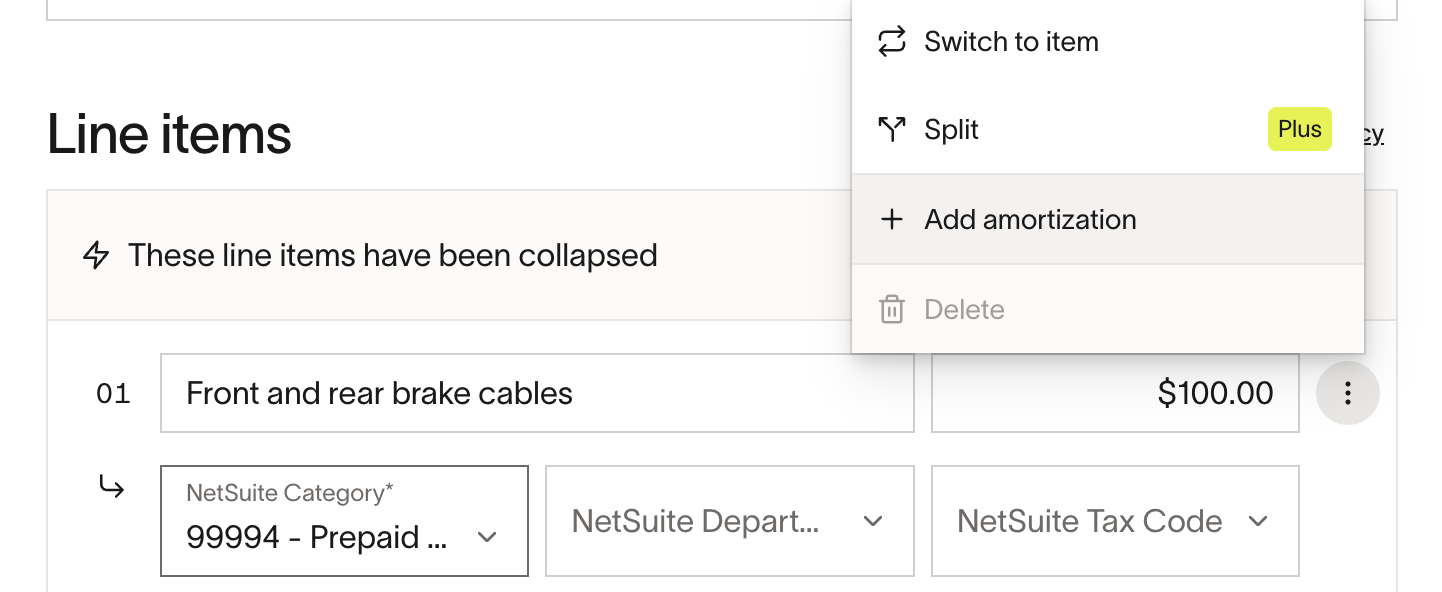
- Open the line item actions menu and select Add amortization.
- Select the NetSuite amortization template.
- Enter the amortization start date and end date.
- Save the bill line item.
- Approve and sync the bill to NetSuite from Bill Pay.
Ramp sends the selected template and dates to NetSuite with the bill line item. NetSuite manages the resulting amortization schedule according to your NetSuite template and posting period rules.
Expected result in NetSuite
The synced NetSuite bill includes the amortization template, start date, and end date on the amortized line item. NetSuite uses the selected template to determine the deferral account, target account, and amortization journal schedule.
NetSuite Bill Pay amortization is separate from NetSuite transaction amortization, which syncs amortized card transactions and reimbursements as a Bill and Bill Payment because NetSuite templates apply to bills.
Frequently asked questions
What if the target account set in the template is not available for the entity selected?
The default accounts used by the template must be valid for the selected NetSuite entity. If NetSuite rejects the bill, update the template or account setup in NetSuite, then retry the sync from Ramp.
If an expense start date is in a previous account period already closed, do we recognize all previous periods in the current one?
NetSuite controls closed-period behavior for template-based amortization. If your NetSuite setup allows catch-up posting, NetSuite may recognize prior-period amounts in the current open period.
What happens if the entire expense period occurs in prior accounting periods that are now closed?
Ramp enforces NetSuite constraints and surfaces the relevant sync error when NetSuite does not allow the bill or amortization schedule to post.
Does Bill Pay amortization work for providers other than NetSuite?
Yes, for eligible businesses using QuickBooks Online, Xero, or Sage Intacct. Those providers use Ramp-managed amortization with accounting integrations with prepaid accounts and scheduled journal entries instead of NetSuite amortization templates.
Can NetSuite Bill Pay bills use Prepaids in Ramp?
No. NetSuite Bill Pay amortization uses NetSuite templates. Prepaids is part of Ramp-managed amortization for eligible businesses using QuickBooks Online, Xero, or Sage Intacct.