Chrome extension integration: Receipt fetching security
Updated March 2026
Ramp's Chrome Extension receipt fetching feature retrieves missing receipts from supported merchants directly from your browser. Customers with this feature enabled can complete missing receipts without manually downloading them from merchant sites and then re-uploading them to Ramp. This reduces manual work for employees and helps finance teams close the books faster.
Customer trust is foundational to our business. When you enable receipt fetching, you trust Ramp to act on your behalf inside your browser. This feature was designed with that trust in mind: we implemented a variety of measures to restrict what the extension can access, minimize the data we collect, and protect the data we do store.
Product overview: Ramp Chrome extension receipt fetching
Receipt fetching is entirely automated. There is no human in the loop at your business or at Ramp on the receipt retrieval process.
To achieve this, the extension checks your Ramp account for transactions that are missing receipts. For each missing receipt, Ramp determines whether the merchant is supported. For supported merchants, the extension opens a background tab, executes a script to retrieve the receipt from the merchant's systems using your existing browser session, and uploads the receipt to Ramp where it is matched to the relevant transaction. If you are signed out of a merchant website, the extension prompts you to sign in before continuing.
The extension runs in your normal browser context. You can click into the background tab group at any time to see what is happening.
Ramp's overall security posture
Ramp takes data protection and security seriously. Ramp maintains a SOC 2 Type II report which provides validation from an independent third-party auditor that our security program meets industry standards to keep your data protected. This report is updated on an annual basis-you can download the latest version and learn more about our security program attrust.ramp.com.
Threat model: receipt fetching
Two notable potential attack vectors that we considered in implementing the Ramp Chrome Extension receipt fetching feature are:
- Unintended extension behavior in merchant sessions: The extension operates within your authenticated browser session on merchant sites. If an extension's script is poorly scoped, or if the communication channel controlling it is compromised, the extension could access data beyond what is needed to retrieve a receipt, navigate to sensitive areas of merchant sites, or transmit session credentials to Ramp.
- Compromise of Ramp's storage and admin systems: If Ramp's systems are compromised, an attacker could access information stored in Ramp's systems, specifically the retrieved receipts and the scrubbed action logs.
To help mitigate these attack vectors, receipt fetching uses deterministic scripts constrained by navigation allowlists to limit what the extension can do on merchant sites. Merchant session credentials stay in your browser. Ramp maintains measures designed to minimize the data collected during receipt fetching, avoid storing information we don't need, and protect the receipts and logs that we do store. The remainder of this document details these mitigations.
Safeguards
Access to merchant systems
Receipt fetching operates entirely within your browser. The extension uses deterministic scripts to make the same backend API calls your browser would make if you navigated to a merchant site and retrieved a receipt manually. There is no machine learning model involved in deciding where to navigate or what to access.
When the extension needs to retrieve a receipt, it relies on your existing browser session context, such as cookies and session tokens that Chrome automatically attaches to requests, to authenticate with the merchant. This is designed so that Ramp never receives, transmits, or stores your merchant credentials or session tokens. These stay entirely within your browser.
Each script includes an allowlist of permitted navigation targets and actions. The extension will not navigate to merchant account settings pages, billing management pages, or other areas unrelated to receipt retrieval. If a script encounters an unexpected state—for example, a merchant page that has changed—it will stop rather than attempt to recover by navigating to unintended areas.
Ramp maintains the ability to disable receipt fetching quickly if a security concern is identified, for example if a merchant makes a breaking change to their site or a vulnerability in the automation is discovered.
User control and disabling
Receipt fetching can be disabled at any time by the individual user:
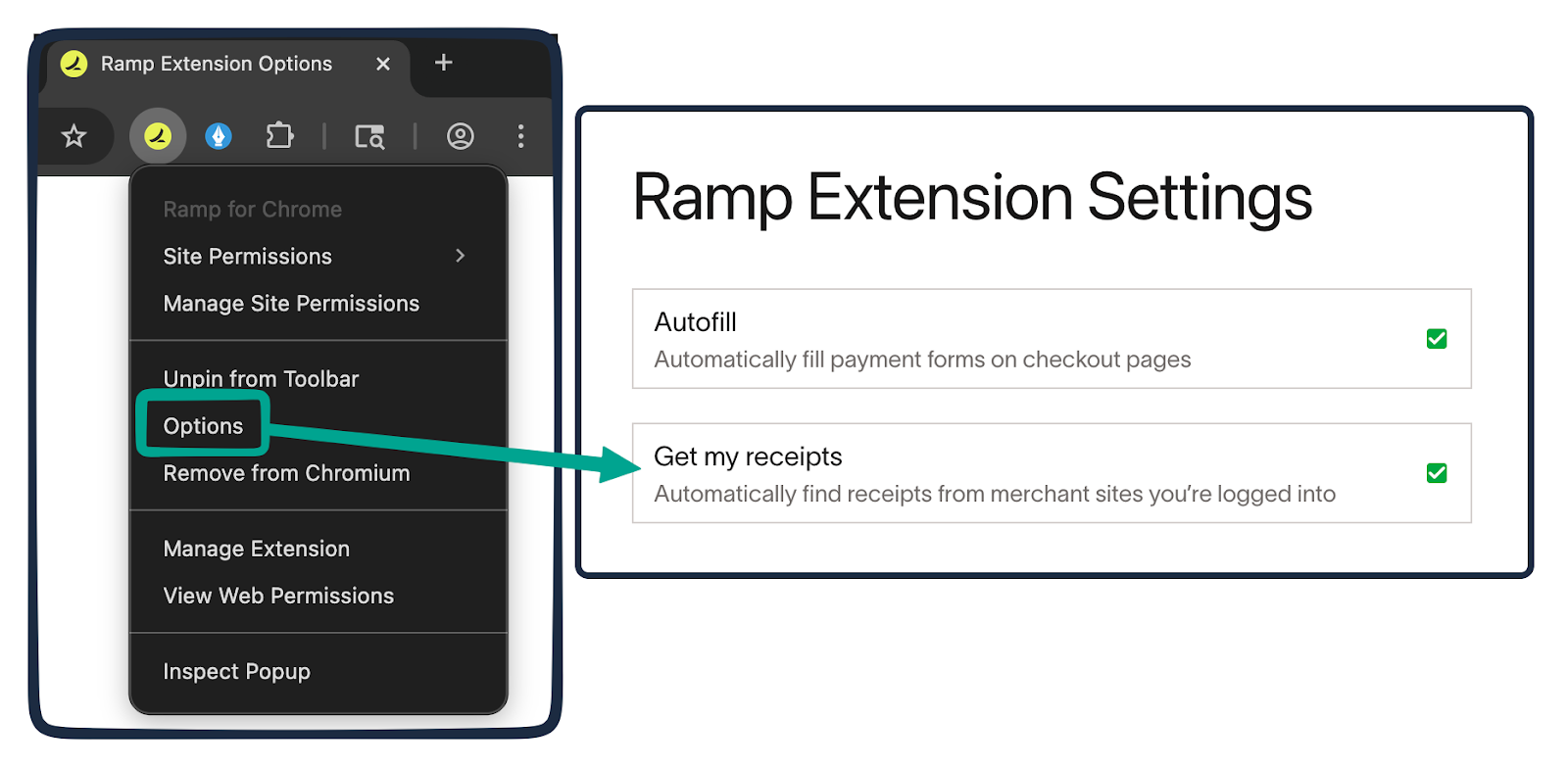
- Right-click the extension in the Chrome toolbar → click Options → click Disable receipt fetching .
- After disabling, the extension will no longer attempt to fetch receipts, and the list of recently fetched receipts will no longer appear in the extension popup's receipts tab.
User visibility over automation
Receipt fetching is designed to be observable at all times:
- The extension opens a dedicated minimized window with background tabs for supported merchants. You can click into the window at any time to see what the extension is doing.
- The extension icon in the Chrome toolbar displays a progress indicator while receipts are being fetched. The extension popup's receipts tab also shows a live status.
- If a merchant requires authentication, the extension will surface a prompt asking you to sign in before it continues.
- For advanced inspection, network activity generated by the extension can be examined in Chrome's developer tools.
Minimizing data processed
Receipt fetching is designed to minimize the data accessed at every point.
When a transaction is missing a receipt, the extension first checks whether the merchant is one Ramp supports. For unsupported merchants, the extension takes no further action—it does not open background tabs or attempt to access any merchant systems.
For supported merchants, the extension executes a deterministic script scoped specifically to that merchant's receipt retrieval flow. Scripts are designed to request the minimum data necessary: the extension navigates only to the pages needed to locate and download the receipt, constrained by an allowlist of permitted paths and actions. The extension does not access:
- Your merchant account password (you enter credentials directly on the merchant's sign-in page).
- Your browser's full history.
- Merchant settings pages or other areas of merchant sites unrelated to receipt retrieval.
- Screenshots, screen recordings, or session replays.
The only merchant data transmitted to Ramp is the retrieved receipt itself (for example, a PDF, image, or HTML receipt) and the metadata needed to match it to the correct transaction.
Minimizing data stored
Receipt fetching avoids storing unnecessary data and is designed to store the minimum needed to attach the receipt to your transaction and support security monitoring.
For each receipt fetching attempt, Ramp stores three categories of information:
- Retrieved Receipt (PDF/image/HTML): When a receipt is successfully retrieved, it is uploaded to Ramp and stored as a receipt attachment associated with the relevant transaction. This is treated the same way as receipts manually forwarded by employees to [email protected], submitted via SMS, or uploaded via the Ramp application.
- Receipt Metadata: Metadata extracted from the receipt (for example, merchant name, amount, and date) is used to match and attach the receipt to the correct Ramp transaction. This is stored as part of your standard Ramp transaction record.
- Action Logs: Ramp stores logs of actions taken during receipt fetching, including timestamps, merchant domain, transaction ID, script actions, and success or failure signals. These logs are used for security monitoring, debugging, and operational reliability. Logs pass through a scrubber designed to redact personal information before storage. Ramp does not store screenshots, session replays, or click recordings of the extension or merchant site.
Ramp does not store your merchant session context (such as cookies or session tokens). These remain in your browser and are never transmitted to Ramp.
Protecting stored data
All information stored by Ramp as part of the receipt fetching feature is encrypted at rest in our database and file storage systems. Receipts stored in Ramp are treated the same way as receipts manually forwarded by employees to [email protected], submitted via SMS, or uploaded via the Ramp application—they are encrypted at rest and subject to Ramp's standard access controls.
Action logs are also encrypted at rest. Access to receipt fetching logs and stored data is restricted following the principle of least privilege and incorporating role-based access controls.
All data transmitted between your browser and Ramp is sent over encrypted connections (HTTPS). Requests from the extension to merchant systems are also made over HTTPS.
Our platform, including where we process and store data for the receipt fetching feature, runs on Amazon Web Services. Learn more about Ramp's security program attrust.ramp.com.