Ramp Chrome extension overview
Overview
With Ramp for Chrome, you'll be able to:
- Pay for purchases quickly, with your Ramp funds ready at checkout
- Submit receipts right away with a one-click submission. Screenshot your receipt on screen or upload a picture from your computer. Ramp will match them to your transaction automatically.
- Access your company's expense policy from any travel site to see requirements before you book
- Help License Intelligence track domain-level access for supported vendor sites when employees enable Chrome extension tracking
Ramp may also auto-capture your receipts for certain merchants like Amazon and Uber. Download it here.
How it works
- Download the extension from the Chrome web store
- Pin the Chrome extension for easy access
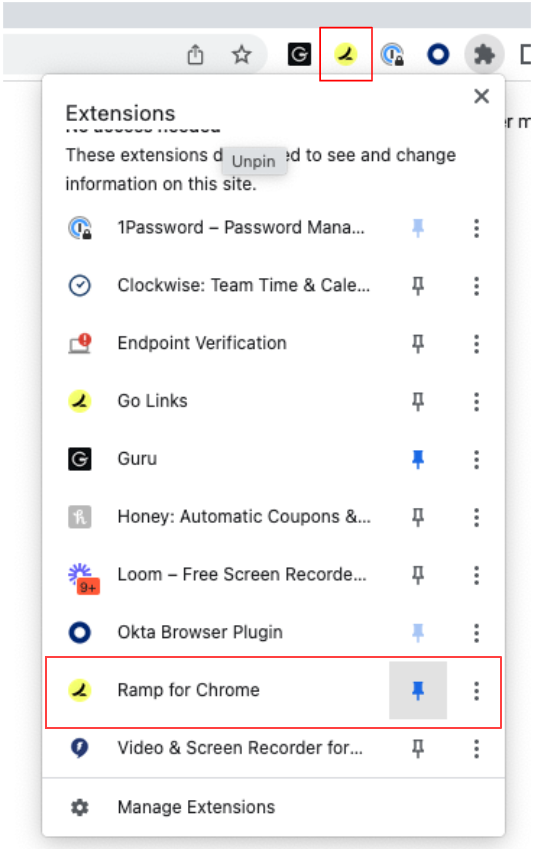
- Launch the Chrome extension once you are on a payment page
- Select the funds you'd like to use and copy over the details to the payment information prompts within the checkout page
- Once you make the purchase, select the Upload receipt icon shown in the image below or select the Upload Receipt button below the funds details
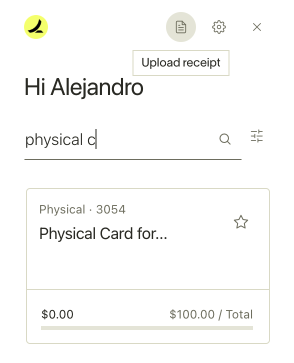
Select Capture Page and then Submit Receipt, and you're done.
Use cases and examples
- You're purchasing a flight for a business trip. With the Ramp Chrome Extension, you can quickly access your Ramp funds details and pay for the flight. After booking, you can immediately snap a screenshot of the receipt and upload it via the extension, ensuring it's matched to the correct transaction.
- When booking a hotel on a travel site, you can check your company's expense policy embedded in the extension. This ensures compliance with company rules and helps avoid reimbursement issues.
Best practices and tips
- Recommendations for optimal feature usage: Always pin the Ramp Chrome Extension for quick access.
- Tips and tricks to maximize the feature's potential: Regularly check your company's expense policy embedded in the extension to stay compliant.
- Common mistakes to avoid when using the feature: Ensure the receipts are clear and legible when submitting through the extension to avoid matching errors.
Frequently asked questions
- Can I use Ramp for Chrome in browsers other than Google Chrome? Yes. Ramp for Chrome works in any Chromium-based browser, such as Microsoft Edge, Brave, Opera, and Arc. Install it from the Chrome web store using that browser.
- What should I do if the receipt doesn't match the transaction? Ensure the receipt image is clear and correctly uploaded. If the problem persists, contact Ramp Support .
- How can I access the company's expense policy on the extension? The policy is embedded within the extension. Open the extension interface, and you'll see the policy section.
- What happens if I encounter an error while uploading a receipt? Try re-uploading the receipt. If the error persists, contact Ramp Support .