QuickBooks Online Error | Split Transactions: Unable to select "Field" as an option
Overview
Ramp has received the following error message from your Accounting Provider QuickBooks Online:
Why is this happening?
Your QuickBooks Online instance may have been set up incorrectly and a field is not pulling in as splittable.
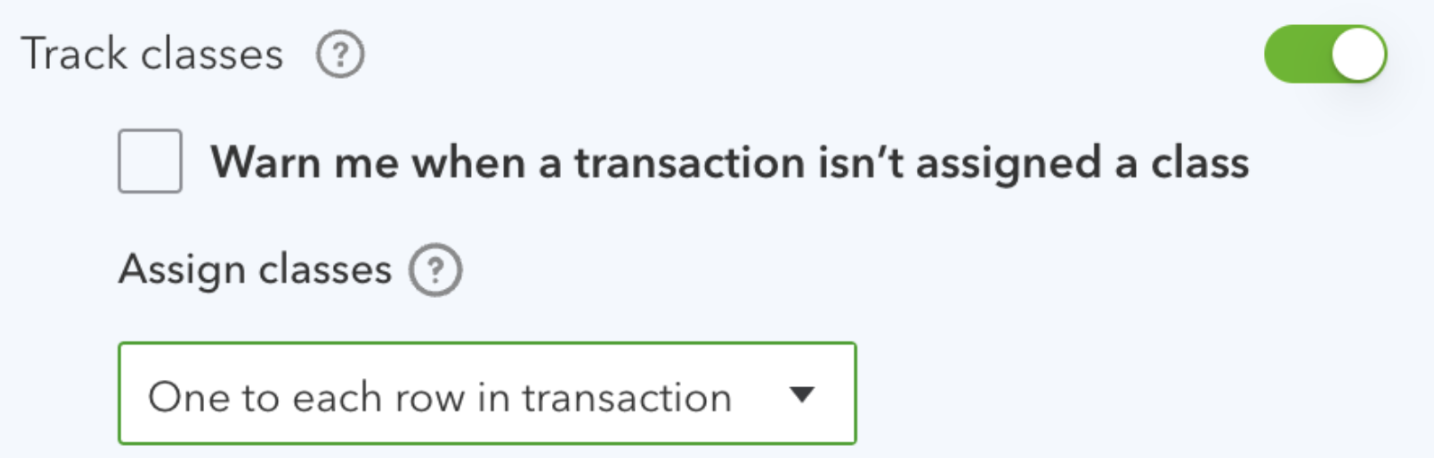
If Class is missing entirely, first enable QuickBooks Online classes in Ramp. Transaction-level class tracking allows Ramp to import classes, but splitting requires row-level class tracking.
How do I resolve this error?
- Within QuickBooks Online, click the settings cogwheel in the top right
- Go to Account and settings > Advanced > Categories . Track Classes should be set to “One to each row in transaction” and not “One to entire transaction”. We read that setting when we pull the tracking categories from QBO.
- Save your QuickBooks Online settings. In Ramp, open Accounting, select Settings, then Accounting fields, and select Refresh. If Ramp says a refresh occurred recently, try again in a few minutes.