New sign-in notifications
Overview
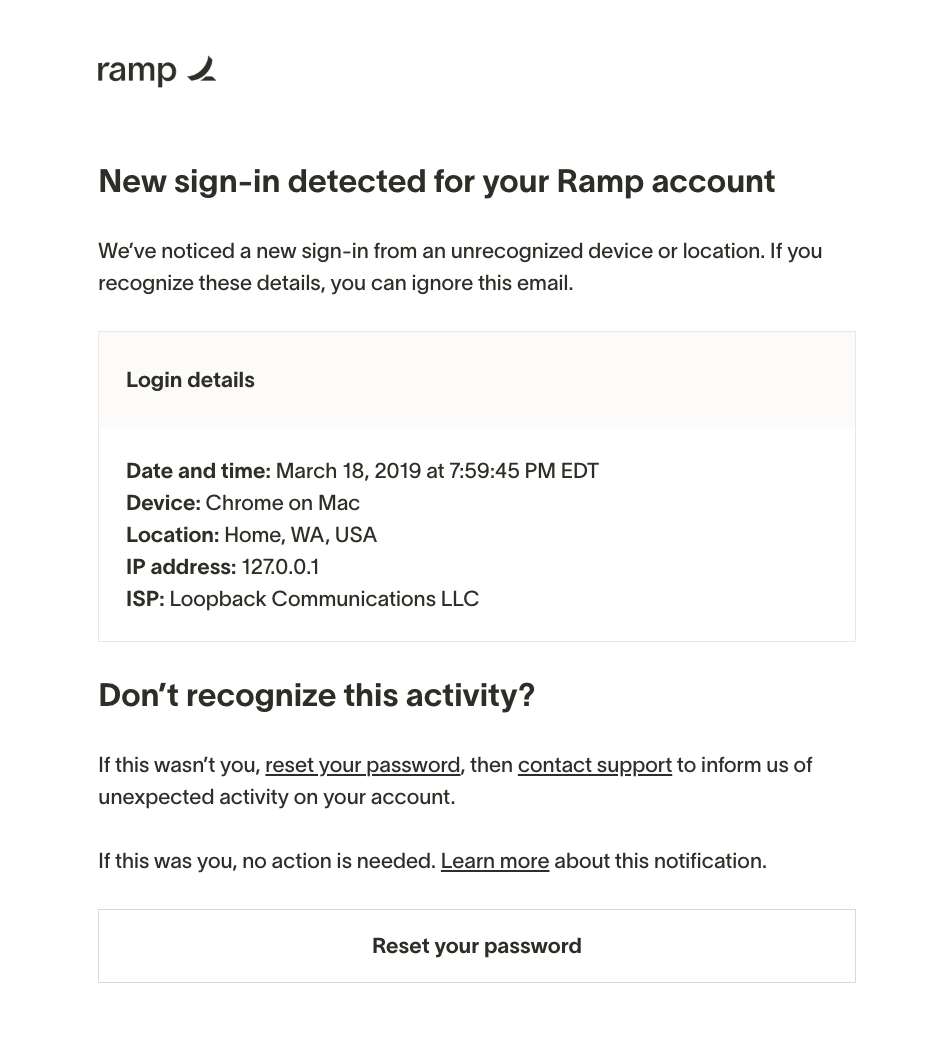
Ramp monitors sign-in activity on your account and sends you an email notification when its security checks identify an unfamiliar sign-in. These notifications are always on and cannot be disabled. They help you spot unauthorized access quickly and take action to protect your account.
Sign-in notifications are triggered only for password and Google OAuth sign-ins. They are not sent for SAML SSO, passkey, or email OTP sign-ins.
What's included in the notification
The notification email is sent from [email protected] with the subject line Ramp sign-in alert. It includes the following details about the sign-in:
- Device description (e.g., "Chrome on macOS")
- IP address
- IP location (city, region, and country)
- ISP (internet service provider tied to the IP address, or VPN service where applicable)
- Sign-in method ("Google" or "Password")
- Date and time of the session
The email also includes a link to protect your account if you don't recognize the sign-in. This link is valid for 48 hours.
If you recognize the sign-in
If you recognize the device, location, and time in the notification, no action is needed. You can safely ignore the email.
If you don't recognize the sign-in
If you don't recognize the sign-in details, take action immediately:
- Click the link in the email. The link takes you to an account protection page where you can secure your account. This link expires after 48 hours.
- Choose an action on the account protection page:
- Password users: Select Sign out and reset password (recommended). This signs out all active sessions across all your devices and sends you a password reset email.
- Google users: Select Sign out everywhere . This signs out all active sessions. Since your password is managed by Google, reset it through your Google account if needed.
- Review your account for unauthorized changes , such as changes to your settings or unusual transactions.
- Contact Support if you find suspicious activity. If anything looks wrong, contact Ramp's Support team to report it.
Why you might receive this unexpectedly
Browser privacy features and network changes can make a familiar sign-in appear unfamiliar. This may happen after you use private browsing, clear browser data, or connect through a VPN or proxy.
If the notification details match your activity and the device, browser, and time look correct, no action is needed.
Frequently asked questions
Can I turn off these notifications?
No. Sign-in notifications are an always-on security feature and cannot be disabled.
I use SSO — will I get these?
Only if you also sign in with Google OAuth. SAML SSO and passkey sign-ins do not trigger sign-in notifications.
How long is the link in the email valid?
The account protection link expires after 48 hours. If it has expired:
- Go to the Ramp sign-in page and sign in. Then sign out of all active sessions.
- Recover your password separately. Password users can select Reset password on the Ramp sign-in page. Google OAuth users reset their Google password through Google; resetting it does not revoke active Ramp sessions.
Does "Sign out and reset password" sign out all my devices?
Yes. Both "Sign out and reset password" and "Sign out everywhere" revoke all active sessions across all your devices.
I got this notification but I was using a VPN — is that normal?
Yes. VPNs and proxies can cause unexpected sign-in notifications. If the device and time match your activity, you can safely ignore the notification.
I'm still concerned about my account security
If you've taken the steps above and still have concerns, contact Ramp's Support team for further assistance. You can also review Troubleshooting Ramp sign-in & MFA issues for additional guidance.