NetSuite Sync Error | Unauthorized User
Overview
Ramp has received the following error message from your Accounting Provider NetSuite:
Unauthorized user
There's a few reasons that could cause this error:
- Employee who connected NetSuite leaves the company
- Employee who connected NetSuite no longer has the Ramp Accountant role
- Ramp Integration record is set to Blocked
How do I resolve this error?
Please follow these steps to resolve this error from NetSuite:
-
Check if the Ramp SuiteApp is installed. Navigate to NetSuite > SuiteApps > check if Ramp app exist
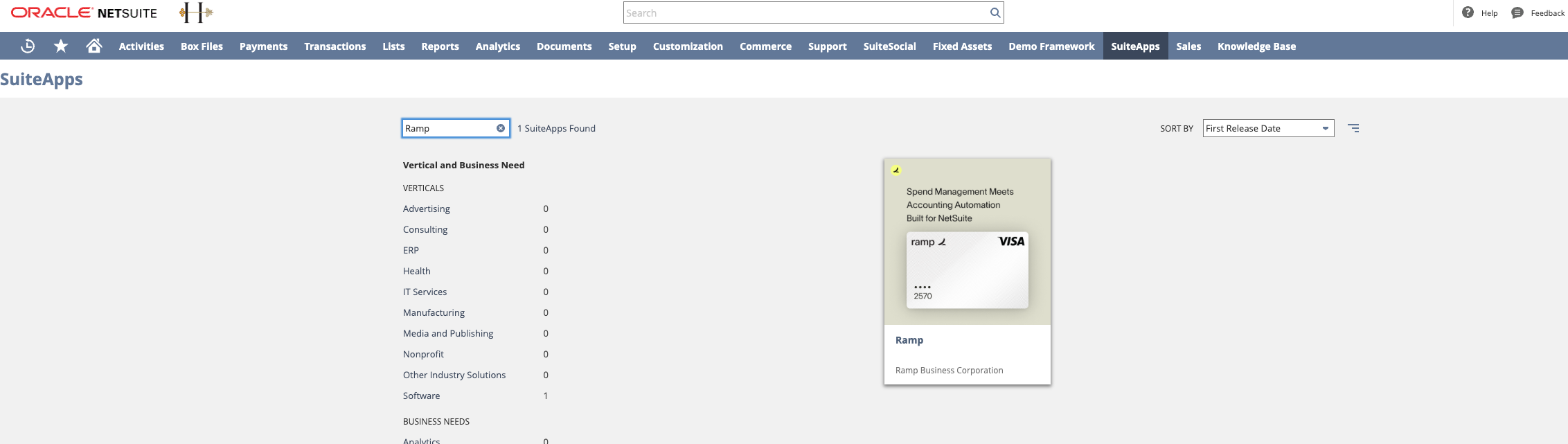
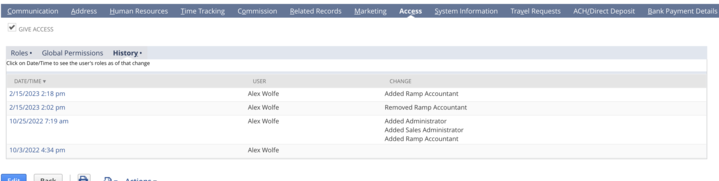
If it does exist, then proceed to Step: "Employee who connected NetSuite no longer has the Ramp Accountant role." If it doesn't exist: Do you know your integration Client ID and Client Secret? If yes: have it handy for when you may need to re-connect NetSuite. If no: if you need to re-connect NetSuite, come back to this step: Go toSetup >Integration>Manage Integrations> Ramp Integration>Edit Click "Reset Credentials" Copy these credentials down and use them to re-connect Ramp with the Standard NetSuite setup reference. Check if the employee who connected NetSuite has left the company. If they have left the company: Assign the Ramp Accountant role to your employee record in NetSuite. Lists>Employees>find your employee record > Access > Roles > add "Ramp Accountant">Click Add>Click Save Disconnect NetSuite on Ramp (Ramp > Accounting>Settings >Disconnect NetSuite) If you have the SuiteApp installed, use the Standard NetSuite setup reference. If you do not have the SuiteApp installed, go back to Step 1: "Employee who connected NetSuite leaves the company" If they have not left the company, proceed to b: "Check the employee record of the employee who connected NetSuite" Check the employee record of the employee who connected NetSuite Navigate toLists>Employees>find employee that connected ramp>Access>History If there's a "Change": "Removed Ramp Accountant",add the Ramp Accountant role back to the employee. “Edit”, navigate toAccess>Roles and add "Ramp Accountant"and click“Add” If there's no change, then proceed to Step 3: "Ramp Integration record is set to Blocked" This is what that would look like
If the employee has the role, go to Ramp Integration - Setup >Integration > Manage Integrations > “Ramp Integration”
If the "State" says anything but "Enabled", please change it to "Enabled".

- Employee who connected NetSuite leaves the company
- Employee who connected NetSuite no longer has the Ramp Accountant role
- Ramp Integration record is set to Blocked
Raw error message: Unauthorized User for your technical team.