Inviting a Guest User to book
Overview
Available on Ramp Plus. See Ramp Plus overview for plan details.
The Guest User Booking feature enables Ramp users to invite guest users to book flights and hotels on the platform. Additionally, it allows users to make bookings on behalf of existing guests, streamlining the travel management process for external partners.
This simplifies travel coordination by allowing external guests to book through Ramp and enhances user flexibility by enabling bookings on behalf of guests.
In Ramp Travel, you can book flights and hotels for an external guest, but not rental cars.
How it works
Step 1: Initiating an external Guest booking
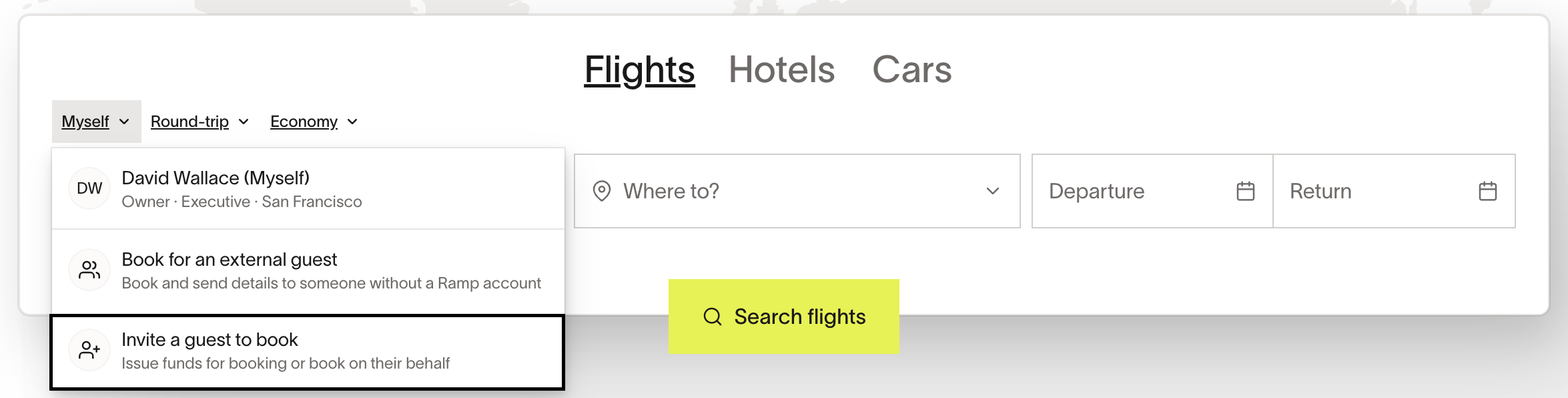
- Navigate to the Ramp Travel booking portal.
- Select the option to invite a guest to book .
Step 2: Entering guest details
- Provide the guest's email, department, and location. Select a manager if the field is required. If you enable Allow manager to act as an Assistant, the selected Manager becomes the Guest's Assistant; if you select No manager, you become their Assistant.
- Optionally enter a deactivation date for the profile we will create on their behalf.
Step 3: Allocate travel-specific funds
- Open the ‘will they be traveling’ section and enter information about the origin, destination, location, and dates of the trip.
- We will then generate a “budget” for flights, hotels, and per-diem, which can be allocated as funds to a virtual card.
[Optional] step 4: add additional funds
- Optionally add more funds for things like gas, meals, or general expenses.
Step 5: Send invitation
- Send the invitation to the Guest's email. The Guest follows the link to join Ramp. After the Guest accepts the invitation, Ramp issues the allocated funds, which the Guest can use to book in Ramp Travel.
Use cases and examples
- You can use this feature to, for example, invite guest speakers to book necessary travel on Ramp.
- You can also use this feature to generate a virtual card that a guest speaker could use to book travel outside of Ramp.
Frequently asked questions
What policy will be applied for this guest?
This Guest will be held to the company's travel policy.
Can an external guest modify their allocated budget?
No. A user with permission to manage the Guest's spend, such as their Manager or an Admin, can make changes by following the steps to edit cards and funds. If you do not have access, ask the Guest's Manager or an Admin to make the change.
Where can the inviter track the guest’s expenses?
Sending the invitation does not grant access. Users with Travel Manager permissions can track the Guest's bookings and expenses in Expenses & Travel.
What happens if approval is required?
The booking request follows the specified approval workflow before final confirmation.
Will the guest receive a confirmation email?
Yes. The Guest receives an invitation email with a link to join Ramp; it does not contain sign-in credentials or budget details. After a booking is completed, Ramp sends a separate booking confirmation to the traveler's email. Allocated funds are issued after the Guest accepts the invitation.
Can a physical card be sent to the guest?
No, a physical card can't be issued to a user with a guest role.
Can someone book on behalf of an external guest?
Yes. See Entering guest details to assign an Assistant during the invitation. The assigned Assistant, not the Guest, uses Assistant Mode. A user with Travel Manager permissions can also book for the Guest.