Physical Card PINs
Overview
Available on Ramp Enterprise. See Ramp Enterprise overview for plan details.
PINs are used on physical cards to verify transactions in many countries around the world. Ramp cards issued in USD do not have a PIN, but cards issued in CAD, EUR, and GBP all do. The PIN is a 4-digit code that cardholders enter when attempting a transaction, which adds an extra layer of security.
How do I access my PIN?
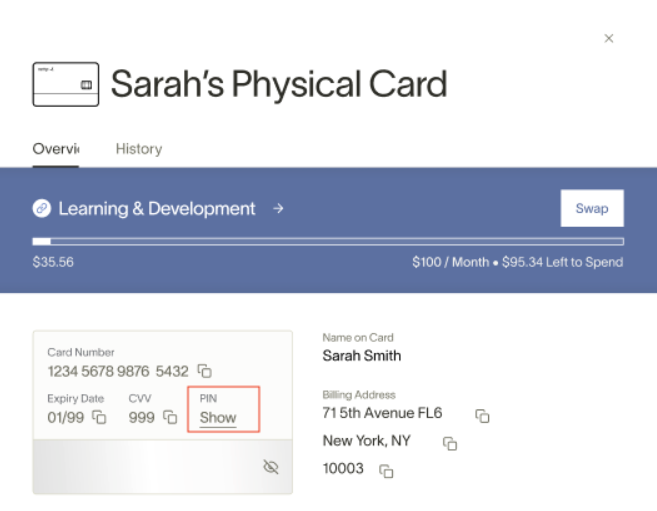
The card's PIN is available within your Ramp account card view on both web and mobile. To find the card's PIN:
- Click on the physical card to reveal the card number, expiration date, and CVV
- The PIN is located next to CVV, boxed in red below
- Click on "Show" to reveal the PIN
Frequently asked questions
Can I change or reset the PIN of my card?
- You can reveal your current PIN from your card details. Some physical cards in PIN-enabled regions may also support an issuer-hosted flow to set or change the PIN, but Ramp does not currently show one general web setting that lets every cardholder choose a new PIN.
- If Ramp shows a Reset your PIN task on your Home page, select it to open My Wallet and follow the prompt. Ramp uses this flow for blocked PIN recovery and may show statuses such as PIN blocked, PIN update in progress, or PIN setup required.
What happens if they enter the wrong PIN?
- If the PIN is entered incorrectly 3 times, Ramp may block the PIN and show a Reset your PIN task on your Home page.
- If Ramp instead shows Get a new card, the chip is locked and you need to request a replacement card.
Why do these cards have PINs?
- PINs are common for non-USD-denominated cards. It adds an extra layer of protection.
Do virtual cards have PINs?
- No, only physical cards have PINS.
What if my physical card does not have a PIN?
- In rare instances, Ramp may fail to auto-generate the PIN for the card
- You can set the PIN at the POS system at the first swipe of the physical card
- The POS will prompt you to set a PIN
- Our issuing partner will receive this PIN from the network and share it with Ramp moving forward