NetSuite integration: Bill Pay amortization
Overview
Available on Ramp Plus. See Ramp Plus overview for plan details.
Ramp supports bill amortization with our NetSuite integration. We do this by automatically pulling in the existing Amortization Templates you have configured in NetSuite and then allowing you to choose whether to amortize certain line items.
You’ll see this feature in Ramp if you are:
- Integrated with NetSuite
- Using Bill Pay
- Leveraging amortization templates in your NetSuite instance
How it works
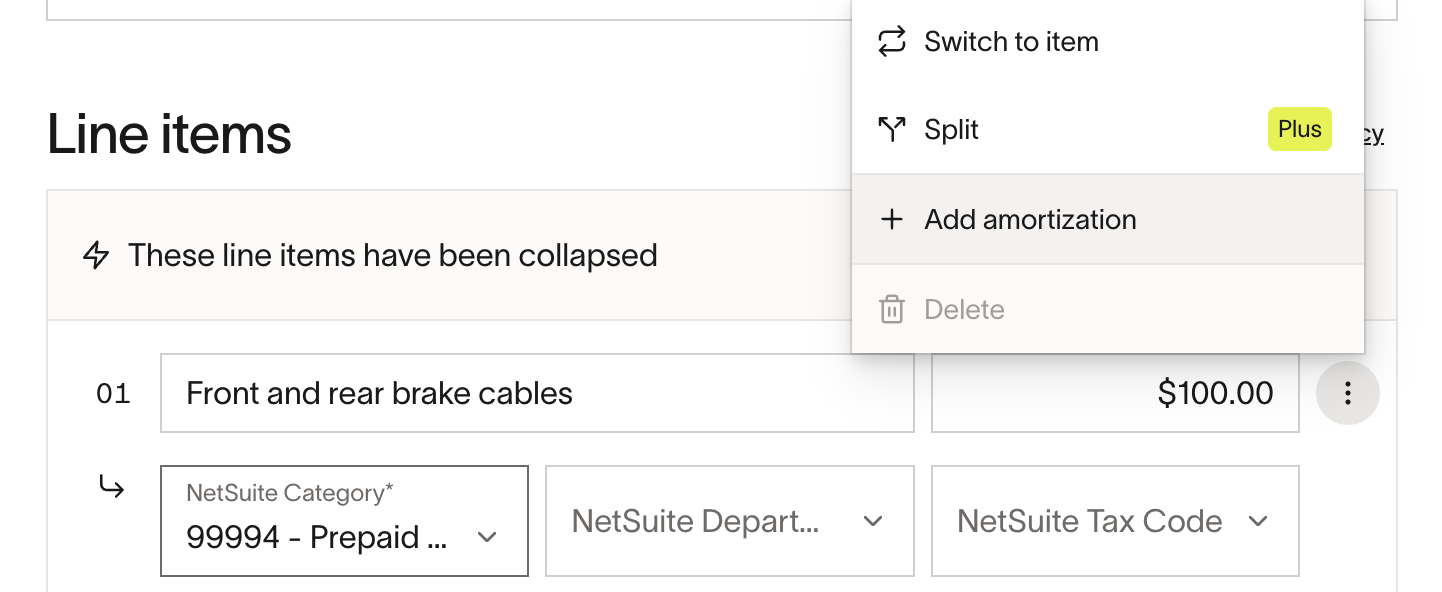
If you have Amortization Templates in your connected NetSuite account, you will see an “Add amortization” option in the bill line item actions menu in Ramp. (see screenshots below)
Once activated, you can choose from the amortization templates you have set up in NetSuite and set the amortization start and end dates. These settings will then sync with your bill to NetSuite.
Frequently asked questions
What if the target account set in the template is not available for the entity selected?
Default accounts must be global accounts in NetSuite.
If an expense start date is in a previous account period already closed, do we recognize all previous periods in the current one?
NetSuite will automatically 'catch up' by adding any previous month's expenses into the current period.
What happens if the entire expense period occurs in prior accounting periods that are now closed?
Ramp Bill Pay will enforce any NetSuite constraints and will surface relevant errors that describe why a specific action is not allowed.