Match external debits to bills in your accounting provider
Overview
Ramp can help you match eligible Ramp Checking Account external debits to open bills in your accounting provider. Use this when you pay a vendor directly from your Checking Account instead of using Ramp Bill Pay, and the bill already exists in your accounting provider.
After you match and sync the transfer, Ramp syncs the Checking Account external debit as a bill payment in your accounting provider. This keeps your ERP records accurate without manually creating the payment.
If a vendor-initiated ACH debit from an eligible Ramp Checking Account or Ramp Operating Account pays a non-recurring USD bill created in Ramp Bill Pay, use direct debit matching instead. That workflow marks the Ramp bill as paid and syncs its payment through Bill Pay.
Key benefits
- Cleaner reconciliation: Connect Ramp Checking Account transfers to the bills they paid.
- Less manual work: Ramp creates the corresponding bill payment during sync.
- Support for multiple bills: Match one Ramp Checking Account transfer to more than one open bill when the payment covers multiple bills.
- Better visibility: See which open bills are tied to each Ramp Checking Account transfer.
How matching works
Ramp pulls open bills from your accounting provider and shows suggested matches for eligible outgoing Ramp Checking Account external debits. Ramp suggests bills based on details such as open bill balance, bill date, and due date.
You can review the suggestions, select one or more bills, and choose how much of the transfer should apply to each bill. This feature is supported for QuickBooks Online, NetSuite, Sage Intacct, and Xero.
Match a Ramp Checking Account transfer to bills
- Go to Accounting > Banking .
- Find the Ramp Checking Account transfer you want to review.
- Open the transfer's accounting details.
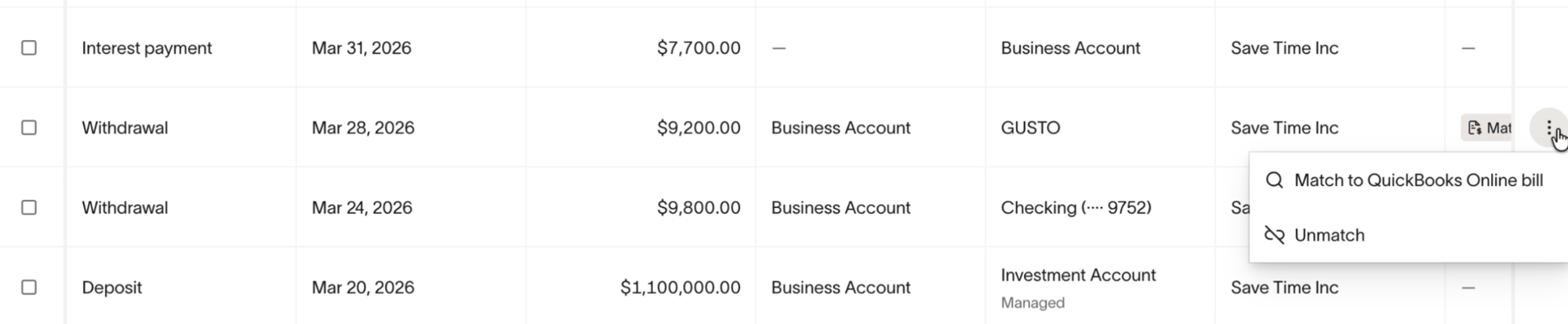
- Click the menu icon on the right, then select the option to match the transfer to open bills.
- Review Ramp's suggested bills, or search and filter for the correct bill.
- Select one or more matching bills.
- Confirm the match.
- Sync the transfer to your accounting provider.
After syncing, Ramp creates the corresponding bill payment in your ERP. For a walkthrough, see this video guide.
Accounting impact
When a matched Ramp Checking Account transfer syncs to your accounting provider, Ramp syncs it as a bill payment. This reduces the open bill balance in your accounting provider and records the payment from the relevant Ramp Checking Account GL account.
Frequently asked questions
What is this feature?
This feature lets you match eligible Ramp Checking Account external debits to open bills from your accounting provider, then sync those transfers as bill payments. You cannot match Ramp Checking Account vendor payments to open bills.
Which providers are supported?
This feature is supported for QuickBooks Online, NetSuite, Sage Intacct, and Xero.
When should I use this?
Use this when a vendor debited your Ramp Checking Account and the bill already exists in your accounting provider.
Can I match one Ramp Checking Account external debit to multiple bills?
Yes. You can select multiple bills as long as they are for the same vendor, same currency, and same subsidiary if applicable. The allocated amounts must add up to the full transfer amount.
Can I partially pay bills?
Yes. You can allocate a specific amount from a wallet transfer, but only for an external debit, toward a bill in your ERP. You must allocate the full wallet transfer amount. For example, you cannot use $80 of a $100 wallet transfer and leave $20 unallocated.
You can pay one bill with more than one wallet transfer as long as the total matched amount does not exceed the bill's open balance. For example, you can pay a $100 bill in two transfers, match $40 from the first transfer, and match $60 from the second transfer. This means you can match multiple external debits to one bill.
Why don't I see a bill in the suggestions?
The bill may not appear if it is already paid, inactive, in a different currency, tied to a different vendor or subsidiary, or not yet imported from your accounting provider.
Can I edit a match after syncing?
No. After the transfer has synced to your accounting provider, the match can no longer be edited in Ramp.
How to unmatch a bill from an external debit?
Open the transfer's menu, then select Unmatch.
Can I match incoming Ramp Checking Account deposits to bills?
No. Matching incoming Ramp Checking Account deposits to bills is not supported.
Can I match Ramp Checking Account vendor payments to bills?
No. Matching Ramp Checking Account vendor payments to bills is not supported.