Invoice line items: Expense vs. item
Overview
Ramp offers the ability to match invoice line items to “expenses” or “items” and can sync both to your accounting provider.
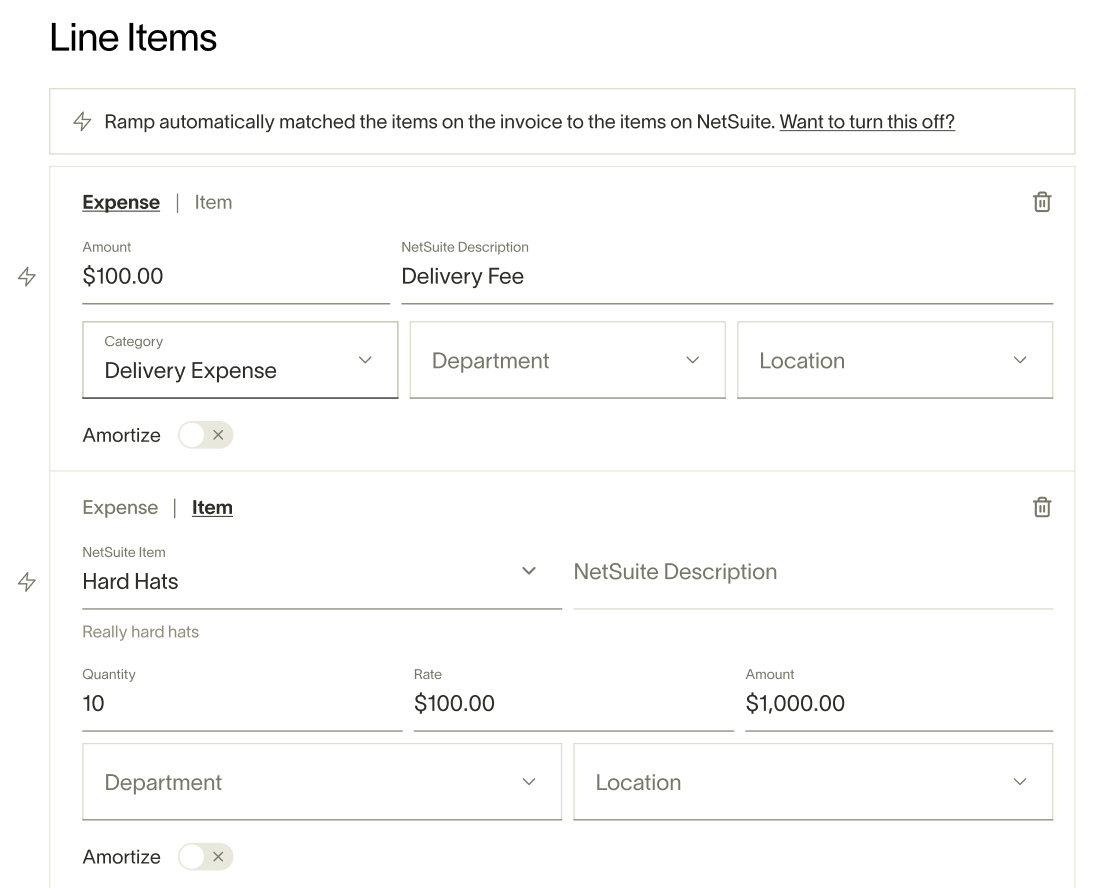
“Expense” line items are the costs incurred by your business such as rent or office supplies. “Item” line items are any recorded product or service that your business purchases or sells such as Tires or Consulting Services.
How it works
Set up
No set-up is required. If inventory items are detected within your accounting provider, “Item” will auto-appear within your Draft Bill and allow you to populate the bill with items synced from your accounting provider.
Item matching is available when your accounting provider supports inventory line items and syncs inventory items to Ramp. Open a line item's actions menu to check availability. Ramp shows Switch to item when the action is available and explains why it is disabled. If the action is missing, confirm that your connected accounting provider contains active inventory items and has completed its latest sync. If Switch to item is still missing after the items sync, your provider or bill type does not support inventory lines.
Line item matching
For Ramp Plus customers, Smart OCR detects whether each invoice line is an “expense” or “item” and adds line items accordingly. See Ramp Bill Pay OCR for details.
If it's an “expense” line item, you can match the expense to a GL category in your accounting provider and update additional fields such as department or location based on your accounting provider configuration.
For “item” line items, you have the ability to match and sync to the corresponding inventory item in your accounting provider and can edit fields like the item units and unit price.
Frequently asked questions
Why can’t I set both a category and an item number for a line item?
In Ramp, each line item on a bill must be coded as either an Expense item or an Inventory item—but not both. This distinction is intentional and based on accounting best practices and system constraints:
Expense items:
- Used for general operating costs (e.g., rent, utilities, software)
- Require only a GL expense account, description, and total amount
- Do not require item numbers, quantities, or unit prices
- Synced directly to your ERP’s expense accounts
Inventory items:
- Used for goods or services you resell or track in inventory
- Require an item reference from your ERP, quantity, and unit price
- Are coded to inventory or asset accounts
- Enable advanced features like partial receiving and 3-way PO matching
Please note: You cannot mix both types on the same line because:
- Expense lines map to GL accounts
- Inventory lines map to item records and quantity-based tracking
- Mixing the two causes sync conflicts and ambiguity in ERP posting