How to fix: "QBWC1085: There was a problem with the log file"
This guide is provided by Conductor, the service that powers the QuickBooks Desktop integration for many business tools, including the one that sent you here.
When connecting to QuickBooks Desktop with Conductor, you might encounter the error shown below, which prevents syncing your QuickBooks Desktop data with Conductor. Follow the steps below to resolve this issue.
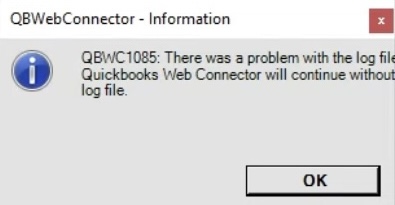
Delete the Web Connector log file
A corrupted QuickBooks Web Connector log file can cause this error. Typically, this file was already in this corrupted state even before setting up the connection. Deleting the log file will force the Web Connector to generate a new one. To do so, follow these steps:
Step 1 | Close QuickBooks Desktop
- Close QuickBooks Desktop
- Ensure QuickBooks Desktop is completely closed
Step 2 | Terminate the QuickBooks Web Connector
Terminate the QuickBooks Web Connector process to ensure it is not running in the background:
- Open the Windows Task Manager by searching for “Task Manager” in the Windows search bar (usually located in the bottom-left corner of your screen).
- In the Task Manager, find “QuickBooks Web Connector”, right-click it, and select “End Task”. You may need to click “More details” at the bottom of the Task Manager window to see all running processes.
- Close the Task Manager.
Step 3 | Navigate to the QuickBooks Web Connector log directory
- Open File Explorer and navigate to the QuickBooks Web Connector log directory by copying and pasting the following path into the address bar:
- C:\ProgramData\Intuit\QBWebConnector\log
Step 4 | Delete the log file
- In the log directory, locate the file named QWCLog.txt, right-click on it, and select “Delete”.
Step 5 | Restart QuickBooks Desktop and the Web Connector
Restart QuickBooks Desktop and the QuickBooks Web Connector to generate a new log file:
- Open QuickBooks Desktop with the company file you want to sync.
- In the top menu bar, click “File” > “App Management” > “Update Web Services” to launch the QuickBooks Web Connector.
- In the window that appears, click “Hide” in the bottom-right corner to keep the Web Connector running in the background.
After completing these steps, attempt to sync your QuickBooks Desktop data again. If you continue to encounter the error, please email us at [email protected] for further assistance.