1099 Corrections
Overview
If a filed 1099 contains errors such as typos, incorrect amounts, or wrong TINs, you can submit corrections in Ramp. Ramp supports corrections to 1099 boxes, amounts, and payer/payee details (name, TIN, and address). There is no deadline for submitting corrections. They should be sent as soon as an error has been discovered.
Vendors: If you need a correction to a 1099 you received, please contact the company that issued the payment directly.
Types of corrections
There are two types of 1099 corrections supported on Ramp:
- Type 1: Incorrect amount(s) or 1099 should not have been filed
- Type 2: Incorrect recipient TIN/name and/or original filing used wrong type of form
How to file a 1099 correction
Select vendor to correct
- From the 1099 table, click Review on a filed vendor → In the worksheet, click the menu on the filed form → Correct
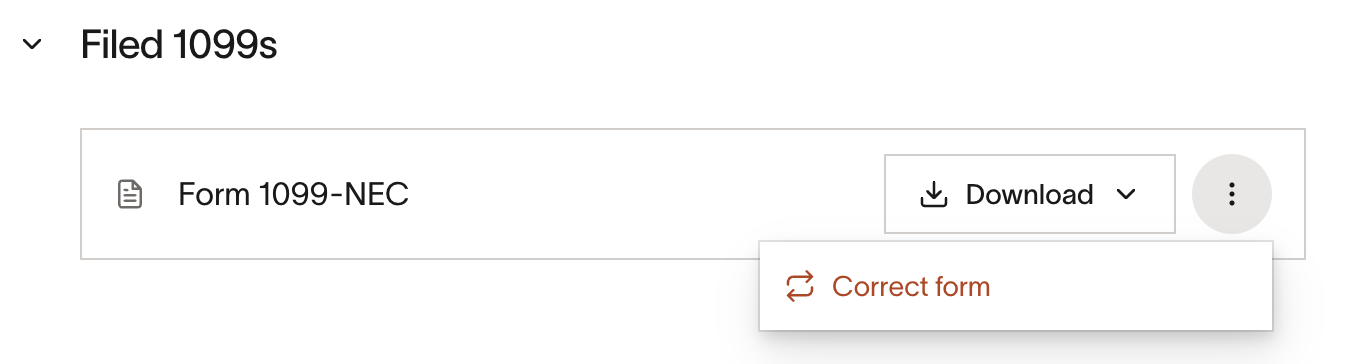
- Corrections can be submitted 12 hours after the initial filing was done.
Correcting amounts (type 1)
- Enter the updated amount(s) → File correction
- If you accidentally filed for a vendor and want to clear the amount filed, hit Clear values to zero out the amounts → File correction. You will need to do this for each 1099 form filed (MISC and NEC)
Correcting recipient information and/or form (type 2)
- Incorrect TIN/Name, same form: First, update the vendor's tax details: in the worksheet, click Edit W-9 under Tax details to update the vendor's TIN, legal name, or address → Save. Then, click the menu on the filed form → Correct → File correction.
- Change form type: Correct → 0 box amount → File correction. Create a new vendor, mark as 1099 eligible, add 'Additional spend' for the appropriate box(es) → File.
- Change vendor details and form type: Same as above.
- If any changes to tax info are detected, Ramp will auto-file the corrected form using the updated details
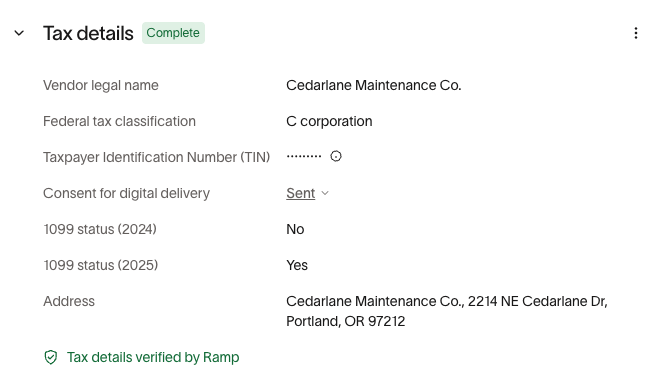
*Note:*You will be charged twice for Type 2 corrections - once to correct the original filing, and another to create a new form.
Submit corrections
- Click File correction to generate a corrected 1099, which appears in your records and is used for re-delivery and state/IRS updates as required. Corrections will only be re-delivered to states participating in CF/SF . Please check directly with states not in this program if you will need to re-send the corrected form
- The IRS knows how to handle reconciliation when a correction is filed
- You will be able to download the corrected form, and the original
- If the initial delivery method was mail to your vendor, you will need to confirm the cost for re-mailing the corrected form to your vendor
This feature is provided for your convenience only and does not constitute tax or legal advice. Ramp does not guarantee and is not liable for your compliance with tax regulations or requirements, and is not acting as a withholding agent on your behalf.