Excluding merchants from receipt and memo requirements
Note: This article primarily applies to Ramp Administrators. Cardholders may find other articles in the Expense policy and receipts section to be more applicable.
With Ramp, you can set a dollar amount above which receipts are required when submitting expenses. You may not want to ask for a receipt for every transaction or vendor, especially for recurring charges like SaaS or ongoing transactions like advertising. Now you can exclude vendors from policy requirements within your Expense Policy. You'll still see notifications and alerts on unusual spend and savings opportunities.
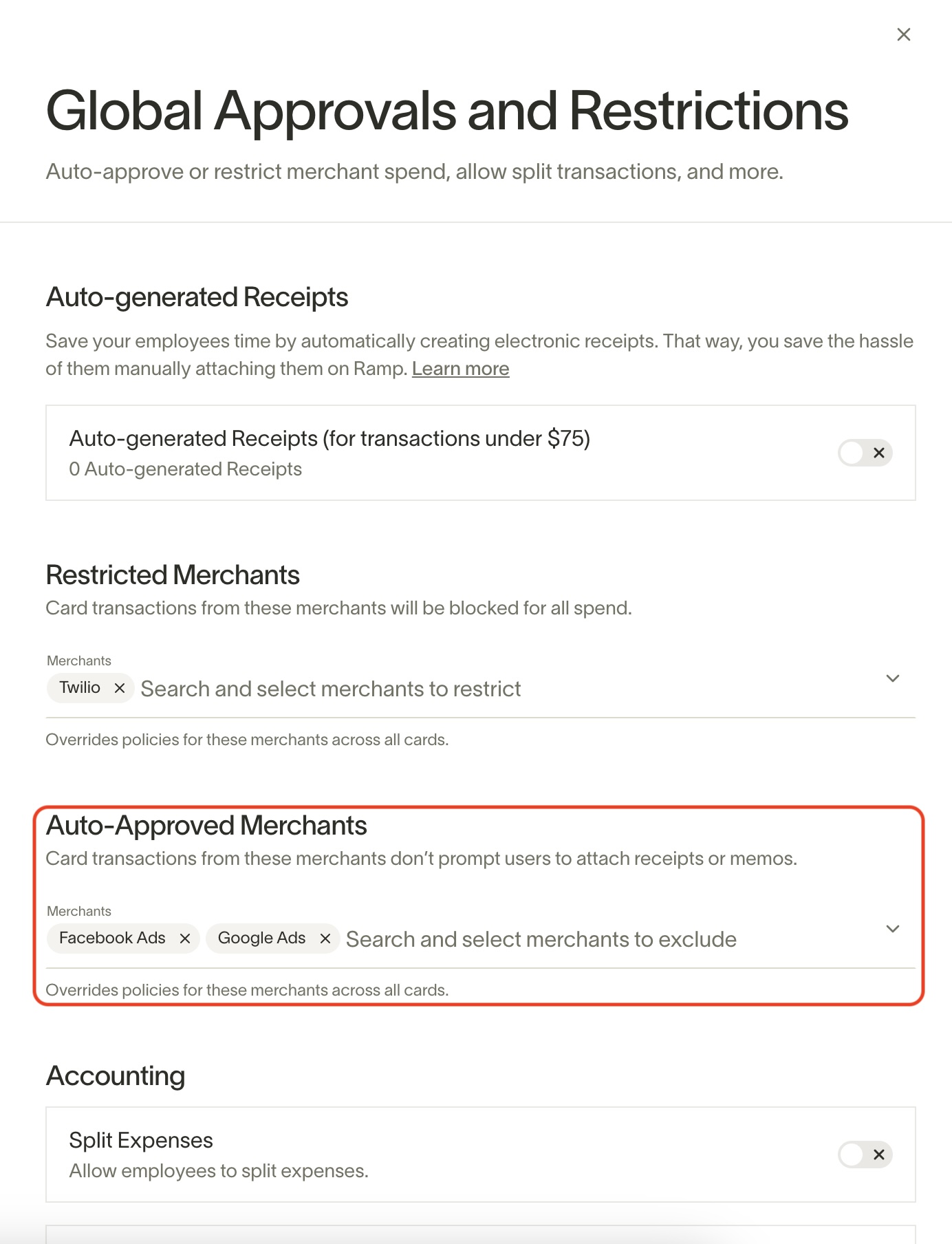
To exempt certain merchants from receipt and memo requirements:
- Go to Policy > Travel & expenses.
- Under Additional controls, select Global approvals and restrictions.
- Locate the Auto-approved merchants section.
- Add the appropriate merchant to the Merchants field.
The added merchants are exempt from policy requirements.
Unlike most policy changes in Ramp, changes to auto-approved merchants apply retroactively. This means policy requirements for older transactions are dismissed.
Finally, you can add a merchant to the auto-approve list when you dismiss policy requirements within an individual transaction. Select the transaction and click the Dismiss requirements button. A pop-up asks if you want to exclude the merchant from policy requirements. Click the Yes, Exclude button to do so.