Enable early automatic payments for your card statements
Note: This article primarily applies to Ramp Administrators. Cardholders may find other articles in the Payments, limits, and statements section to be more applicable.
Set up early automatic payments to ensure you will always have an available balance for your expenses. Ramp will automatically debit your linked account when your cleared and pending card balance reaches a percentage of your available card capacity. Ramp checks the threshold when you save the setting, after qualifying card balance changes, and periodically.
Note: If you enable this feature after your balance reaches or exceeds the set threshold, Ramp checks the threshold immediately. A new transaction is not required.
How to set up
- Company > Statements & payments > Early autopay
Step 1: Determine what percentage of your available card capacity you want to trigger an automatic payment. Ramp offers four percentages:
- 50%
- 60%
- 70%
- 80%
Step 2: Determine your payment preference. Ramp offers two payment preferences:
- Pay cleared balance (default)
- Pay cleared + pending balance
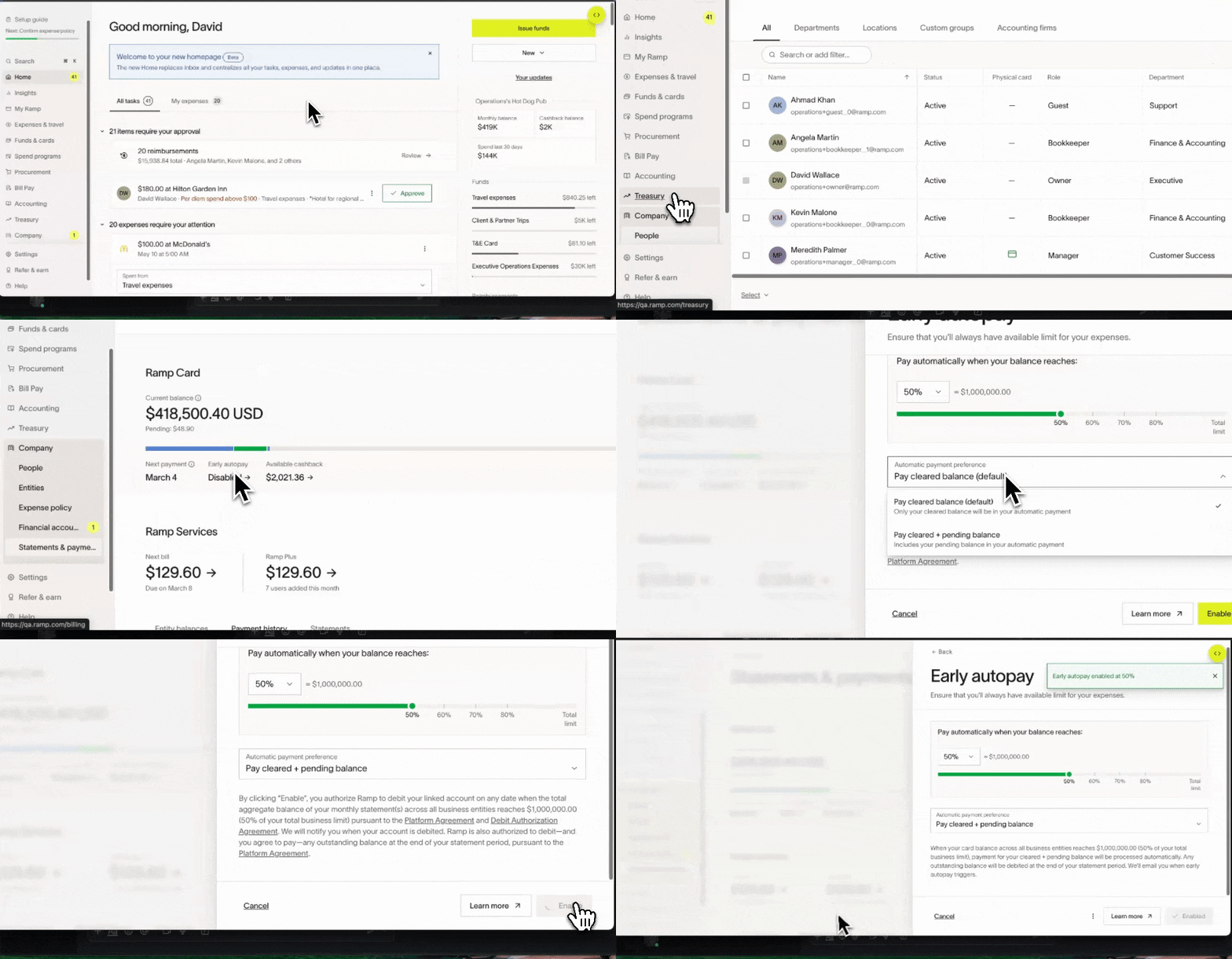
Payment preference
Ramp has two payment preferences, allowing you to determine the payment preference best for your business operations.
Pay cleared balance
Ramp will automatically debit only the cleared balance:
Benefits:
- Statement payments always reconcile to statement amount because early auto-payments only debit cleared transactions, and statements similarly only include cleared transactions
- Card balance will never be negative
Drawbacks:
- The maximum number of pending payments is based on the linked bank account's payment history and number of business entities. Reaching that maximum could prevent additional payments. If this happens, contact Ramp Support.
This payment preference may be best if your business has a high volume/dollar amount of:
- pending transactions that ultimately are reversed (e.g. hotel holds) or
- returns of goods and services
If you select this payment method, Ramp suggests setting the trigger at 80% to ensure you have a large number of cleared transactions to prevent you from reaching the maximum number of payments.
Pay cleared + pending balance
Ramp will automatically debit the cleared and pending balance, reducing your balance to $0.00:
Benefits:
- Card balance is reduced to $0.00, completely freeing up your available balance
Drawbacks:
- Statement payments may not reconcile to statement amount, as statements only include cleared transactions, and payment could be made for a transaction that is ultimately reversed
- Card balance could be negative, as a pending transaction could later be reversed (e.g., return, hotel hold)
This payment preference may be best if your business:
- does not have many reversed transactions or returns
- has a lower business limit but a high spend, allowing you to free up your card balance completely
If you select this payment method, you may be unable to reconcile your statement payments to your statement, as pending transactions can change.
Use cases and examples
Example 1: Single entity with Pay cleared balance
Early autopay setup:
- Available card capacity: USD 50,000
- Early autopay trigger: 80% of available card capacity (triggers at USD 40,000 in cleared + pending balance)
- Early autopay payment preference: Pay cleared balance
The business currently has $35,000 in cleared transaction and $4,000 in pending transactions
- Total cleared ($35,000) + pending ($4,000) is $39,000, which does NOT trigger early autopay threshold
$2,000 of the $4,000 pending transactions move from pending > cleared
- Total cleared ($37,000) + pending ($2,000) transaction is still just $39,000. Early autopay is still not triggered
Business makes a transaction of $3,000, which adds to their balance as a pending transactions
- Total cleared ($37,000) + pending ($5,000) transaction is now $42,000
Early autopay threshold for the business is triggered, Ramp automatically debits $37,000 (cleared transactions only) from the linked bank account
- Your card balance is $5,000, which is the total pending transactions
Example 2: Single entity with Pay cleared + pending balance
Early autopay setup:
- Available card capacity: USD 50,000
- Early autopay trigger: 80% of available card capacity (triggers at USD 40,000 in cleared + pending balance)
- Early autopay payment preference: Pay cleared + pending balance
The business currently has $35,000 in cleared transaction and $4,000 in pending transactions
- Total cleared ($35,000) + pending ($4,000) is $39,000, which does NOT trigger early autopay threshold
$2,000 of the $4,000 pending transactions move from pending > cleared
- Total cleared ($37,000) + pending ($2,000) transaction is still just $39,000. Early autopay is still not triggered
Business makes a transaction of $3,000, which adds to their balance as a pending transaction
- Total cleared ($37,000) + pending ($5,000) transaction is now $42,000
Early autopay threshold for the business is triggered, Ramp automatically debits $42,000 (cleared and pending transactions) from the linked bank account
- Your card balance is $0.00
Example 3: Multi-entity with Pay cleared balance
Early autopay setup:
- Available card capacity: USD 100,000
- Early autopay trigger: 50% of available card capacity (triggers at USD 50,000 in cleared + pending balance across all entities)
- Early autopay payment preference: Pay cleared balance
The business has 3 entities with the following in cleared and pending:
- Entity A has $15,000 in cleared transactions and $5,000 in pending transactions ($20,000 total)
- Entity B has $10,000 in cleared transactions and $10,000 in pending transactions ($20,000 total)
- Entity C has $8,000 in cleared transactions ($8,000 total)
- The total cleared and pending transactions across all 3 entities in $48,000, which does not yet trigger the early-auto pay threshold
Entity C then makes a $5,000 transaction, which adds to its balance as a pending transaction
- Total cleared + pending transactions across the entire business at $53,000
Early autopay threshold for the business is triggered. Ramp automatically debits only the cleared amount from each entity's linked bank account:
- Entity A: debit $15,000
- Entity B: debit $10,000
- Entity C: debit $8,000
The total balance for the business is now only the pending transactions:
- Entity A: $5,000
- Entity B: $10,000
- Entity C: USD 5,000
- Total: USD 20,000
Example 4: Multi-entity with Pay cleared + pending balance
Early autopay setup:
- Available card capacity: USD 100,000
- Early autopay trigger: 50% of available card capacity (triggers at USD 50,000 in cleared + pending balance across all entities)
- Early autopay payment preference: Pay cleared + pending balance
The business has 3 entities with the following in cleared and pending:
- Entity A has $15,000 in cleared transactions and $5,000 in pending transactions ($20,000 total)
- Entity B has $10,000 in cleared transactions and $10,000 in pending transactions ($20,000 total)
- Entity C has $8,000 in cleared transactions ($8,000 total)
- The total cleared and pending transactions across all 3 entities in $48,000, which does not yet trigger the early-auto pay threshold
Entity C then makes a $5,000 transaction, which adds to its balance as a pending transaction
- Total cleared + pending transactions across the entire business at $53,000
Early autopay threshold for the business is triggered. Ramp automatically debits each entity's cleared and pending balance from its linked bank account:
- Entity A: debit $20,000
- Entity B: debit $20,000
- Entity C: debit $13,000
The total balance for the business is now $0.00