Advisor Console roles and permissions
Overview
This article covers the roles available in the Advisor Console and the permission levels used when accessing client accounts.
Advisor Console roles
The Advisor Console has 2 built-in roles to help accounting firms manage how their employees use Ramp: Console Admins and Console Users. These are the roles that control how users interact directly with the Advisor Console, e.g:
- Ability to provision access to clients
- Ability to invite staff to the Console
- Ability to remove clients and staff from the Console
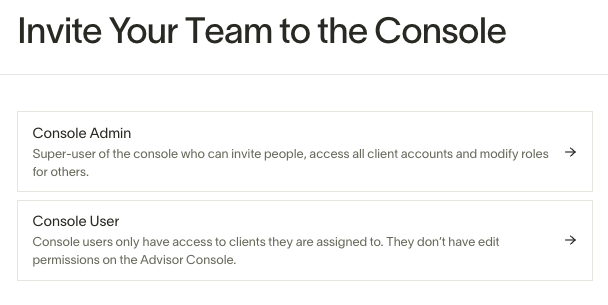
The first user of any Advisor Console, by default, will be a Console Admin. From there, that Admin should invite in additional staff members as either Console Admins or Console Users. We encourage limiting the number of Advisor Console admins as a security best practice. Most firms will only have one or two admins.
Console Admins
Console Admins are the super-users of the Ramp Advisor Console. Admins can:
- Manage Admins and Users on the Console. Admins can invite new users, revoke existing access, and change user's roles.
- Manage Client Connections. Admins can accept connection requests from clients on behalf of the firm and off-board existing clients.
- Assign Console Users to Clients. Admins can assign other admins and users roles to clients. They can also revoke access once assigned.
Admins can also perform all actions that Console Users can perform, including accessing client Ramp instances.
Console Users
Most accountants should be provisioned to the console as Console Users. Console Users can:
- Access Client Ramp Instances. Once a Console Admin has assigned a user to a client, the user can access the Client using the dashboard.
- Console users do not have access to any console clients unless they are assigned to the client.
- View all Console Admins. Console Users have access to a list of all Console Admins.
- Console Users cannot see other Console Users.
Client permissions and Custom Roles
Overview
When assigning staff to your clients, you must choose a set of permissions or roles that they'll have access to within the client's account. These permission levels control how users interact directly with the client's Ramp account, e.g:
- Ability to view transactions within the client's account
- Ability to pay bills within the client's account
- Ability to assign cards to people within the client's account
Available client-account roles depend on the client's enabled products. Options may include Admin, IT Admin, Finance Admin, Accounting, Accounts Payable, Accounts Receivable, AI Token Spend Admin, and View-Only Admin.
When a client sends your firm a connection request, they authorize the roles you can assign when accessing their account. Console Admins can assign only roles the client authorized, and some roles may be unavailable based on the client's products or Ramp Plus plan.
Create a Custom Role
Admins also have the option of creating a Custom Role. This gives you more granularity on the level of permission that role will have in the client's instance.
To create a Custom Role, you can:
- Click Create Custom Role and proceed to check the boxes for each section.
- Or click an existing role, then click Duplicate role, and then select the appropriate checkboxes for permissions.
Recommended roles
- Administrator: You are a super-user of the client's Ramp account. You need to be able to change approval workflows, create accounting rules, modify Ramp company settings, invite users and/or issue cards.
- Accounting & Accounts Payable: You need transaction and card data in order to help with expenses and accounting, and you need to be able to view, create, and edit bills.
- Accounting: You need transaction and card data to help with expenses and accounting. You can view bills, but you cannot create or edit them.
- Accounts Payable: You only need to be able to view, create, or edit bills (Bill Pay product only).
Assign a Custom Role
When assigning a staff member to a client (see also Assigning staff members to clients for full detail), you'll be prompted to choose from the available roles.